I have been using plex for a long time, and this is the first time I have ever encounters this., When I try to add a new TV shows to my library is says changes can not be saved. The media is going through the same file location and it does work, I have restarted my plex media server, and as well as restarted my computer. I can add new libraries, but I cannot add new media to my existing one. Please help.
Are you actually editing your library to add a new tv show?
If you do, you are doing it wrong, and this was destined to eventually happen https://support.plex.tv/articles/naming-and-organizing-your-tv-show-files/
As an example, I have a library just for my tv shows, one just for movies, one just for stand up specials.
my tv shows are add to plex by title (ie True Blood), then in that folder i have season 1, then the actually episodes. so with all the tb shows which i have, I want to add the new tv show Adult,so it has its one folder where i am storing everything, then season 1, then the tv shows…
is that what ur asking?
So far, so good. That is quite sensible an in line with the requirements.
No, you have just described your folder organization, which also appears to be in line with the recommendations.
I am asking why you are editing your library in order to add a new show.
That is not necessary.
When you edit your tv show library now, and go to the tab “Add Folders”, how many paths are listed there?
there are prolly hundreds of paths.
for every tv i have, i add each new tv show, and each season.
so when i go to edit the lirbray, and add new folder, it is for a new tv show, and the amount of seasons in it.
That is plain wrong.
Don’t do it that way – even if it worked for a while.
Your tv shows should be in a dedicated folder that holds only tv shows, like so:
/Media
   /Movies
      movie content
   /Music
      music content
   /TV Shows
      television content
Do NOT mix tv shows into the same folder as movies or other content.
Inside the /TV Shows folder, there should be a subfolder for each tv show. And then sub-subfolders for each season. Even if a show has only one season, add the Season 01 subfolder anyway.
Do NOT add subfolders for each individual episode.
/TV Shows
   /Doctor Who (1963)
      /Season 01
         Doctor Who (1963) - s01e01 - An Unearthly Child (1).mp4
         Doctor Who (1963) - s01e02 - The Cave of Skulls (2).mp4
The crucial part:
Edit the library, and add only the folder /TV Shows to it.
Do NOT add each show’s subfolder individually.
After you added a new tv show into the /TV Shows folder, simply trigger “Scan Library Files” in Plex. That is enough.
ya that is what i do. and still cannot add new shows, bc plex wont safe my changes.
Apparently it is not what you do. You are still (trying to) adding each show indivdually on the “Add Folders” tab.
You need to remove all the other folders and only leave the tv shows folder on there.
If you must, do it in stages with only a few changes at once.
Or maybe it is faster to create a completely new library. Once that has been completely populated, remove the old library that is no longer editable.


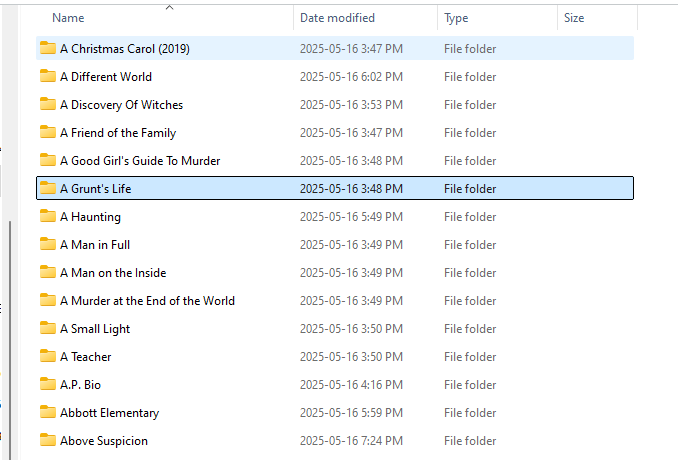


Your first screenshot shows that you are still doing it completely wrong.
You must not add individual tv shows, you must not add individual seasons.
And since you also use “index letter” folders, you have even more issues.
For Plex to work correctly, you would have to add each of your index letter folders separately. Which again amounts to quite alot of folders. if you have them stored across several drive letters.
Your file names are fine. Although I’d recommend to always add the release (year) to the folder name.
so i am not suppose to add every single individually?
That’s what I’m trying to tell you the whole time.
maybe u shoulkd look at ur replies., u said to add individual tv shows, plus each individual season, which is what i was doing, TheLivingBubba, is saying to ONLY add the drive where the folders are located.
There is a really big difference, plus when i looked it up a long time ago, adding the tv show, then each season was the proper way…
I wrote above:
No, you are adding work for yourself and confusing the system. A library points at a folder and you add media to the folder. Once you setup a library you should rarely need to edit it in Plex. @OttoKerner linked the article https://support.plex.tv/articles/naming-and-organizing-your-tv-show-files/ lays out that you should use “main directories,” etc.
I saw someone else earlier this week describing doing the same thing, so you are not alone, but you are making it more complicated then it needs to be.
ok, thanx, i already started a new library, this would make it way easier.
Plex is smart enough to drill down into subfolders to find all TV shows (SORT OF, BUT NOT IN YOUR CASE. MORE LATER), so that is why everyone tells you to only add your TV Folder as a source. Looking at your folder structure in what you HAVE added, this may be more complex. You apparently have sub-divided your TV shows by genre I:/Adult, but ALSO sub-divided this folder by letter. Unless your library is HUGE (hundreds of B’s, C,s etc), I suggest you do one flat sub-folder.
*Side-note:* Plex can see into ONE level of subfolder . Plex expects the very first subfolder within a source to be a single show. In your case, If you just add I:/Adults/ as a source, Plex will see 26 folders within that, and thinks each folder itself is a single show. It is unlikely to match any A folder to a show, and you will get odd results. It is not worth the effort to work on making Plex understand this, so do not do that.
*End Side-note*
However, if you insist on having a subfolder in “Adults” for each letter, you can do it, you just need to add each LETTER as a source in Plex. Add I:/Adult/A and I:/Adult/B and I:/Adult/C/ etc etc.
Once you do that, I notice you also have single letters in the roots of multiple drives:
J:/P/ and Z:/S/ and Z:/T/ etc. You should add each of THESE as a source for your TV shows folder as well. All in all, based on what I have seen, you should have 26x2 = 54 folders as a source (Adults A-Z, and A-Z). If you have even more genres, you need to add each letter in those as a source as well.
I have the same issue, “changes can’t be saved…”, have i been doing this wrong for years? You guys are saying i only need to link the “TV” folder, and the program will go into every show name and season folder by itself?
Yes, you point it at the folder you want, and if you have it organized like shown, it will scan and grab all the shows when you click, “Scan Library Files.” Same with movies.
/tv
├── Show A
│   ├── Season 1
│   ├── Season 2
├── Show B
│   ├── Season 1
├── Show C
│   ├── Season 1
│   ├── Season 2
│   ├── Season 3
/Movies

├──  Movie A (2002)
│   └── Movie A.mp4
├── Movie B (2007)
│   └── Movie B.mp4
├── Movie C (2017)
│   └── Movie C.mkv
