Server Version#: 1.41.3.9314
Player Version#: iOS v4.11.5
I am casting to a chromecast audio device from iOS. It seems like perhaps when the app goes into the background, it loses connection to the player even though music continues to play as expected through the speakers. This means that I can’t choose something else to play or control volume when I re-open plexamp. I noticed that plexamp does not have any ability to run as a background task in iOS as it is not shown in the “Background App Refresh” page. I do not have any issues with Spotify and Chromecast audio so I believe that the general network configuration is fine.
Hmm, I’m seeing it do a reconnection when it returns from the background, and I’m seeing the state update to different tracks played.
Jan 01, 2025 19:40:51.019 [Javascript] INFO - Audio Route: Attempting to reconnect player 72edcde3d7aa83d4276428f08ef67ab8.
Jan 01, 2025 19:41:26.828 [Javascript] INFO - Audio Route: Attempting to reconnect player 72edcde3d7aa83d4276428f08ef67ab8.
Jan 01, 2025 19:42:00.045 [Javascript] INFO - Audio Route: Attempting to reconnect player 72edcde3d7aa83d4276428f08ef67ab8.
Jan 01, 2025 19:42:23.299 [Javascript] INFO - Audio Route: Attempting to reconnect player 72edcde3d7aa83d4276428f08ef67ab8.
Jan 01, 2025 19:48:50.804 [Javascript] INFO - Audio Route: Attempting to reconnect player 72edcde3d7aa83d4276428f08ef67ab8.
Jan 01, 2025 19:54:00.036 [Javascript] INFO - Audio Route: Attempting to reconnect player 72edcde3d7aa83d4276428f08ef67ab8.
Jan 01, 2025 19:54:03.775 [Javascript] INFO - Audio Route: Attempting to reconnect player 72edcde3d7aa83d4276428f08ef67ab8.
Jan 01, 2025 19:54:14.131 [Javascript] INFO - Audio Route: Attempting to reconnect player 72edcde3d7aa83d4276428f08ef67ab8.
Jan 01, 2025 20:01:54.142 [Javascript] INFO - Audio Route: Attempting to reconnect player 72edcde3d7aa83d4276428f08ef67ab8.
Jan 01, 2025 20:04:21.519 [Javascript] INFO - Audio Route: Attempting to reconnect player 72edcde3d7aa83d4276428f08ef67ab8.
Jan 01, 2025 20:04:27.093 [Javascript] INFO - Audio Route: Attempting to reconnect player 72edcde3d7aa83d4276428f08ef67ab8.
Jan 01, 2025 20:04:37.922 [Javascript] INFO - Audio Route: Attempting to reconnect player 72edcde3d7aa83d4276428f08ef67ab8.
Jan 01, 2025 19:40:35.955 [Javascript] INFO - Player: State transition paused -> playing for source 3fd4e7451169efd66570ab825e4b6e0f862b85f9 ID 2513.
Jan 01, 2025 19:40:35.995 [Javascript] INFO - Player: Sending state changed [A] The Black Keys - Everlasting Light (PQID 2513) (6000/203773) in state playing with artwork true.
Jan 01, 2025 19:43:53.047 [Javascript] INFO - Player: Sending state changed [A] The Black Keys - Next Girl (PQID 2514) (0/198213) in state playing with artwork true.
Jan 01, 2025 19:47:11.483 [Javascript] INFO - Player: Sending state changed [A] The Black Keys - Tighten Up (PQID 2515) (0/211080) in state playing with artwork true.
Jan 01, 2025 19:50:43.048 [Javascript] INFO - Player: Sending state changed [A] The Black Keys - Howlin’ for You (PQID 2516) (0/191800) in state playing with artwork true.
Jan 01, 2025 19:53:54.678 [Javascript] INFO - Player: Sending state changed [A] The Black Keys - She’s Long Gone (PQID 2517) (0/186000) in state playing with artwork true.
Jan 01, 2025 19:57:01.101 [Javascript] INFO - Player: Sending state changed [A] The Black Keys - Black Mud (PQID 2518) (0/129440) in state playing with artwork true.
Jan 01, 2025 19:59:10.548 [Javascript] INFO - Player: Sending state changed [A] The Black Keys - The Only One (PQID 2519) (0/300347) in state playing with artwork true.
Jan 01, 2025 20:04:10.968 [Javascript] INFO - Player: Sending state changed [A] The Black Keys - Too Afraid to Love You (PQID 2520) (0/204733) in state playing with artwork true.
There might be an issue, but I’m not seeing it, and I’m not seeing an issue testing locally.
Thank you for looking into this so thoroughly. There definitely is an issue but I concede that it might be an edge case specific to my system. Interestingly, the music continues to play on chromecast audio but it becomes out of sync with the interface of the iOS application as well as the plexamp application downloaded onto my Mac from the App Store. What do you make of the Cast errors? I’ll attach some screenshots to try to explain better.
Cast: Error sending message, attempting reconnect: Channel is not connected or is not registered with a session
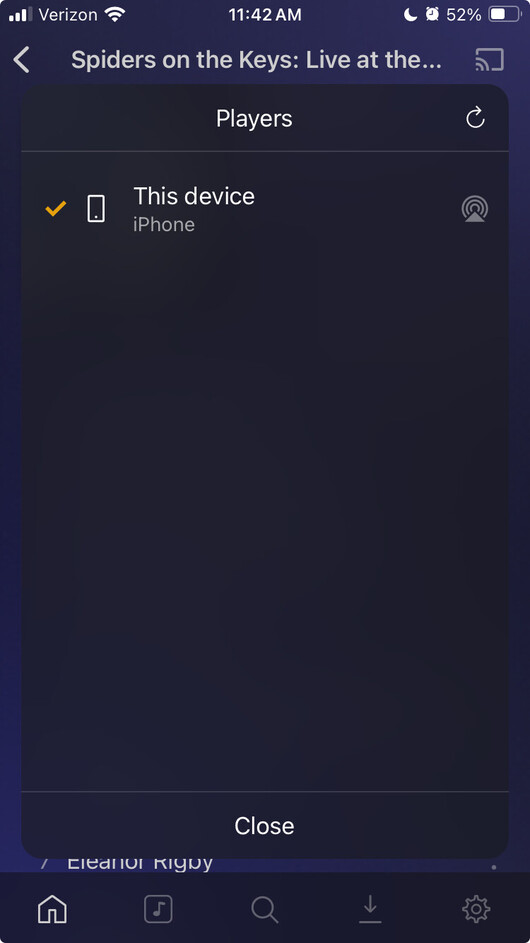
Here’s a more concise log with screenshots showing the issue. The iOS app continually drops the connection to Chromecast while the music itself continues to stream normally. I can re-join the Chromecast and resume control, but it will drop again. The way that this manifests is shown in the screenshots which you can correlate to logs based on the clock at the top of the screenshot.
Screenshot 1: Music is playing on “Living Room” with full app control. Streaming proceeds from Sunny Side of the Street to next track on the album So Swell When You’re Well, continues playing on “Living Room” even though iOS app not connected.
Screenshot 2: All players missing from list, apparently disconnected
Screenshot 3: All players return. I can choose “Living Room” and regain player control.
I would like to be able to choose “Living Room” and have it persist. Please let me know if I can provide more detailed info.