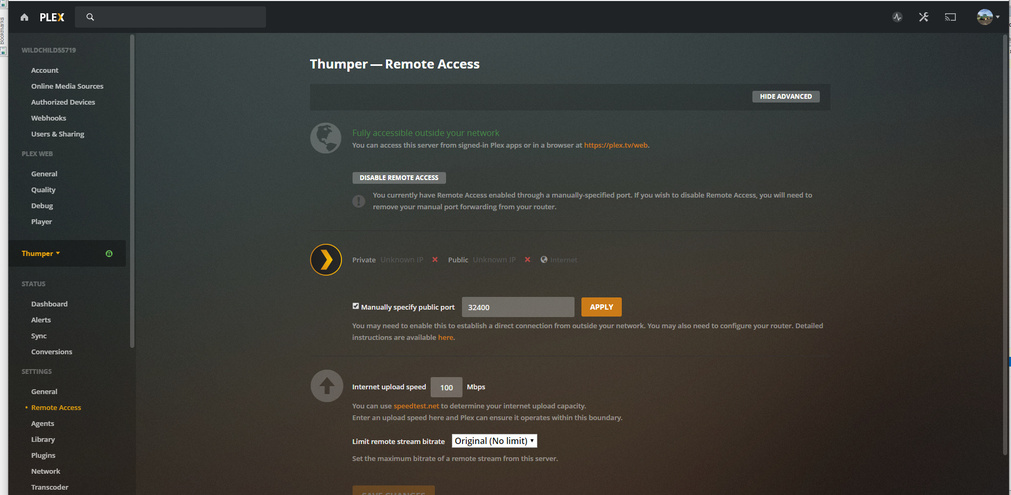
Server Version#: Version 1.18.6.2368
Player Version#:
I’m having an issue with my Plex server and setting up remote connectivity. When I enable remote access it comes on line and tells me that I’m fully accessible from outside of the network, but then after a couple of seconds it changes to not available. I had this issue behind the windows server. so i setup unbuntu server which i was building any way. and it still does it.
I currently am manually specifying the public port as 32400 .
I am running behind a cisco asa5550 i have my own RWIP nat setup and ports forwarded . no matter what i do this seems to keep happening . can any body tell me what i am missing ? when i use packet tracer i every thing seems good ? is there a port or protocol i am missing . what ip does plex reach out to ?
Did you create the NAT and the policy on the ASA? Don’t forget that ASA first does the NAT, then matches the policy, so the policy has to be to the lan ip
thought i had it but the ip addresses didn’t show up in the remote access page in plex . and i could not access server form iPhone . i will get it i am getting close
I am in a similar boat here. Mine is open from outside. My issue, I don’t want to open my server up to the whole world. I want to utilize a network object on my acl to only allow the connection from the plex relay servers. I would then feel little more comfortable. I was getting really ■■■■ and did have a nginx reverse proxy working. My question is does anyone know the FQDN’s that plex uses so I can make a group. I have the basics ones but want to make sure i am not forgetting any
There’s a link to an automatically updated list of the IPs from which you’ll receive requests from Plex. It’s not an FQDN, but it should allow you to restrict access as you’d like.
ok , i have been working on this for a few weeks now. every time i think i find the issue it seens to get worse. from what i can see plex is not even trying to talk on 32400 . now this ? and no i can not access it from the outside.
ok i got this figured out. i had mistype my gateway when i was redoing things. still not able to get to the outside and plex doesn’t seem to be using 32400 even thou it is checked
32400 is the default listening port of the Plex server, and can not be changed. The “manually specify public port” is only necessary to enable if you’re using another public port on your edge that is then forwarded to 32400 internally on the server, so if you’re using 32400 as the public port and have opened it in the firewall as well as set up proper NAT’ing you might as well disable that option.
Most of the log from a week ago showcases outbound connections from the server to Plex’s server, which isn’t relevant in this case. That just shows that your web browser/the server were able to communicate with Plex’s web service, which can basically be assumed anyway if you’re able to access the server settings.
From the sounds of it you have a faulty network NAT configuration in your Cisco firewall – especially if the Cisco device doesn’t show any hits at all on the specified rule. Are you certain it’s configured properly and that the port 32400 (if you’re now really sure to use that externally as well) is being used for both the “inside” and “outside” ports?
Either way, NAT/port forwarding in the network infrastructure seems to be the issue here.
OK !!! I think there is some kind of bug here! yes i do think i have had some nat issues but i am fairly sure i got them worked out now. now i had just made change in asdm so it cleared the hit counts but it was working
1 (Inside) to (outside) source static any any destination static NETWORK_OBJ_192.168.55.0_27 NETWORK_OBJ_192.168.55.0_27 no-proxy-arp route-lookup
translate_hits = 0, untranslate_hits = 0
2 (Inside) to (outside) source static any any destination static NETWORK_OBJ_192.168.100.0_27 NETWORK_OBJ_192.168.100.0_27 no-proxy-arp route-lookup
translate_hits = 0, untranslate_hits = 0
Auto NAT Policies (Section 2)
1 (Inside) to (outside) source static thumper jtfw service tcp 32400 32400 no-proxy-arp
translate_hits = 0, untranslate_hits = 0
2 (Inside) to (outside) source dynamic lan interface
translate_hits = 1751, untranslate_hits = 0
Manual NAT Policies (Section 3)
1 (wifi) to (outside) source dynamic wi-fi interface
translate_hits = 70, untranslate_hits = 0
2 (Inside) to (outside) source dynamic lan interface
translate_hits = 0, untranslate_hits = 0
3 (phone) to (outside) source dynamic phone interface
translate_hits = 22969, untranslate_hits = 59
now it still wouldn’t show remote access to the outside till i switched nics in the network settings saved then switched back and saved again
I think there are other issues going on. As I have PMS running through my home router and it fails after a short period of time. I am working with a Plex employee on another thread. As mine worked fine for about 7 years, well I don’t think we had remote access back then like now!