Server Version#: 1.15.4
Player Version#:
I’ve installed the Media Sever app in OS 10.11.6.
When I click on the app, it doesn’t open -
actually it does absolutely nothing that I can see.
Is it running somehow in the background?
Well, I guess it’s not gonna open.
Sounded like an interesting way
to use my Sonos with iTunes, but
I guess I’ll never know. Oh well…
Yeah, I did this four times and I noticed each time that this was the problem:
“Launch the Plex Media Server from the Applications folder”
Can’t do it.
Are you saying that Plex Media Server itself does not start (as in, its icon doesn’t show in the status bar)? If so, try starting PMS from the Finder. Click on the Applications folder in the dock and scroll to the bottom. Select Open in Finder, right-click on “Plex Media Server,” and click Open. The PMS icon should show in the status bar as the doc linked above shows:
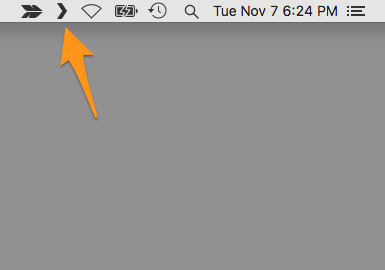
You can click on that icon and select “Open Plex…” which will open the local Plex web app on the server.
It does not even start from the Applications folder.
I never ever get to an open Plex Media Server - much less
actually see a status bar.
That’s strange. Just to be clear, I’m referring to the status area of the macOS menu bar:

That last small icon on the right belongs to Plex Media Server.
Also, just to test, try opening the following address from Safari (or your browser of choice) on the Mac:
http://127.0.0.1:32400/web
There’s no Plex icon in the menu bar.
I would think that the software would
need to be opened at least once before
it would appear in the menu bar tho.
Is it really supposed to “silently” appear?
Clicking on the address shows that the site can’t be reached.
Yes, you do have to run it before it will show in the menu bar. But that icon is the only visual indication that PMS is running afterward. No application window opens up. Also, by default, it should run when you log in to your system. You may want to try logging out and back in, or just try rebooting and see if the icon appears. Once running, that link I provided will open its web UI.
Other than that I’m not sure what to suggest, other than perhaps uninstalling PMS and installing it again. Here’s the uninstall procedure:
https://support.plex.tv/articles/201941078-uninstall-plex-media-server/
This topic was automatically closed 90 days after the last reply. New replies are no longer allowed.
