What would you be trying to filter? Example would be Black Panther. It would be part of a Marvel Collection but would not be part of a series. If you want to find that movie you could look in the Marvel collection, the Single Movie Collection, or just search for Black Panther. I totally understand that this isn’t a great option and Plex needs to fix this but it is a work around while we wait.
Part 2 of your method is the hard part. I’d have to go find all the movies I want to display, there’s no filter for that is there? I’d want anything without it’s own collection to be in this single movie collection.
Then I’d have to monitor it, as collections eventually come out I’d have to remove them.
Again it wouldn’t be that bad if there was a filter for it.
Would love to see this implemented. “Hide” (in any collection behavior) should override “Show”, in my opinion.
Another vote for this here
Items hidden within a collection should take president over collections that show items
Being able to have collections like Disney, Marvel, Dreamworks etc would be great
My current work-around is to add the above as a custom Genre so i can filter them when desired while not having films within their own collections cluttering up the library on a daily basis, not ideal but it works
+1 for this, so glad I found this thread! I’m trying to go all-out with Collections and keep running into these issues.
Hide items should definitely take precedence over show items. The Marvel example outlined above by tom80H is a perfect example of the current (frustrating) behavior.
+1 For me too. I’d also like to see this feature. When I was managing my Marvel movies, I ran into the problem and was pleasantly surprised to find this thread.
Adding my vote to this! I’ve been creating Collections for popular as well as mixed genres lately (e.g rom-coms) and pushing them to the top of the the list for easy access. Ideally, I wouldn’t want these to be hidden.
But I also have franchise collections and a Kids Movies collection (which I consider more a sub-library than a genre) and would very much like to keep those hidden within their respective collections.
The problem therein lies when some hidden movies are also part of those aforementioned genre collections; where they’ll be showing again in my library.
Glad to know there’s already an active thread on this!
100% agree with this.
I too feel this best solution would be to separate collections into 2 types. Items within a “Sequels/Series” type of collection should always be hidden, while items in any other collection will be visible. In fact, it might just be less confusing if sequels/series were a completely separate feature.
For example:
You could select Iron Man 1-3 and in the edit menu there would be an option to add a series name. Any items under that series name would always prioritize a visible series but the items hidden. Then you could add the series “Iron Man” into a collection “Marvel Cinematic Universe” and still respect the hidden items within the Iron Man series.
Either way… just want Plex to respect hidden items no matter what. If I hide them, I want them to stay hidden.
The only reason I can think of is if you’re treating “collection” as an assortment of random movies rather than a “series”. In this Forum Thread the poster talks about wanting to hide Christmas ONLY movies (say if you’re a collector of Hallmark specials but don’t want them cluttering your main library) but that would mean Die Hard would be hidden too. Granted Die Hard would be in it’s own collection but she apparently only has the first movie and not the other 4. But this could apply to The Sound of Music, Just Friends, The Family Stone and Edward Scissorhands to name a few non-franchise, Christmas themed, movies.
Over-all, having Hidden override Show applies to 99% of the probable issues. In the 1% above, I can’t even think of an option at the collection level that would show the movies I listed anyway; it would have to be at the movie level option and at that point it’s getting too meticulous with it. Or, you add those movies to a “No Collection” collection, hide that Collection, thus having those movies show in your library singularly. And at that point you’re really only adding that tag to a dozen or so movies so it’s not a huge hassle to keep track of.
So long answer short, there is still no reason why it shouldn’t be Hidden > Show.
Another vote for this! I finally started making my “Oscars: Best Picture” collection and started noticing annoying oddities in my library, like “Lord of the Rings: Return of the King” appearing next to my “Lord of the Rings Collection” (which is set to hide items). While Skagabomb’s examples are valid, the vast majority of cases seem to be the opposite way that Plex works today. In the world of software, changing the default behavior of a feature that’s been around awhile is usually a no-no, so I’d be happy if it were some extra option buried somewhere.
Voted. My workaround for this is similar to, but slightly different than, the “single movies” collection idea above. I default my collections to “hide items in the collection”. For any one-off movies that I want to show I add to its own collection and then hide that collection. Using the Black Panther example, I have Black Panther in the “Marvel Cinematic Universe” collection and also the “Black Panther” collection. For collections with just the one movie, I then set the “Black Panther” collection to “hide collection (and show items)”, which results in it showing up somewhat normally. I also do that where I have media in other libraries that is part of the same franchise/movie (i.e. a single movie and its soundtrack, so they are linked together at the bottom of the screen. The only advantage to this over a “single movies” collection is when Black Panther 2 comes out, I already have the “Black Panther” collection ready, but still need to remember to toggle it to show the collection and hide the individual items.
Agree that “hidden” should override “show” when a individual movie is in both. While we’re at it, a “hide collections with only one entry” option would be helpful for linking movies with soundtracks, etc. This would be similar to the “Hide for single season series” options on a TV show library.
Voted. Just ran into this issue with Pixar movies. I am trying to hide my individual Toy Story movies after creating a separate Toy Story collection. Come on Plex!
Voted. My experience is the same as above. Marvel (want to show individual Movies, but Hide those in other collections), and Favorites (such as Actors or Directors). Hide should take precedence over show.
I think an extra option for the per-collection advanced setting would do the trick. You have hide and show, what about “Ignore for this collection?”
When displaying the list of movies, any movies in collections that are using that option will remain on the default setting unless they are in a collection that has them set to show or hide. As in, it’s as if they aren’t in that one collection even though they are. This would allow collections to have movies (or shows, whichever) but in a passive manner. Any content that’s in another collection that is set to show their items will show them despite any other collections they are in that hide included items, just as it does now. However, if some of the items aren’t in other collections, but other items are (and none of those collections are set to show), then the only ones that will show are those not in any collections. Desired behavior achieved without changing the existing behavior, only adding another option to use the existing behavior while having a collection that doesn’t cause unwanted results.
Currently…

With my suggestion…
Hide/Show collection itself…
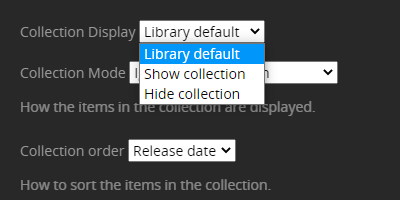
Hide/Show/Ignore items in collection

How does that translate in the real world?
Let’s use the example of a “Pixar” collection that contains standalone movies (e.g. “The Good Dinosaur” or “Inside Out”) and items that are also in other collections (e.g. “Toy Story”)
I just wanted to start putting this in a table to run through some scenarios but that’s a whole lot of combinations. And maybe I’m just a little slow this afternoon 
You mean my suggestion? The “ignore” setting would be like saying, “Don’t count anything in my collection as being in a collection unless they are in a different collection.” So anything that isn’t in a collection that uses an option aside from “ignore” would be treated like a standalone item.
To make it simple, it’s like having three rules.
- If item is in a collection set to “ignore,” then pretend it’s not in this collection.
- If item is in a collection set to “hide,” then set item to be hidden.
- If item is in a collection set to “show,” then show the item regardless of other collections settings.
Three collections: Pixar (ignore), Toy Story (hide), 1990’s (show).
Inside Out, matches rule 1, but not 2 nor 3, but since we’re pretending it’s not in a collection, it shows.
Toy Story, matches 1 but we ignore it, matches 2 so set to hide, matches 3, so set to show.
Toy Story 2, same deal as Toy Story.
Toy Story 3, same thing again, except that it doesn’t match rule 3, so it remains hidden.
Default behavior is that if a collection is set for its items to show, then they show, even if other collections they are in are set to hide those items. The above respects that behavior while providing the ability to let a collection not be the deciding factor in the visibility of its items.
Ok… my personal preference would still be for “hide items” to have a higher priority than “show items”. In the absence of that I consider an advanced library option (w/ override per collection) would be ok:
"Show Items" overrules "Hide Items" for items in multiple collections(current default)"Hide Items" overrules "Show Items" for items in multiple collections
I suppose your suggestion achieves the same but I’m not sure the average end user will be able to follow (not that I don’t want to give them credit but there’s already been lots of confusion with the basic display options  )
)
Still… I appreciate you sharing and keeping this one alive (keeping it boiling)
The wording might not be the best, but the concept is solid. Could even have a tick box to enable/disable “Phantom Mode,” with an explanation that whether they show or not will depend on if they are in other collections. Or perhaps duplicate the feature but call it “Grouping,” where it doesn’t have any impact on the show/hide status at all, just creates a group for easier browsing, similar to a genre or other filter.
I love this idea of a global library option to toggle between “show items” (current default) and “hide items” taking precedence for items in multiple collections. Seems like it would be the simplest way to fix this issue without breaking the current behavior.
I wouldn’t complain about the per collection setting suggested either - sounds like a little bit more work and it took me a few mins to grasp - but more granular control is always welcome.
And agreed - either way it’s awesome to see interest/chatter on this, because the display irregularities are driving me insane lmao. I’m honestly surprised there aren’t more votes on this, considering how common the Marvel collection example must be.
Collection feature is probably only used by small percentage of users, hence low interest. Now, with upcoming new agent and better auto collection feature, the interest will rise on the topic, maybe? Either way, I’ve given up on non-series collections…for now.
