This could be implemented by allowing for prioritizing collections for each movie. Have them arranged in an ordered list that you can drag/drop to give higher priority to a collection higher in the list for each movie.
I’ve been a fan of this one for a while, though low interests in collection and note how moviedb have had multiple collection/universes as a potential option for some years now hopefully it can be done sometime
Voted! #100
Hidden content status in one collection should be prevalent!
I don’t see any case where is should not be.
Like many of us I want to regroup certain movie series. (Star Wars, Harry Potter, BTTF, etc)
But I want also to be able to collect them by Studio, Genre, or quality (e.g 4K/UHD)
So for example, I want to hide the Harry Potter movies and show only the collection cover in my library.
But they are also 4K movies so obviously they are in the 4K/UHD collection.
If I hide the content of the 4K/UHD collection, every single movie would be hidden too.
By showing the content of the 4K/UHD , I now have my 8 Harry Potter movies visible in the library as well as the HP Collection Poster.
That can’t be the intended behavior, and creating a Single Movie Collection is not a great workaround too.
Accidentally created a duplicate post about this and a mod was nice enough to point me here. Just going to include what I posted in the other thread as a quote.
This really shouldn’t be how this feature operates and it’s sort of bewildering why Plex would dismiss these concerns and label this as expected behaviour that won’t change.
Plex, please be open to how people want to optimally display their libraries. Not just for the app but for everyone’s benefit. I know I hated the idea of collections hiding items within it when people were originally asking for that feature. Then my library grew and someone explained how they were going to use the feature once it was implemented. My library organization is better for being open to that new perspective.
This would be a welcome feature.
The way I see it (based on careful reading of all the comment/opinions here and Plex’s (apparent) own position on this matter) is this:
The problem is two-fold
- People (“power users” let’s call them) use collection in a way that perhaps wasn’t designed into the collection behavior.
- The individual collection setting “hide collection” has the undocumented (or at least unintuitive) effect of changing the display state of items within that collection to “shown”.
The solution, which I think could resolve this for everyone without altering the current behavior (good or bad) and therefore not upsetting anyone who prefers the current behavior, would be this:
Leave everything exactly the way it is except add a new individual collection option, “Always Hide Items in this Collection”, which will make any collection with this option selected always hide its members regardless of the state of whatever other collections it belongs to (i.e. this is the ability to override anything that would otherwise result in a “show”).
Optionally, another possible solution would be to change the “hide this collection” option to behave the same as “library default” with the added effect of the collection only being shown in the Collections view. Meaning, don’t force the items to be shown when the collection is hidden.
As a note to the above, it’s certainly possible there are some who do want a movie and the collection it’s in to not be shown at all in the default Library view. A good example might be “Christmas Movies” if you only wanted that collection and its movies to be seen in the collection itself from the Collections view and not seen in the default Library view.
I think implementing the first option would be simple to do (speaking as an experienced web developer) and would not impact the current behavior (so will not cause frustration with anyone who prefers or is used-to the current behavior), and is therefore the best solution.
I think implementing both changes described above would be the most beneficial to everyone (because it would be more intuitive, judging by the feedback here), though it does potentially impact users who like that “hide this collection” results in forcing its members to be shown.
For clarification, here are what the options “should” be, in my opinion:
- Library default (functionality unchanged)
- Hide items in this collection (hides items unless another collection overrides this, i.e. functionality unchanged)
- Show this collection and its items (functionality unchanged)
- Hide collection (shows items and hides collection, i.e. functionality unchanged)*
- Always hide items in this collection (overrides all other collection settings)
*Optionally, reword this one to clarify its current behavior (“Hide this collection and show its items”) or change its behavior to be identical to “Library default” except only showing the collection itself in the Collections view, the latter being I think what most people intuitively expect it to do.
Just thought it’s worth mentioning that with the introduction of Smart Collections (Plex Web 4.56.3, PMS 1.22.3) you can now achieve the desired behavior.
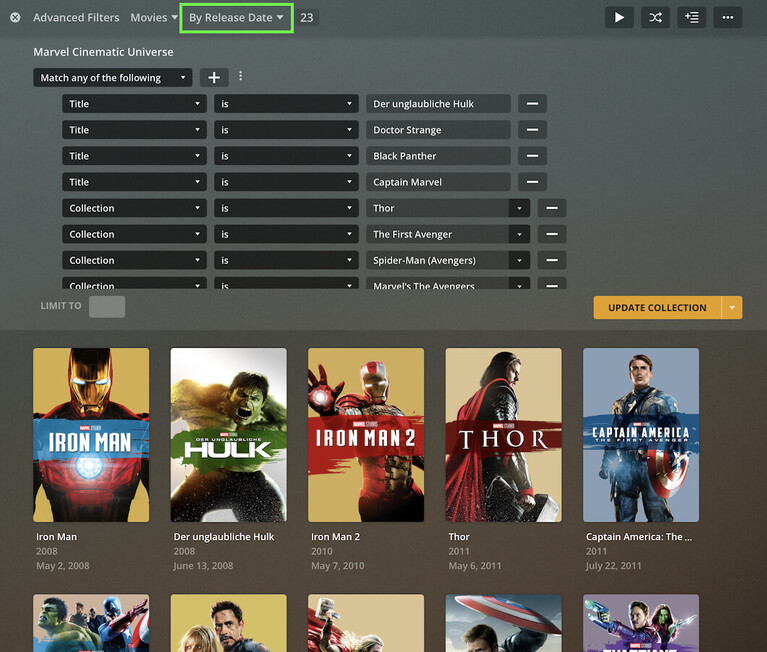
I deleted my “classic” MCU collection and replaced it with a smart collection. I used the Match any of the following group (new Advanced Filter feature) and included the collections / individual movie titles as filter criteria (e.g. Collection Is Iron Man, Title Is Black Panther…).
Smart collections don’t interfere with how their items are displayed. They’re basically just a grouping that will be displayed if collections are enabled for that library.
With that, Plex will display my regular collections (Iron Man, Thor, Guardians of the Galaxy…) as well as the individual movies (Doctor Strange, Black Panther… next to the smart collection MCU.


Got it, thanks
I totally missed “smart collections” as a feature update - saw the release notes but it didn’t click really. Thanks for mentioning it here with some details about it.
There’s been a number of feature updates recently that I feel I’ve been missing despite visiting the forums regularly and watching announcement threads. Is there a better way to keep up to date on these functional changes or new features besides hoping to catch the right note in the right thread at the right time? Am I missing an area where I should be seeing these feature updates highlighted and presented to users?
Since the support articles tend to cover new feature\functions (which I appreciate you guys doing a very good job on), is there a way new or updated articles could be more prominently presented? Like a “Here’s the updated article on Collections detailing the new Smart Collections feature” or “the new Plex TV Agent is now Live, here’s the article detailing how it works and how to migrate to it” (both examples of recent features\functional changes).
If there was a way for people to see when significant revisions of support articles are made maybe that would be useful?
Sorry this is off-topic a bit … I will fiddle with the Smart Collections and see how they handle the different hidden vs unhidden functions. Thanks for bringing it to our attention.
The release announcements are usually a good way to keep track of most updates.
I’m usually following the server updates and those for Plex Web (this will send me an e-mail notification whenever there’s a new update).
I’ll ask if Plex is considering some additional section on the support article page to highlight new / recently updated pages.
There are also Plexcerpts newsletters, my friend told me she got the April Plexcerpts newsletter yesterday, but I still didn’t get mine. But not sure it has the info on collections though, and I’ve heard it’s not very detailed.
UPD: Moved part of my message to a more relevant thread if anyone wants to continue the discussion: Better visibility for new Plex features on the forums
It does if all your collections are Smart Collections. If you have collections which can’t be made very easily or at all with the Advanced Filters and a film happens to be in two of them you still run into the problem. It isn’t fixed so much as Smart Collections doesn’t have the same issue.
We’re so very close to being over this hump, I really hope Plex developers don’t think the issue is solved.
I didn’t mean to suggest it’s solved. Just stating there’s now a way / workaround for a wide range of applicable use cases – even if that means listing all / some of the respective movies in the advanced filter.
It helped me with the “Universe” collections like MCU, Middle Earth or Harry Potter’s Wizarding World. I’ve also started using it for some collections of story arcs in TV shows (e.g. The Laughing Man / Individual Eleven episodes of the Ghost in the Shell SAC) – which is nicer than listing them as a playlist.
Another way to do this is to use Labels. Just add a MCU label to every movie you want in that collection and create a smart collection looking for that specific label. This way you dont have to constantly change the smart collection filter. Plus this can help add items that are not easy to find by filtering
Also, using the Studio filter and selecting Marvel Studios will get everything in the MCU
That’s what happens when you get too excited over a new feature… you get the job done but it could have been soo much easier 
I had been playing around with Studio contains Marvel – which returns all the X-Men stuff as well. Maybe this was my unconscious self trying to get out of another 10 years of Marvel movies 
I was right there with you, I only figured out the Studio filter would work after adding about 10-12 filters to get it initally
Also - for a James Bond Collection, selecting Ian Flemming from the writer filter gets you everything but Never Say Never Again
Just have to a a title filter for that name
You’re right though, if you use traditional collections for the lower-level collections (direct sequels) and use smart collections to then incorporate those into the broader collections it does help clean up libraries considerably Sadly it seems like you can’t use Smart Collections as a filter (that would be amazing). It’s just there are some remaining that will just be a headache to do via a smart list.
I wish we had a way to mass edit the collection hiding status AND be able to have a screen to see which collections and items are hidden and which are not. Some sort “admin only” screen in the web-app next to “Recommended, Library, Collection” views in each library.
Also wish we had a tagging field separate from the Sharing label field for just doing library tags. In the meantime I’m hoping the developer of Plex Meta Manager figures out a way to sync online collections with the Sharing Label, so that those collections (Trakt Trending, IMDB/Trakt Lists, etc.) can be made via a Smart Collection using the Sharing Label as the filter.
My main library view is now actually lower than the number of movies I have (I have an absurd amount of collections), so we seem to be finally on our way to getting these long time issues fixed!!
