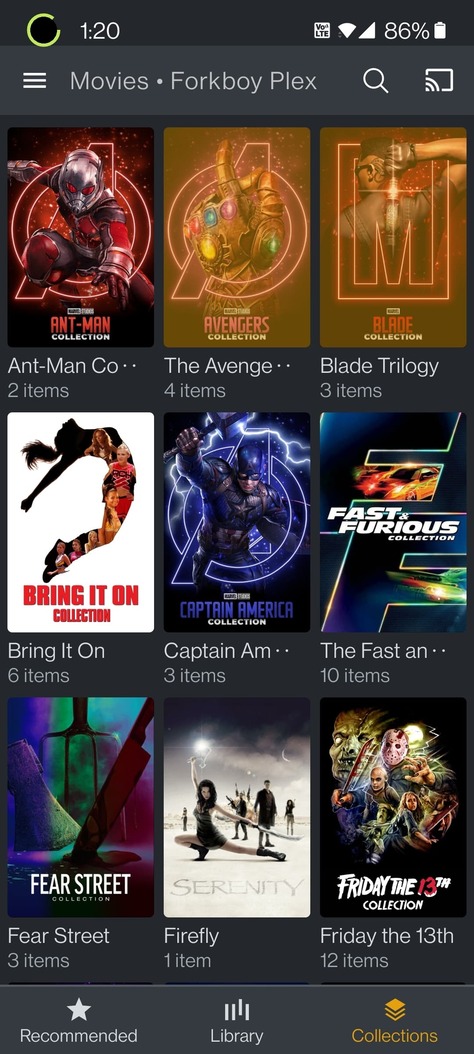
So I’ve been using a little bit of my morning to create my Collections of Movies. Everything was going great until I stopped for lunch, went to go check all the Collections I’ve made so far and this is what my browser is showing when I go to Collections Tab.
It wasn’t doing this all morning, just started now after leaving it sit for about 30 minutes after my last edit. I did do a library scan since I found I was missing one of the Fast and Furious movies and added it in but it added to the collection fine.
If I look at my Movie Collection on my Android Plex App (beta) it shows fine…
Thanks @tom80H that fixed the issue, it would have been nice to warn me that that would make me have to reset my Plex Web experience. Two other things…
I swore my Libraries had a different order to them (left “pinned” Menu section), but can’t be sure. Can this be moved into a specific order (like my Roku Menu allows?)
Any idea what is causing this? It was a valid question, right? Am I going to have to keep doing this because I’m creating a lot of Collections?
For number 1, click the 3 dots next to the library in the left menu and you’ll get a “reorder” option.
For number 2 - I’ve seen this come up before in other posts and that fix is the usual one but dunno if I’ve ever heard what causes it other than just “software glitches sometimes”. Maybe tom80H can provide better answer there.