[bug] Plex Web movie library messed up with collections

Since I work with collections quite a lot, it cauht my eye that there is a weird behavior of Plex Web.

My library setting is to hide items from view when they are in a collection:

Let me show you the collection tab of the library first:
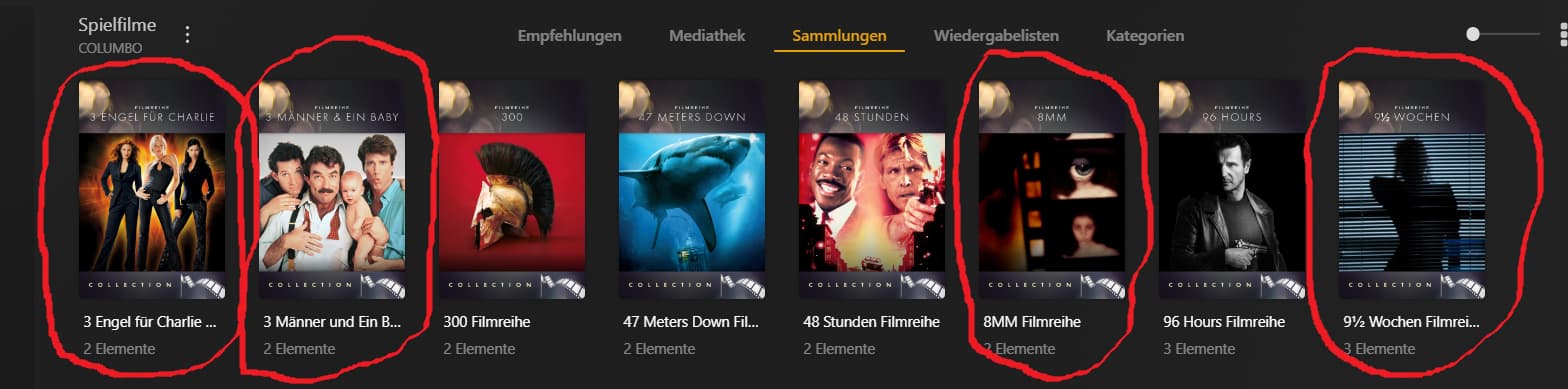
All these collections shown in the picture are created by Plex (using the info from TheMovieDB with posters created by myself - but I also use smart collections which get involved later). I marked a couple of collections to show differences. All of these marked collections contain 2 movie items (one is holding 3).

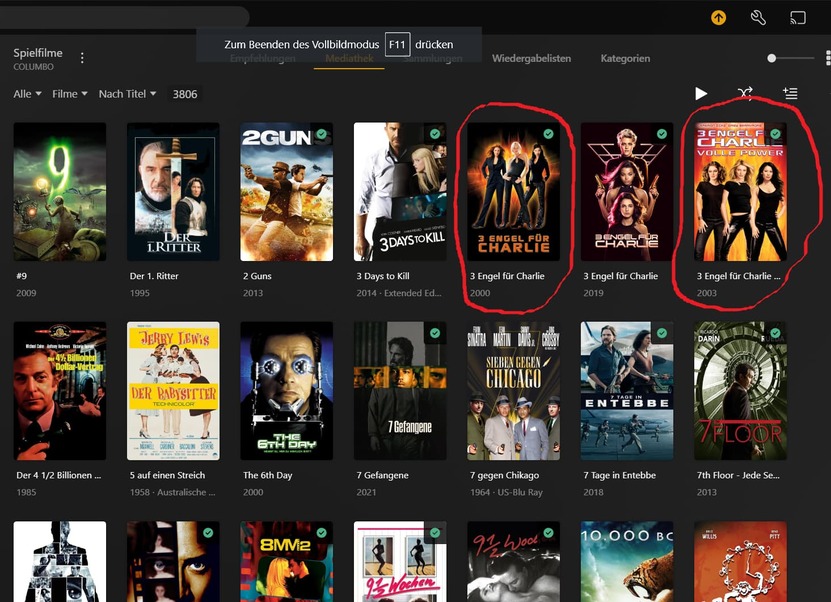
Next, let me show you the library view tab of Plex Web - movies sorted by title:

One thing is obviously wrong. While the first two collections are shown in this view (and its movies are hidden), two other collections are missing from the view with their movies showing up instead: 8mm and 9 1/2 weeks collections).

Further down, other collections are visible again.

This is local Plex web from my Plex web server.

Plex Web version number is: Version 4.108.0

Then, I checked the app,plex,tv version and … surprise (to me)… no collection shown at all in library view
I checked the setting of the library and it has the same setting than the local Plex Web:

Not so obvious but there’s another weird thing…

The sorting on the “collection” tab is “alphabetically” while the sorting of the library tab is “title”… which is not the same. Therefore, the sorting of the collections is different. Of course, there’s no “alphabetically” sorting in library view - so why should there be one in collection tab? Please make this the same “Title” standard sorting - or add sorting menus to this tab, too.

Smart collections in library view:
I have lots of smart collections with lots of movies in them - some movies are in more than one smart collection.

I went and checked for these kind of collections. Here’s a short peak into a couple of my smart collections:

All marked ones are smart collections, as you can see if you find the little gear symbol in their upper right corner.

As these are collections of movies that about a certain actor/actress/director/directress, it is clear that one movie can be part of several collections.

Switching to library view…
Aaaron Eckhart collection is there… Akira Kurosawa collection is not. - neither are Al Pacino collection nor Alain Delon collection. But Alan Rickman collection is these…

Further more… all movies inside the smart collection of Aaron Eckhart are also shown in the library view..

Checking the online version… no smart collection at all is shown in that version.

Some of the math about indeces and stats of library view with collections is either completey wrong or the number of collections in my library broke Plex’ or my view itself is broken… whatever.

Everybody must admit that something is wrong with this view… :slight_smile:

Can somebody help?

Edit: Just checked and the library view on Fire-TV is the same than in Plex Web.

1 Like

This has already been reported to the developers and a fix is being worked on.

My collection are all hidden as per edit on my app on my tablet and I can go into say Aliens Collection and this will display all the films in that collection. On the web browser All my collection are not hidden like in the App. Also on the web browser I click on the letter at the side and nothing happens when usually it will take me to the film section starting with the letter I click on.

Since I started this thread in Nov 2023, we had lots of Plex Web and PMS updates and I want to re-check and summarize the different “problems” around collections.

Here’s a summary of issue I had with collections:

a) Not all of the collections are showing in library view.

This was still the case yesterday when I last checked, but I found the reason for that and I am able to fix it. See at the end of this post.

b) Sorting on “collections” tab is alphabetically (and different) to the sorting on the library tab.

This seems to have been fixed. I cannot find any differences in the sorting on both tabs.

c) app.plex.tv is not showing collections in library tab.

Old bug, has been fixed a long time ago.

d) not all smart collections are visible in library tab (same problem as a)

Solution see below

e) Movies inside smart collections are shown in library tab, even if settings say “hide movies inside collections”

I think, this is intended behavior - and I can understand this.

Now, back to the visibility problem of individual collections in library tab.

After poking around in the settings, I finally found advanced settings for each individual collection:

This is how I discovered that you have “visibility” settings for each collection.
The image above is how it is set for around 90% of my more than 650 collections in my library.

But for almost 10% of my collections, the setting is set to hide the collection and show the elements instead.

image

I don’t have the slightest idea at what point of time in history this has been set to these collections. It wasn’t me - at least not by intention.

But I cannot simply set this for all of my collections.

If I mark a couple of collections, then click on Edit, I don’t have this setting to select Library Default again. I have to do it individually.

So, I asked Gemini on how to set this for all collections in my library and this is the python script that helps me to auto-reset the collection mode of all collections in all libraries.

You need to set the Plex Token, the PMS URL.

from plexapi.server import PlexServer
import os

# --- Configuration ---
# Replace with your Plex URL and token
BASE_URL = 'YOUR_PLEX_URL'  # e.g., 'http://localhost:32400' or 'https://your_plex_domain.com'
PLEX_TOKEN = 'YOUR_PLEX_TOKEN'

# --- Collection Mode Constants (for clarity) ---
# These are the internal values PlexAPI uses for collection modes
COLLECTION_MODE_HIDE_COLLECTION_SHOW_ITEMS = -1 # "verstecke diese Sammlung, zeige aber ihre Elemente"
COLLECTION_MODE_LIBRARY_DEFAULT = 0             # "Mediathek-Standard"
COLLECTION_MODE_HIDE_ITEMS_SHOW_COLLECTION = 1  # "verstecke ihre Elemente, zeige nur diese Sammlung"


def get_plex_connection():
    """Establishes a connection to the Plex server."""
    try:
        plex = PlexServer(BASE_URL, PLEX_TOKEN)
        print(f"Successfully connected to Plex server: {plex.friendlyName}")
        return plex
    except Exception as e:
        print(f"Error connecting to Plex server: {e}")
        print("Please ensure your BASE_URL and PLEX_TOKEN are correct and your Plex server is running.")
        return None

def process_collections(plex):
    """
    Iterates through all libraries, then all collections within each library,
    and updates the collection mode if necessary.
    """
    if not plex:
        return

    for library in plex.library.sections():
        print(f"\n--- Processing Library: {library.title} (Type: {library.type}) ---")
        if library.type in ['movie', 'show']:  # Only process Movie and TV Show libraries for collections
            try:
                collections = library.search(libtype='collection')
                if not collections:
                    print(f"No collections found in '{library.title}'.")
                    continue

                for collection in collections:
                    print(f"\n  Collection: {collection.title}")
                    print(f"    Summary: {collection.summary}")
                    print(f"    Items in collection: {len(collection.items())}")
                    
                    # Check the collection mode
                    current_collection_mode = collection.collectionMode
                    print(f"    Current Collection Mode (raw value): {current_collection_mode}")

                    if current_collection_mode == COLLECTION_MODE_HIDE_COLLECTION_SHOW_ITEMS:
                        print(f"    '{collection.title}' is set to 'Hide collection, but show its elements'.")
                        try:
                            collection.editCollection(
                                collectionMode=COLLECTION_MODE_LIBRARY_DEFAULT,
                                lockedFields=[12] # 12 is the field ID for collectionMode
                            )
                            print(f"    Successfully changed '{collection.title}' to 'Mediathek-Standard'.")
                        except Exception as e:
                            print(f"    Error updating collection mode for '{collection.title}': {e}")
                    elif current_collection_mode == COLLECTION_MODE_LIBRARY_DEFAULT:
                        print(f"    '{collection.title}' is already set to 'Mediathek-Standard'. No change needed.")
                    else:
                        print(f"    '{collection.title}' is set to another mode ({current_collection_mode}). No change needed.")

            except Exception as e:
                print(f"Error processing library '{library.title}': {e}")
        else:
            print(f"  Skipping library '{library.title}' as it's not a movie or TV show library.")


if __name__ == "__main__":
    if BASE_URL == 'YOUR_PLEX_URL' or PLEX_TOKEN == 'YOUR_PLEX_TOKEN':
        print("Please update BASE_URL and PLEX_TOKEN in the script with your Plex server details.")
    else:
        plex_server = get_plex_connection()
        if plex_server:
            process_collections(plex_server)
        print("\nScript finished.")

Hope that it helps somebody.
