I have only convert to this bevor was it a mkv with 10 bits and pv5 (info from plex server) after this ( 40 seconds for covert) show it so…
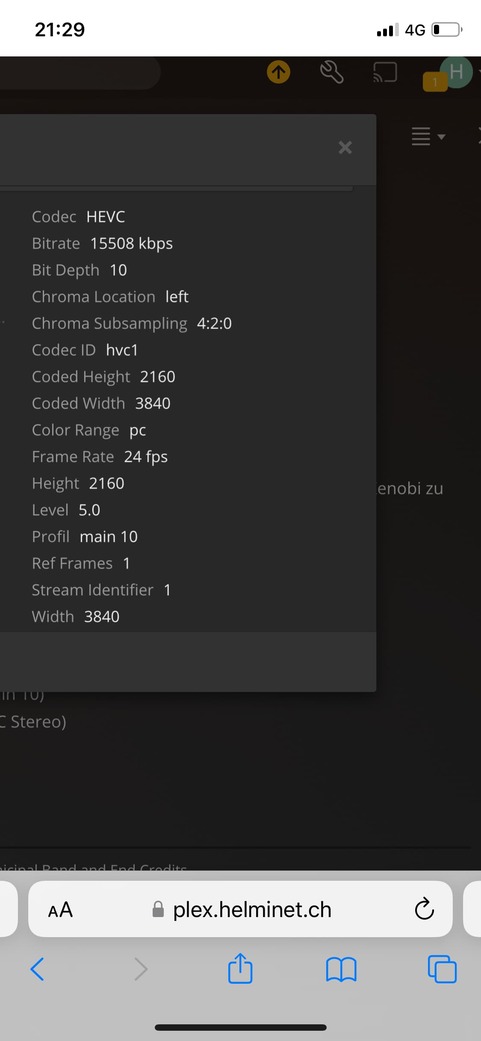
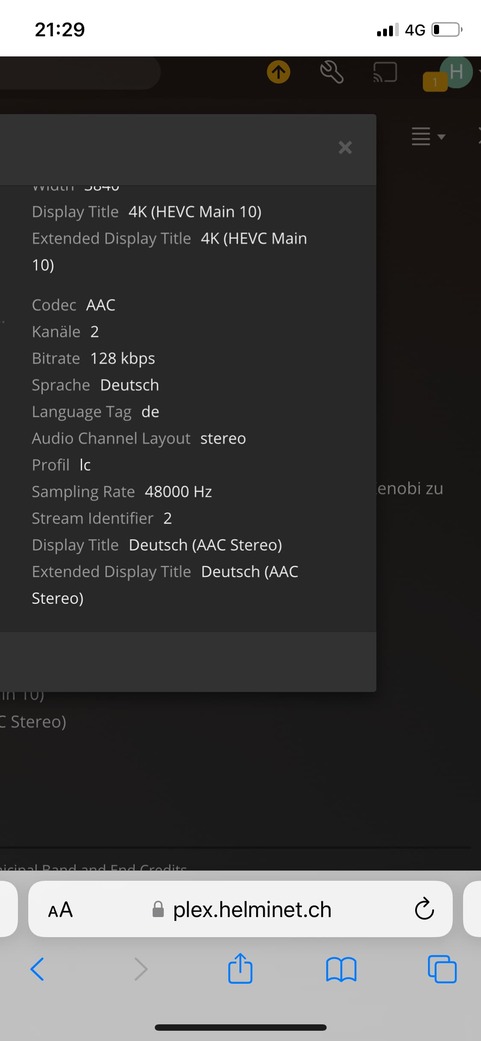
@Volts
You have right after convert the movie or serie will start with plex player but not in the correct colors (its the same when you make a downgrade to older version)
Thanks for confirming! I wish it was that easy, but the DV P5 color encoding is really very different, and ffmpeg doesn’t handle it yet.
I recall months ago some of my titles played with the wrong colors not realizing what the issue is. I thought the file was corrupt. But reading this thread, one thing is evident to me: DV transcoding was never supported by Plex Server, and Direct Play only works on players that support it. The difference seems to be that before Plex server 1.25.4, DV files would Direct Play with the wrong colors and now that Plex realized that, they updated the newer server versions to prevent playback of DV files if the player does not support correct Direct Playback. Transcoding DV never worked and still doesn’t and will not work unless Plex licenses Dolby Vision.
The confusion in this thread seems to be that a lot of people have different players which will behave different trying to play DV files based on its capabilities. I personally have no issue playing DV files on my Android TV because it directly supports Dolby Vision. However, if I play the same file through my Apple TV, the error message mentioned earlier appears.
This is clearly a licensing issue. Plex has never supported Dolby Vision and I am not expecting they will. So the moral of the story is, don’t mislead yourselves and others. There is no fix for something that is not broken to begin with. This is not a bug. Plex just never supported and does not support Dolby Vision transcoding. The only reason some of you can play Dolby Vision (DV) files is because your player is able to handle it with Direct Play. Some Android devices can handle DV so Direct Play will work on those, but some other Android devices will not support DV. The Android landscape is very diverse. Apple TV does not support DV either unless you have an Apple TV 4K, which I read does not support all DV profiles either. So check your device capabilities to see if it supports Dolby Vision. If it does, the Plex Player on that device will play DV titles just fine. If the device doesn’t support DV, the Plex Player will display an error. Then again, this also depends on the server version. If the server version is before 1.25.4, you will get bad colors. If the Plex server is above 1.25.4, then you will get an error message.
Regarding the diversity of results on Android devices, there’s nothing Plex can do about that because the Plex player on Android is a “dressed up” Android media player, so it will inherit the capabilities of the native Android player. And since the server does not support transcoding of DV, then all it can do is display an error message rather than playing a video with bad colors.
If you are playing a DV file just fine with the correct colors, try switching the player to a lower resolution, which will force the server to try and Transcode. You will see that you will get an error message saying Unable to Play. Why? Because again, Plex has never had support for transcoding Dolby Vision (DV). You can notice the lack of DV support even in your own Plex library as the format is not correctly displayed in the resolution. It says 4K HDR rather than 4K DV.
The only thing Plex is doing wrong here is not being upfront about it and displaying a misleading error message to its users. Why can’t the error message simply say “Unable to Direct Play or Transcode Dolby Vision color space. Format not supported.” That would’ve saved us months of speculation and angry posts online.
I barely have any titles in DV, but I have some. So after learning this, moving forward, I will make sure all my files are HDR10 and avoid DV files, and will replace those titles in DV with HDR10 titles. I will standardize on HDR10 since that is what Plex supports. All those of you having the same issue should do the same, or move to another server platform that supports DV, which I don’t know if there is one.
1 Like
You can also use DV profile 8, at least for movies, to have a hdr10 fallback, but also a DV track in case it is well supported one day.
Great explanation, but Infuse on the Apple devices works fine. So Infuse must be doing something different on the client side than Plex does. If Plex could replicate that…
I just bought a license for Infuse. It’s almost as if Plex doesn’t care that their product doesn’t work as well as other market alternatives.
Server : Mac 1.27.1.5891-c29537f86
Client : Apple TV 4K (latest release)
Result : Color Space is not supported error
Steps Taken
Downgrade server : 1.25.4.5487
Client : Apple TV 4K (latest release)
Result : File played (colors not correct)
1 Like
I’m even having trouble with a Profile 5 DV file on Apple TV 4K Gen 1, as explained in most other comments here, Infuse works fine.
Pretty disappointing.
Get Infuse and use it as your client/player. I suspect everything will play properly.
Try Infuse. It seems like Plex is blaming this on improper encoding and won’t implement the correction that Infuse uses to play the file properly. I think Plex. Jews the steps Infuse is taking as a “work around” which should be fixed with proper file encoding rather than playing a different profile than encoded.
there is a server and Apple client issue that both need be done to fix the issue with it not remuxing DV profile 5 that causes the colorspace not supported error. Both fixes are being checked and hopefully will be out soon but I don’t have an ETA
9 Likes
But Infuse already works…
1 Like
I wish you guys had a way to follow bugs so I’d know when to update my server to fix an issue i’m having, but thanks for acknowledging this.
1 Like
Is there a way to set up *arr to select for profile 8 DoVI files specifically? I’m one of the many who can’t play DoVi with my current setup, either on my Vizio TV (even though can play DoVi from other built-in streaming services) or on TVs that only support HDR10 (ie: Samsung), so always having that fallback would be great but a pain to manually maintain.
I’m not sure if you specifically target profile 8 but this site list a bunch of custom filters for hdr/dv Collection of Custom Formats - TRaSH Guides
Yeah those filters are only as useful as the filenames selected, and in my experience you almost always just get “HDR” or “DV”, never both, or more specific info like DV profile.
If you know how to write small scripts, there are plenty of ways of filtering profile 8.
-
Run ffprobe on files, remove them before importing to Plex, and send a notification mail or something like that.
-
Import file in Plex, use Plex Api to list DV files, and remove them, create an alert, etc etc
It’s good to hear that the Plex developers finally got their head out of each other’s ■■■■■, but how on earth hasn’t this been solved 4 months and 600 complaints ago? I had to purchase an Infuse subscription in order to use my PMS with iOS devices, since their software actually works.
1 Like
I like others I went the infuse route. It seems Plex engineers have found and addressed an issue within the Plex client/server apps. We just have to wait for that code change. Luckily I only purchased an Infuse pro license for 1 month. Secretly hoping Plex would fix the issue sooner rather than later.
1 Like
