
On Version 1.26.2.5797: I got “Color Space is not suppported”
On Version 1.25.4.5468: It play without a issue.
Tested on Apple TV 4k Gen and Windows with Firefox
Edit: Ok Colors are a bit off
On Version 1.26.2.5797: I got “Color Space is not suppported”
On Version 1.25.4.5468: It play without a issue.
Tested on Apple TV 4k Gen and Windows with Firefox
Edit: Ok Colors are a bit off
For the time being I’ve opted to go with two sets of libraries. One is 4K with DV and the other is 1080p w/o DV. This solution obviously won’t suit everyone because of the extra storage requirements, but it works for me.
Got tired of waiting on this so I installed/bought Infuse Pro, which plays the files with no issue…
Another big reason I went with Infuse was I can never get local streaming to work on Plex. My internet had an outage for 5hrs and could use Plex at all. It’s ridiculous that I need internet to stream locally. I’ve tried everything under the Sun to get it work in the past with no solution. Well now my solution is Infuse and starting to like it more and more
Not to siderail this thread but your issue with no internet is resolved by entering either the network ip addresses of the devices or the whole network (using cidr) under “List of IP addresses and networks that are allowed without auth” in Settings > Network.
Samesies!
I wish… 10.10.0.0/24 or direct IP doesn’t work. appreciate the reply though
Thanks for confirming!
Version 1.26.2.5797 has not fixed the issue for me
Issue still present in 1.27.0.5849-99e933842
Can confirm that the issue doesn’t exist in 1.25.4.5487
Can you give an example of this - a file that worked in an older version but not in recent versions?
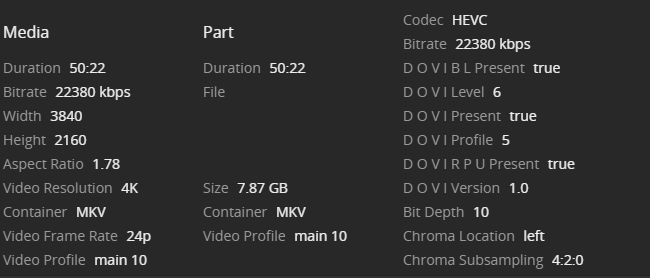
Thanks! On which device?
Plex for windows, web client and android.
Like I said above content works on running server version 1.25.4.5487, but 1.26+ that error occurs.
During playback, how did colors look? I would expect purple-green color problems with DV Profile 5 on those clients.
Plex Web isn’t expected to work. The color space isn’t supported.
Does the Windows system support Dolby Vision? I don’t know what to expect from the Windows app here. Did you test this again?
Does the Android device support Dolby Vision? A few phones and tablets do.
Downgraded to 1.25.4.5468. Trying to play a Dolby Profile 5 video, it now plays on Chrome but the colours are way off (all shades of green). On my iPhone using the Plex app, there is sound but not video. Infuse plays the video fine. Colours look good and sound is fine.
If this is a licensing issue, could we have any indication about whether there are any talks with Dolby to fix this? I know commercial deals can be sensitive for competitive reasons but the lack of information is probably already driving your users to competitors.
What is Infuse doing differently to Plex especially with AppleTV? May be the client app needs to be updated so it works as Infuse does? I’ve noticed more content is in DV now and is available sooner than HDR.
Just chiming in to say I’ve experienced the same as everyone else regarding DV profile 5 MKV files not direct playing on Apple TV. Hoping to see a fix soon.
I too am having this (extremely annoying) issue.
When the mkv convert to mp4 container then it works
(ffmpeg -i input.mkv -codec copy output.mp4)
For which player? Ffmpeg doesn’t produce correctly-tagged MP4 files for DV Profile 5.
Share a sample?
