Server Version#: Version 1.18.2.2058
Player Version#: Version 4.22.1
I have a large number of movies that were split between 2 NAS devices. I have upgraded storage and copied all the files to the new storage. I am running Ubuntu 16.04 on my server. I unmounted the shares while I was doing the copying. Once finished I reboot the server and ensured everything was mounted. I went into the settings and disabled auto trashing after scanning. I added the new share location and it started scanning. I am not sure if it timed out or what, but it originally showed double the movie count which is to be expected. Then it started matching the movies. It only found about half of them as duplicates. There are a bunch of movies that did not match to anything. There are some movies that are matched as duplicates wrong and the right duplicate did not match. For example, I have the 2,3,4,5 and 6 headed shark attack movies. One of the 3,5 and 6 matched to the 2 but the duplicate 2 didn’t match to the 2. I have a lot of collections and custom Genre’s and things that I put together and I don’t want to duplicate that work. I noticed that on my NAS’s one of them is completely out of space and the other only has 97% free. Not sure if that is a factor or not.
I have thought about going through the duplicates and deleting the ones that have matched that are part of the old storage and then scanning to see if it will pick them up. I am not sure why the server is not seeing the same movie as a duplicate even though it found all the right information.
Have you performed a cmp of the files to verify something didn’t go wrong in the combining process?
Chuck, not sure what a cmp is. Something I have found though that is kind of odd is that if I change the match on the file so that instead of matching Movie Database but Plex Media which is IMDB it works and matches them. Any idea how I can force the library that have not matched to update with the IMDB agent instead of Movie Database? It seems like the only way it will show as a duplicate is if it is matched with the same agent as the original movie.
your situation happened because at some point you changed your library metadata source.
this is ‘normal’ and ‘expected’.
yes.
no easy way that I am aware of, other than ‘plex dance’ the ones that are using the agent you don’t want to use.
Tekno,
Thank you!!! I am not sure when I changed things. How do I set Plex Media as the default? I don’t mind matching things up this way now that I know what is happening.
As a side note I have some movies that are listed as miniseries even though it is basically a TV movie. I had them matched previously and they are not matching for some reason now. If I match to the current database using the match to personal media does that work?
you can set each library to a different agent in the edit library > advanced settings
the default are plex movie (movie libraries) and the tvdb (tv show libraries)
tvdb and tmdb seemed to have shuffled or recatagorized some tv movies as tv shows, or vice versa.
for example, stephen king movies/shows are still a big inconsistent mess.
like the original “IT” 2 part tv movie, is now a 2 episode tv show.
either way, it was probably the metadata provider that changed, so what may have matched before, may need to be switched to the other library (movie or tv) for plex to get metadata.
you can try to fight it if you want, but it is like yelling at the wind. Just re-arrange your files however tvdb or moviedb, and plex, demand.
Oh, one other thing…
I think (not sure) you can combine movies into one by checking them (top left corner of movie poster > 3 dot menu > merge).
I think whichever you click first is what will be combined into (you might have to double check).
it’s still manual, but may be preferable than the plex dance.
I am not actually going to merge both movies, but you can see how to do it…
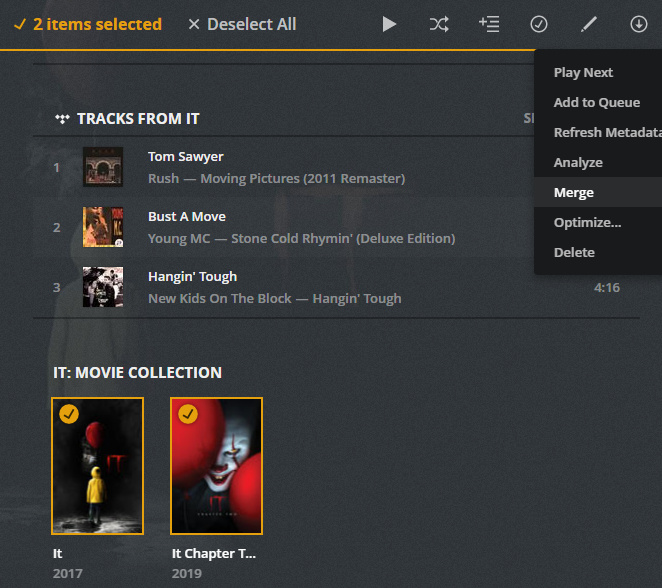
If I combine them, once I remove the libraries will the metadata remain the same?
yes when you combine them you will get the (2) in the corner indicating duplicates.
Once you are all done combining or whatever, then you can remove the old path/files, then rescan/empty trash/clean bundles/optimize.
As a note, you may want to ensure you back up the db again before doing the final empty/clean up.
always good habit to backup the database before making any major changes.
Tekno,
Thank you so much for all your help. Do you know of a way to display movies that are not duplicates? I know how to see all the dupes.
not that I know of, there is no ‘non-duplicates’ filter.
other than simply using ‘all’ movies (which will of course display duplicates as well non-duplicates).
what exactly are you trying to accomplish?
I have about 5k movies I have to match for duplicates. I am trying to just run from a list so I can just hit them all one by one instead of having to scroll through my list looking for duplicates. The other issue I am having is that for some reason the wrong movie is being matched. I will eventually need to find the ones with the wrong matches.
I know the pain.
I just try to let go of my OCD and deal with them as I see them.
Duplicates don’t show up unless they are matched to the same metadata.
There isn’t anyway to search for duplicate titles.
You could start with collections and see if there are ‘dupes’ within collections.
That will give a smaller more narrowed down list of things to look at, at least first.
Tekno,
I had to disable collections because it was annoying me with the auto match. I like the idea though and will try genres and see where that gets me. Thanks again.

