I have an odd problem that is occurring.
My setup is Windows 7 running the PMS and a Roku2 as the client.
For one particular movie every time it reaches about 14 min in, my Windows computer shuts down, and not a nice shutdown, it just drops.
Every other movie is fine when playing on the Roku2.
I also tried running the windows client with the failing movie and it plays successfully.
The only difference I know of is that for the Roku2 it has to transcode and for the windows client it doesn’t.
Is this a problem with codec’s or are there things that I can find in the logs that will help pinpoint what the problem is?
After doing some testing i think it is something related to the transcoding process… I used Handbrake to convert it to an mp4 and it shutdown the computer at the same point.
I would check your cpu temperature.Transcoding and handbrake encoding runs the cpus at 100% thus heating it up. You might have a loose cpu fan or some other cooling issue and the motherboard is shutting down to protect from over heating.
I suspect CPU heat might not be that issue. I've suddenly ran into the same problem. First, regardless of what I attempted to watch, my computer was shutting down. Win7 logs indicated it was a bonjour issue. I removed bonjour and that seemed to clear my shutdown issues for the TV shows I had downloaded.
Next, I'm attempting to watch movies and my computer is shutting once again. The problem is that the windows logs aren't showing any errors (other than "unexpectedly shutdown"). I'll report more as soon as I can obtain some logs from Plex - if available & useful. (v0.9.6.7-266f05d)
-Chris
Your computer is overheating and shutting down before it cooks itself OR, the power supply in your computer is not putting out enough wattage to keep it running under full load.
So when I play a 42 minute mp4 or avi that is under the "TV Shows", it plays fine. But when I play either file format under the "Movie" area, it shuts down from 4-7 minutes into the show and it's overheating or doesn't have the power?? I think not. If I had the problem in both areas, that'd be different... I'll watch my temps (I know the power is good) and eat my hat if I'm wrong...
-Chris
It will entirely depend on the codec's in use and how much CPU power they consume to decode/encode each of them. Plex (and Handbrake for that matter) run NO ring-0 code so are totally incapable of being the direct cause of any type of pc shutdown. They can rely on systems which have ring-0 code like graphics drivers but applications can't really be blamed for protected code going awol.
PS : And i was replying to the original poster, not you anyway. mp4 or avi are just container formats, they say nothing about the complexity of the video held within them, If your 42 min long mp4 or avi have mpeg2 or Indeo video in them for example decoding it will barely tax moden cpu's at all. If your 7 min long movie has H.264 or even VC-1 video then this will be a far more taxing situation for your CPU - so before you start offering to eat your hat, you might want to know that you are comparing 2 very large covered boxes and hoping they do have the same "stuff" in them. If you want to know what codecs you are actually using grab something like mediainfo.
Right now I'm eating that hat!!! LMAO. I not only found the problem (which you pointed out immediately), but I think I might have learned something about Plex. I started monitoring the temps and found my cores were running about 51C (seemed a bit high, but it's not something I have ever payed any attention to). Played one of the TV shows I've watched in the past & saw no change in either core temps OR load... I thought... Odd.... is Plex storing the old transcoding maybe??
Next I loaded up a movie & hit 71C within a couple of minutes. My cpu is set to protect itself at 70C... so I hurry up & shut down before it just shut itself down. Looked inside & whatdya know - a cooling fan wire had become entangled with my CPU fan. All fixed up & running 20C idle & topping out at a whopping 33C under load (transcoding/playing a movie).
When I'm wrong, I'm way wrong... THANKS!!! (back to eating my hat)
-Chris
Thanks for the info. As you can see, I know little about video too.. what is your preferred format for ripping your DVDs? I've switched to mkv & it "seems" better...
-Chris
Ah.... could be another long reply :)
The correct answer is really, whatever is most compatible with the client(s) you want to use.
Personally, i use handbrake and do this;
- Select the high Profile option
- change the container to mkv
- add what ever subtitles I need (which is pretty much forced english subs for anything with English audio and full english subs for anything with foreign audio)
- leave the audio as default (which will give me a passthrough AC3 or DTS 5.1 channel track and a re-encoding AAC 2 channel track)
When i play things, i just let Plex transcode to whatever format as i have far to many varied devices for any 1 format to really suite them all.
those settings are very compatible with a lot of stuff anyway, but if i had nothing but Apple devices, or mostly Roku's for example, i would do them slightly differently.
I tried everything on my AMD system that I use for encoding and it would just over heat at some point and shut down at over 80C. I took the same files to a another machine and although it took longer it was able to do the encoding. Here is what I found between the two systems.
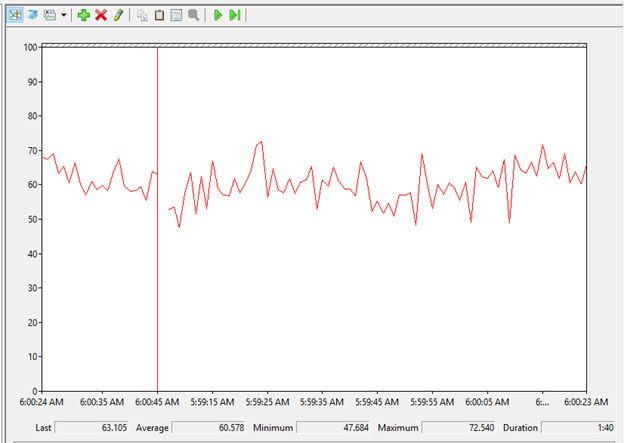
Intel Processor Windows 10 System using about 60% of the Processor time while encoding with Handbrake.

AMD Processor Windows 10 using 85% + of the processor while encoding the same files with Handbrake and causing the system to overheat and shutdown.
Now the System with the AMD is running a water cooled AMD processor on an Asus Crossfire V and has performed flawless through many CPU/GPU tests such as 3DMark. The Radeon R9 295-X2 video card is also water cooled. The intel system is a dual processor with a regular HSF.
This topic was automatically closed 90 days after the last reply. New replies are no longer allowed.
