Server Version#: 1.19.1.2645
Player Version#: 4.31.2
I recently changed some settings on my network to try and get Remote Access to work. I never succeeded, but now I can’t connect on my local network either.
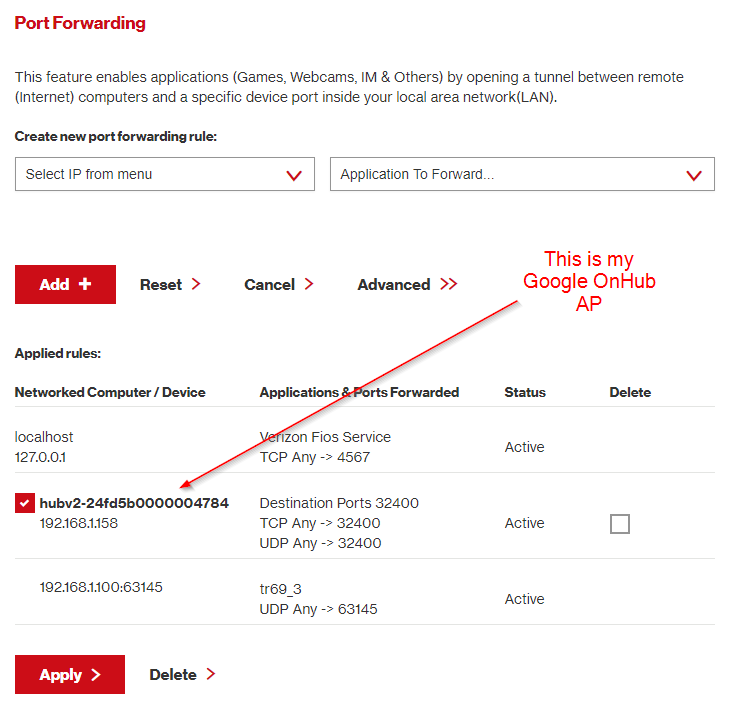
I have a Verizon Fios modem/router in bridge mode, and a Google OnHub as my main Access Point. I have port 32400 forwarded on both. UPnP are enabled on both. I tried both no port forwarding + UPnP; and also port forwarding on both + no UPnP.
I have my Plex Media Server on a Windows 10 box that I access only from my local network. It has a static IP set:
On my PMS box, I can reach Plex via localhost:32400/web/index; for some reason 127.0.0.1:32400/web/index stopped working altogether.
When I try to connect from a remote PC on my network, I get “Unable to connect to [my plex server] securely.” I allow insecure connections, and then I get "The server [my plex server] is unreachable. Make sure it’s running, double check your network, and try again.
I was trying to get Remote Access to work with my PMS on a VPN. I setup the Inbound Rule in wf.msc, then ran the netsh interface command; I went back and deleted the inbound rule I created, but still no luck.
I have followed all the troubleshooters I can find on here and on the web. So, in a last ditch effort, I’m uploading my logs to see if someone smarter than me can point me in the right direction here.
Update:
I removed all Port Forwarding (from Verizon gateway and Google AP) and enabled Remote Access on my PMS. I was able to connect on my home network to plex.tv, but only through Relay, so I’m not directly accessing it.
Both these computers are on the same wifi network so I’m still a bit baffled as to why I can’t directly connect to it.
I’m increasingly sure that running this command is what screwed the whole thing up:
Not sure if it’s a typo, but your first screenshot shows you manually configured an IP of 192.168.86.25, yet your Google router port mapping screenshot shows that you have the port mapped to 193.168.86.251. If the port is mapped to a different IP than your server, that could be the problem.
Assuming that is sorted out, you may be into something with the VPN settings. I am. not familiar with the VPN setup, can you revert those changes you made?
Can you try connecting your Plex server directly to the Verizon router, assuring you have the remote access port manually mapped to the Plex server’s IP? You’ll probably have to change the IP on your plex server since from the screenshots above your routers were on different subnets.
I personally have had network issues when I had a router set up behind another router. You end up with double NAT, and although it’s been a long time since I had any real network experience, I recall having lots of issues with that configuration. Look into reconfiguring your router. Perhaps you can leave the Verizon router act as the router, and configure the Google router as just a bridge. I don’t know your router, but in general you’d connect a LAN Port from the Google router to a LAN Port on your Verizon router, and you have to put the router in Bridge mode (if that’s possible). With this setup, your Verizon router would be the only router, handling DHCP and NAT, and the Google router would only be enabling WiFi access to your network.
A better solution is to ditch the Verizon router entirely. When I had FiOS, my access box (ONT) had an Ethernet port and a coax port. By default the internet service is enabled on the coax port, sending TV signal and internet data over the coax to the Verizon router. I called Verizon and had them switch my box to use the Ethernet port for internet, which enabled me to use my own router directly connected to the Ethernet port on the Verizon box. I still had coax running from the Verizon box to the Verizon router and then to my TV, but I disabled WiFi on the Verizon router entirely and didn’t use it.
I did catch the discrepancy between the Google AP and my static IP; I ended up getting rid of all Port Forwarding and it’s still giving me problems and I think you’re right no with the difficulty using the Verizon gateway as a bridge to my Google wifi.
Right now, I’m doing a system restore which may fix whatever I screwed up in my registry. I’m just so annoyed that this was working fine until I started messing with it, but hey, that’s the cross we bear, right?
I may try ditching the Verizon modem per your suggestion if the restore doesn’t work. I’m just worried the problem is more with my PMS than it is with my network configuration.
I did a system restore to 4/9. I can’t believe this, but it actually worked - which makes sense if I screwed something up with the registry.
The steps I took was I restored the settings, I reinstalled PMS, and I turned off the static IP (I will probably be able to enable this again). I’ve decided NOT to screw around with remote access so long as I’m running both the Verizon gateway as a bridge to my Google Wifi.
So, moral of the story, keep your restore points and use them. My next step was to reinstall windows and I’m glad I didn’t have to go there, or that I didn’t screw things up with my network.