Server Version#: 4.49.2
Player Version#:
(File removed)
For some reason the plex server or the router or windows is creating the issue. Can be minutes, hours or maximum about a day and the port is closed. retry always brings it back but only temp.
PC has a static IP, port fwding has been added still no go.
tried disabling firewall, virus you name zero difference.
Im just not sure what is the cause the clear way to diagnose, a few friends have remotely logged set everything up in the router as should with port fwd and what ever else is needed, that seems to make the port close immediately which makes me think its could be in the verizon router. i just do know what to do, but every day numerous times a day i have to retry to open the port so i can view anything. an assistance is greatly appreciated.
From the logs it looks like Plex is attempting to open an automatic port forward via UPnP. Have you updated your Plex remote access settings to reflect the port forward you created on your router?
For basic troubleshooting:
confirm your settings and make sure you have checked the manual port definition in the remote access settings (incl. the public port of your port forward matching the one in your Plex settings).
double check if the public IP you see on the Plex remote access settings matches the public IP you see in your router (to rule out some double-nat or CGNAT situation)
If you can see your specified public port from outside your home network, the issue should be somewhere between your router and the PMS (= the router itself, your home network, Windows or the Plex Media Server). If the port cannot be seen as open this implies the issue should be found between “the internet” and your router (namely your ISP or router configuration).
Sometimes it can help to pick a different public port if you currently cannot see it from the outside.
Do you have any experience with verizon routers? maybe im doing something wrong as im a noob with all this internet protocol stuff. I did google search, and follwed a guide on my router someone posted which did not work. The pc i use is a dedicated plex server as i use it for nothing else. im almost ready to wipe the windows drive and put a fresh copy to rule any possible glitch. TIA
ok i followed the steps, thank you by the way. I used the private port to create the rule is that correct? also do i manually set the public port or just leave it they plex does it?
Initial test appears to be working lets see how long it stay open, if it makes it past 24hrs, we’re trekking into new territory
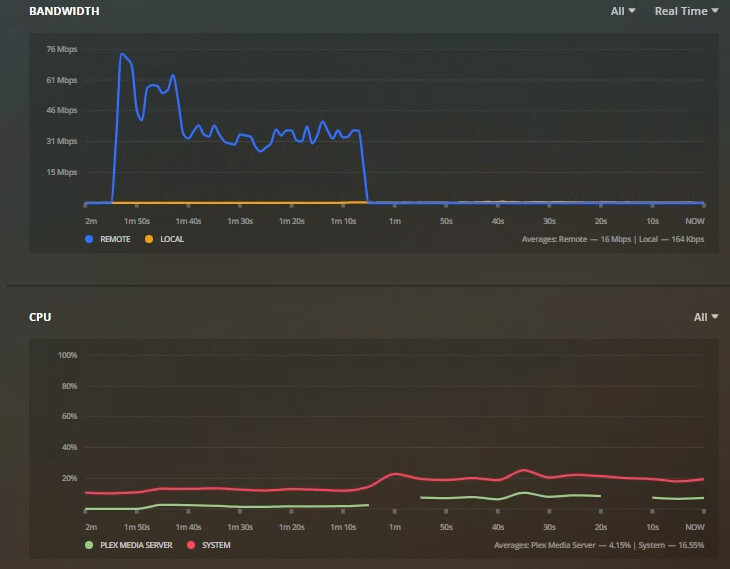
Graph photo. What do the breaks in the plex media server mean? is this a failer in the server itself, ive seen this lead to streaming videos to stop playing
With the given configuration your router will forward ALL requests to ANY ports to your Plex media server. While this is probably working, most users would prefer to avoid such a situation (e.g. because it’ll expose your server).
I strongly recommend to opt for a single public port (preferably from the range of 20000-50000) … you only need to open it over the tcp protocol.
ok So i finally fixed it, removed all the settings in the router and started over creating the static version of the settings the UPnP would create but with UPnP disabled. If anyone has this similar issue with a verizon router i might be able to help.