My server keeps crashing and I cannot figure out why. I tried to install older versions but that has not helped to resolve the problem.
Server Version#: Version 1.19.1.2645
Plex Media Server Logs_2020-04-17_21-33-22.zip (1.7 MB)
Player Version#:
My server keeps crashing and I cannot figure out why. I tried to install older versions but that has not helped to resolve the problem.
Server Version#: Version 1.19.1.2645
Plex Media Server Logs_2020-04-17_21-33-22.zip (1.7 MB)
Player Version#:
I am dealing with this issue as well.
Why hasn’t anyone responded yet? I have never had so many issues as this week… I have tried going back to older versions, but it persists now. I went back to latest version and soooo many issues.
It even says server settings are unavailable…
have the exact same problem. i’ve tried uninstalling and installing previous versions but the Plex Server (Windows 10) keep crashing. The crashes are erratic. It disappears in the try icons. i’ve never had this sort of problem before and I haven’t changed anything on my computer in the last few weeks for this to happen. I’d happily provide my crash logs if someone can help me with them.
Still nothing?
Please help plex. We are plex pass members.
Same problem here. Was there maybe a windows update that happened and broke something? Because I haven’t touched anything on this machine in months.
I am going to try this. Thank you so much for sharing.
So I tried this. I uninstalled this update and blocked it, but I am still having Plex issues. It was working, but now it says unexpected error loading this library. Like it was showing my libraries and then they just up and disappear. This has been such a headache. May I know what plex version you are using that seems to be working? I am so sick of this issue.
I just installed 3 or 4 versions back and no matter what version of plex I install my movies and tv folders do not display my files on the home page like they use to. It’s just all plex free stuff, but my folders are still there on the left.
What in the world is the deal with plex? Please help us plex.
I will try to attach my logs. Plex Media Server Logs_2020-04-18_14-21-27.zip (4.6 MB)
I may have found a solution. I removed one of the more recently added hard drives from a library.
so i fixed my issue. I have my plex server on my Windows 10 machine.
Uninstalled my plex server, deleted the plex registry entries in my user. I also deleted the plex folder in appdata. reboot for good measure. installed plex server. rebuilt media libraries and everything worked. no crashes since. I also logged out from my other devices (iphone, PC, tablet, etc).
I know it’s a pain in the ass to do all this but it worked for me.
I thought about doing this. I think I am going to end up doing this today just for good measure! Do you have the latest plex version working? Also, do you get all the windows updates automatically? Thanks again for reporting back.
yes, latest plex version installed.
yes, i have auto updates.
before doing the full uninstall, i checked multiple crash logs but couldn’t find anything (or didn’t look hard enough) related to my constant crashing. like Trickybach mentioned above, it was probably a windows update as I didn’t change anything to my Windows PC recently. Anyhow, hope it works for you.
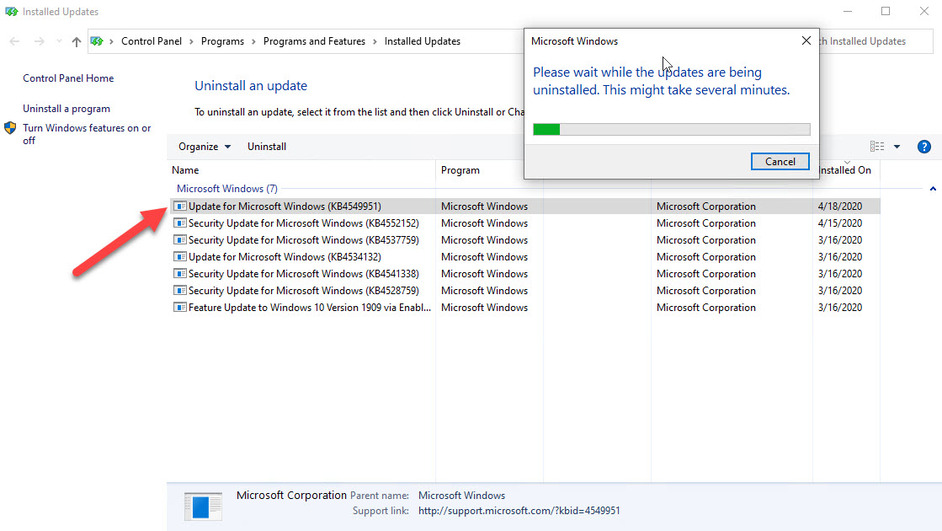
About 24 hours later here. Things are still stable - Plex Media Server has not crashed since uninstalling the Windows update (KB4649951). Currently running Plex Media Server 1.19.1.2630 on Windows 10.
Prior to uninstalling KB4649951, Plex would crash within minutes of being launched. I had tried re-installing PMS 2645 (no improvement), and rolling back from 2645 to 2630 (no improvement). At the moment I’m afraid to update to 2645 again because things are working now. I might wait for the next release before updating - perhaps the next update will address the issue with KB4649951.
Great report back. I had tried going that route, but the crashes still happened for me.
So I have deleted my old PMS from registry and all its folders. I installed the latest version brand new. It’s been a huge process and it will likely be fetching data for days. My libraries are massive.
I have not received any crashes yet, but I am also a little nervous. I have the latest plex version and I did reinstall KB469951.
so after updating a library, the crashing started again. i tried to do what i did last and uninstall everything plex but it crashed again. back to square one for me.
maybe try uninstalling that particular recent windows update, or it may be one of your hard drives. it doesn’t even have to be the actual hard drive itself, sometimes weird files can throw it off too.
just curious, do you have a grab folder that is empty in one of the hard drives plex scans?
so far my plex has been fine since i deleted everything and reinstalled, but i also did not add back a particular hard drive.
Starting to get playback errors (something about failed conversion) here and there again…
After all I did deleting all of plex… and I am still having issues. Unreal. Anyone else? Does plex ever offer help?
Where is Plex support for this? Still crashing and can not understand why it’s crashing. Dedicated server so no updates to effect Plex. What’s up guys??
Looks like it is definitely related to scanning.
Just had a couple of conversion playback errors while scanning for new recently added media.
Anyone find any new solutions? Is plex working on a solution?