Reporting similar problems on a QNAP TS-453Be server version 1.18.4.2171. Turning off HW acceleration appears to work for now, but not an ideal solution. The link above to 2175 does not work for me, so I haven’t tried that version.
If you’re a 453be the package you want is the x86 (since it has an Intel CPU).
You can browse the app store and click on the Plex app manually:
https://www.qnap.com/en/app_center/?middle_place=1&qts=4.4.1&type_choose=Entertainment
Stop Plex. Install the package manually via the QTS appcenter. Start Plex.
Hey guys! Apologies for the delay. I have updated the links in my post here
These now use the older i965 driver for Apollo Lake processors which fixes the corruption issue when burning subtitles, and also includes a driver patch to fix the poor quality that is experienced during the for 30-60 seconds of playback, It also fixes the color conversion issue that some users experience when HW transcoding 10-bit media.
Please install build 1.18.7.2306-9bdf93750 linked in the post here and let me know if it solves your issues.
Thanks @chrisallen - I had the 30-60 second pixelation issue on my QNAP TS-253A.
Installing Plex 1.18.7.2306-9bdf93750 fixed that problem for me.
Any ETA on the updated Intel iHD Driver?
Removing the iHD_drv_video.so solved the issue.
Running Plex on Synology DS218+ (version DSM 6.2.2-24922 Update 4)
Plex Server Version 1.18.5.2309
Attached screenshot of my issue.

I’m having the same issue…
Running Plex on my DS918+ with server 1.18.6.2368.
No HW issues at all on my ipad/iphone/windows. Only with samsung tv’s and tablets.
Ive tried to delete the IHD without succes, everytime i want to open the Plex CD (Putty) it gaves me ‘access denied’ - i’m NOT a linux expert. But i know for sure i have permission for everything on my server.
Is there a way to delete this driver on a different way?
I’m having this problem for more than a couple of months now.
help.
Make a scheduled task.
You do not put it on a schedule…
Save it to run when you want.
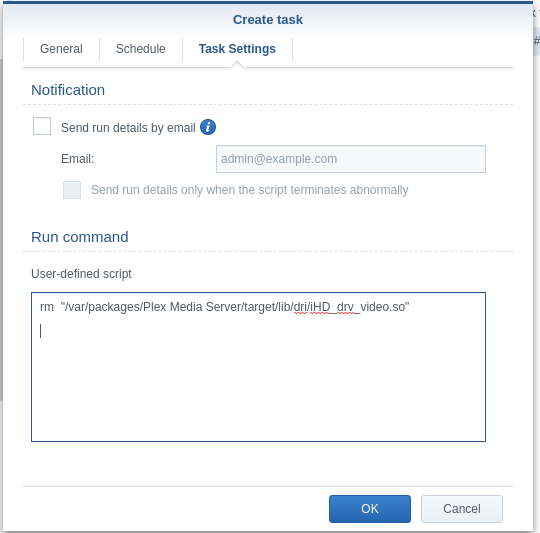
rm "/var/packages/Plex Media Server/target/lib/dri/iHD_drv_video.so"
1 Like
After creating the scheduled task and saving it,
Did you manually “run” the task?
omfreaking god. It works,
thanks!!!
so “Pusha Da Button” did work? 
LOL
Have a great day!
1 Like
Removing the .so file worked on my DS1019+. Thanks for the workaround!
Thanks a lot ChuckPa. Works like a charm.
For anyone that’s trying to run the Task, for the user I had to change it from root to my main Synology login (whater your admin user is). I didn’t work under root user for me. Just an FYI.
Just want to provide steps specific to my configuration.
I have QNAP 453be.
I am NOT using the Plex app
I am using docker-compose
Steps.
- If you don’t have the plex image, get it first. (run docker container, let it download the image, and stop the container)
- Find the container location. SSH into the server and do
find /. -name 'iHD_drv_video.so'
For me the path was/./share/CACHEDEV2_DATA/Container/container-station-data/lib/docker/overlay2/<randomAssString>/diff/usr/lib/plexmediaserver/lib/dri/iHD_drv_video.so - Run the command to remove the file
rm -rf /share/CACHEDEV2_DATA/Container/container-station-data/lib/docker/overlay2/<randmonAssString>/diff/usr/lib/plexmediaserver/lib/dri/iHD_drv_video.so - start docker (
docker-compose up -d)
Note:
<ranmdomAssString> would change w/ each upgrade/everytime you download an image.
I confirmed this worked w/ version: 1.18.6.2368
I would love to not do this. But this works for now.
I have been waiting patiently for the public release that addresses 2 issues with hardware acceleration: the entire video image has blocky artifacts during 30-60 seconds pf playback with some versions and entire video corrupted like the beginning of this thread in other versions of Plex Media Server. Today, I upgraded Plex Media Server to 1.18.7.2438 as it was my understanding that these 2 issues should be fixed. The good news I can say that those specific symptoms are fixed for me. However now the HW acceleration playback is still unusable with slightly different symptoms. Now it pauses frequently and there are blocky compression artifacts around parts of the image where there is motion. I am not clear from all the threads on these previous two issues, are we still supposed do delete the problem Intel driver? I was waiting for the final public release thinking it would solve all the hardware acceleration issues rather than try any workarounds. Unfortunately the hardware I bought back in November and the complete rebuild of my Plex server for the purpose of supporting HW acceleration still is not working for the intended purpose.
Plex Server Version: 1.18.7.2438-f342a5a43
HW: Intel NUC7PJYH, 128 GB SSD, 8 GB DDR3 SDRAM DDR3 1600 (PC3 12800)
OS: Ubuntu 18.04.4 LTS (GNU/Linux 4.15.0-88-generic x86_64)
Players: Chrome Version 80.0.3987.116 (Official Build) (64-bit) running on Windows 10. Plex for Android 7.28.0.15501 (ba34f115) running on Android version 10 with security patch level: January 1, 2020
Edit: I deleted the iHD_drv_video.so rebooted and HW transcoding works.
I’m on 1.16.5.1552, is it safe to upgrade to 1.18.7.2457 yet on a DS1019+ NAS?
Just stick to the version 1.17.0.1709 for now, it’s the latest working with good performance on my DS918+
I found it here : https://luenepiet.de/public/Synology/Plex%20(Server)/Intel%20-%2064-bit/PlexMediaServer-1.17.0.1709-982421575-x86_64.spk
I have the J5005 CPU (ASRock J5005-ITX) in a Debian Buster OS and using the LSIO Plex docker container (latest beta: 1.18.8.2527). I’m having the same exact pixelated issue when I use hw transcoding. Any idea how to fix this? It’s very frsutrating to say the least.
@chrisallen @ChuckPa Here’s my Plex Media Server logs that show HW and non-HW transcodings:
Can anyone confirm if this is fixed on the latest version for Synology?
PlexMediaServer-1.18.9.2571
I see this issue on my Asrock J4105-ITX system. Using Unraid with the official PMS Docker container. Deleting the iHD_drv_video.so fixes it.
Re-creating the Docker container, or doing updates brings it back so I have this cmd scheduled within Unraid, just in case!
docker exec -t PlexMediaServer rm “/usr/lib/plexmediaserver/lib/dri/iHD_drv_video.so”
1 Like
I don´t get why is the iHD_drv_video.so on the installation, seen that it gives more problems than it solves.
1 Like
