Server Version#: Anything above 1.19.4
Player Version#: NA
Would really appreciate some help with this!
We have been have this problem for several years now, any version above 1.19.4 PMS closes overnight. Just upgraded one server to Monterey + PMS 1.28.2 in the hope that the latest OSX would fix this but still crashing nightly. There are no Crash Logs from last night (before restarting PMS) latest is 2 days agao and is empty. Server Log attached.
After the next crash, restart PMS and wait a couple of minutes for it to fully start.
Then pull the log files, Settings → Troubleshooting, and upload the entire ZIP file.
When PMS starts, it rolls the log files. A new Plex Media Server.log is created and has info from the latest restart. The previous PMS.log becomes .1.log, etc and .5.log is tossed into the bit bucket.
The entire set of log files will have the full set, from Plex Media Server.log to .5.log. We can then see the history and also if there have been any issues since the latest restart.
I can see the crashes. However, I cannot tell why Plex is crashing.
Plex is scanning files and quits. Both crashes occur shortly after 4 a.m., during scheduled tasks.
One thing to check is file permissions on /Volumes/Multimedia.
There are several “permission denied” messages for both TV shows and movies. Make sure Plex has at least read only permission to /Volumes/Multimedia and all subdirectories and files.
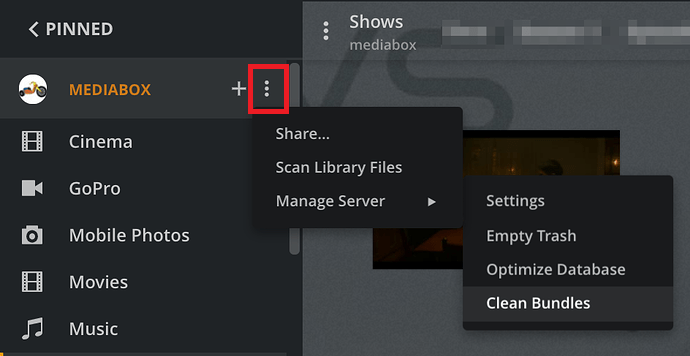
After fixing file permissions, please do the following (see screencap below for where to click)
Scan all libraries
Empty Trash
Clean Bundles
Optimize Database
Those four steps manually perform some of the scheduled tasks.
If Plex crashes while during above steps, pull the log files.
If not, let Plex run overnight and see if it crashes during scheduled tasks. If it does, grab another set of log files.
Some of permission denied errors in Plex Media Server.x.log files:
FordGuy61 Thank you so much for taking the time to assist me this has been frustrating me for a long time. I have given full read/write permissions to everyone on the NAS share and have cleaned & optimised the database. Fingers crossed!
Thanks for the update. The permission errors are gone from the log files.
What type of Internet connection do you have?
There are no entries in the log files for Plex obtaining a public address. The responses from plex.tv hosts appear to be cached.
Plex crashed during maintenance tasks at 03:56:51.
The last maintenance task it kicked off was a EPG refresh at 3:38:23.
Some maintenance activities such as a metadata refresh or EPG refresh require an Internet connection.
I do not know for certain, but am wondering if Plex crashed because it could not contact the necessary hosts on the Internet.
One thing you could try is to disable all tasks in Settings → Scheduled Tasks. If Plex makes it through the maintenance tasks without crashing, enable one of the tasks and see what happens during the next maintenance window. Keep enabling tasks until you find the one(s) that cause the crash.
You can see the tasks in the Plex Media Server.log files (including 1.log to .5.log). Search the files for entries with Butler:.
Some examples:
DEBUG - Butler: we're in the window, starting.
DEBUG - Butler: Waking up!
DEBUG - Butler: Done doing work.
DEBUG - Butler: we're outside the window, stopping.
After tommorow I will be travelling for a few weeks, I have a another server running PMS 1.19.4 which is solid so my collegues can use that while I am away.
Back on this again, this PMS is on a ship for crew entertainment, have just returned from leave PMS Version 1.28.2.6106 still crashing nightly with no sheduled tasks selected! Have a work around using Automator to restart PMS each morning but would really like to get to the bottom of this. Plex Media Server Logs_2022-11-24_10-47-21.zip (3.9 MB)
@FordGuy61 do you see anything new? @ChuckPA would you assist? You have a good eye for Lets Encrypt and CERT issues.
@CrewZCNB7 A couple of things off the top of my head,
One suspicious WARN is from LetsEncrypt that repeats. Does the ship have a constant connection to the Internet? If not describe how you’re doing authentication. I should mention Warnings are not Errors, which is why I’ve asked ChuckPA to help.
Log snip showing the CERT warning and Jumbo Frame mentioned
Nov 24, 2022 09:00:36.965 [0x7000080d1000] DEBUG - [HttpClient/HCl#36] HTTP/2.0 (0.7s) 200 response from GET https://plex.tv/media/providers?X-Plex-Token=xxxxxxxxxxxxxxxxxxxx (reused)
Nov 24, 2022 09:00:36.965 [0x700008901000] DEBUG - [MediaProviderManager] discovered cloud provider (Movies & TV)
Nov 24, 2022 09:00:36.965 [0x700008901000] DEBUG - [MediaProviderManager] discovered cloud provider (Metadata)
Nov 24, 2022 09:00:36.965 [0x700008901000] DEBUG - [MediaProviderManager] loading cloud provider details (Metadata) (alive: 1)
Nov 24, 2022 09:00:36.965 [0x700008901000] DEBUG - [MediaProviderManager] loading cloud provider details (Movies & TV) (alive: 1)
Nov 24, 2022 09:00:36.965 [0x700008901000] DEBUG - [MediaProviderManager] we had 2 cloud providers online, we now have 2
Nov 24, 2022 09:00:36.965 [0x700008901000] DEBUG - [MediaProviderManager] cloud provider (Metadata) is online and available
Nov 24, 2022 09:00:36.965 [0x700008901000] DEBUG - [MediaProviderManager] cloud provider (Movies & TV) is online and available
Nov 24, 2022 09:00:37.000 [0x7000080d1000] DEBUG - [HttpClient/HCl#37] HTTP/2.0 (0.8s) 200 response from GET https://plex.tv/api/v2/server/users/subscriptions?auth_token=xxxxxxxxxxxxxxxxxxxx (reused)
Nov 24, 2022 09:00:37.001 [0x700007aad000] DEBUG - MyPlex: using cached data for request for https://plex.tv/api/v2/server/users/services?auth_token=xxxxxxxxxxxxxxxxxxxx
Nov 24, 2022 09:01:03.792 [0x7000081d7000] DEBUG - [ViewStateSync] Starting
Nov 24, 2022 09:01:03.792 [0x7000081d7000] DEBUG - [ViewStateSync] No user tokens found; stopping
Nov 24, 2022 09:01:07.925 [0x7000080d1000] WARN - [HttpClient/HCl#1] HTTP error requesting GET http://r3.o.lencr.org/MFMwUTBPME0wSzAJBgUrDgMCGgUABBRI2smg%2ByvTLU%2Fw3mjS9We3NfmzxAQUFC6zF7dYVsuuUAlA5h%2BvnYsUwsYCEgPO7EpDl2pCBl4ImfVHRsoGYQ%3D%3D (52, Server returned nothing (no headers, no data)). Network appears to be configured for jumbo frames.
Nov 24, 2022 09:01:07.925 [0x700007fcb000] INFO - [CERT/OCSP] couldn't fetch a valid response; retrying in 300 seconds
I was reminded how a really frustrating hard to understand crash could be easily solved by the user reinstalling MacOS but not overwriting their data. Because you’re on 10.13, I’m not sure what options you have. But if it’s old, it might be worth a couple of hours of your time if debugging this hits a wall.
If this is true… Turn it OFF.
Consumer grade products do not handle it.
Jumbo frames cause all kinds of timeouts & failures which don’t really exist.
To use Jumbo Frames, EVERY DEVICE must be configured for it, including those who stream from you and all the routers between you and them. AKA – NOT a viable option when wanting to stream remotely.
We have a Satellite Internet connection when offshore and 4G when close to land so there are occasional dropouts, as long as clients have Internet to logon initially it then seems to work fine offline.
Connections run through a Kerio Control firewall which I believe has default MTU of 1500 which can be changed for each interface. Both also have UK VPN, we do not stream remotely from this PMS only via ships Lan.
However, it crashed again last night on a solid 4G connection with MTU 1428?
I am happy to try reinstalling Mac OS if I wont lose my database? Plex Media Server Logs_2022-11-26_10-34-32.zip (3.8 MB)