Server Version#: 1.20.2.3402
Player Version#: Plex for Windows 1.20.0.1406-f47a81b7
Ctrl+click shortcut no longer works for selecting multiple music tracks. Only Shift+click works, but it’s not enough because I don’t want to select a certain range of tracks only, let’s say, track 1, 5 and 8.
Neither Ctrl+click, nor Shift+click works in the web app. Why? Is there any technical reason why it’s no longer possible or feasible to support such standard convenient shortcuts?
I just recently switched to the new Plex for Windows app because you’ve finally implemented audio passthrough thinking maybe now it’ll all be good and you’ll keep improving the software and you’re already removing such basic stuff? Time to download the previous version and once again block all updates. I really can’t trust you
EDIT: JFYI to anyone who wants a version with working Ctrl+click, the last one that still has it is 1.14.0.1340-0acc754c
I’m using Firefox for Windows 10. Latest version of both. I used the link Otto posted above https://app.plex.tv went to my Music library, clicked on an album and here I can neither Ctrl+click nor Shift+click to multi-select tracks. Does that work for you when you use Otto’s link (in case it contains some modifiers that change this)? If so, which browser are you using?
I never use Plex’s web app so I don’t really care how it works there, but I’m curious why it would work for you, but not for me and if it does actually work then what exactly was Otto trying to tell me by saying “it will be changed to how it’s working in the web app”… if both shortcuts are supposed to work there, in which case, he could just say “that’s a bug and will be fixed”
I am asking the developers about the Shift modifier. I definitely see a need for it myself. I didn’t receive an answer, yet.
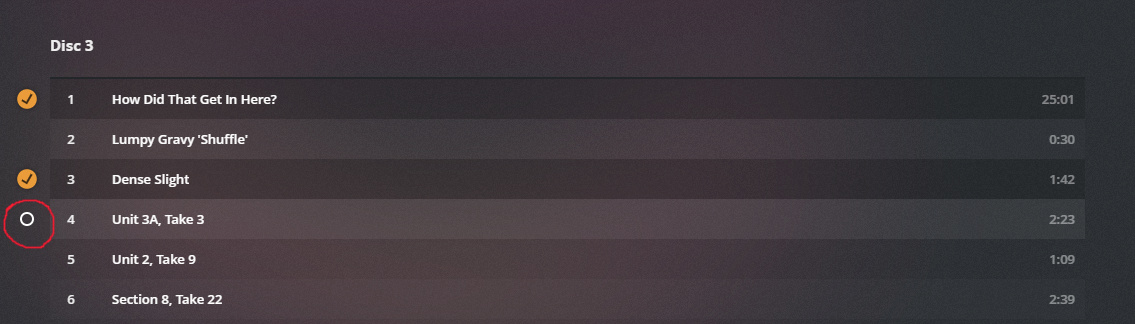
The CTRL modifier won’t be necessary anymore, due to each track having a ‘select’ checkbox in front of it, which can be toggled with a simple click.
(only shows on mouse-over)
This circle is already available in the Windows app, but it’s a worse solution than Ctrl+click because it’s much faster and more convenient to be able to click anywhere within the same line while holding Ctrl instead of aiming at the circle.
The circle was available before, it just wasn’t at the front of the line. It’s over by the other controls at the right in the local version (4.34.4). And clicking anywhere on the line (aside from the controls) would select the track.
I’m fine with the ‘CTRL’ modifier no longer being needed, but I agree with VarHyid that having to go to the circle to select is not an improvement.
And the loss of SHFT-click has to be an error. I can’t imagine they would choose to remove that.