DBRepair development

@SE56

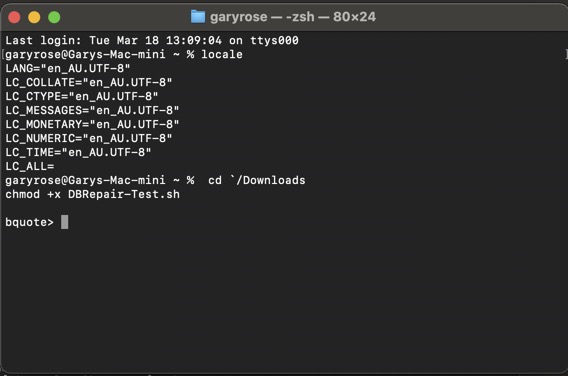
When you get a chance, in the terminal, would you please type locale and share that result?

I expect it will look like this:

$ locale
LANG=en_GB.UTF-8
LANGUAGE=
LC_CTYPE="en_GB.UTF-8"
LC_NUMERIC="en_GB.UTF-8"
LC_TIME="en_GB.UTF-8"
LC_COLLATE="en_GB.UTF-8"
LC_MONETARY="en_GB.UTF-8"
LC_MESSAGES="en_GB.UTF-8"
LC_PAPER="en_GB.UTF-8"
LC_NAME="en_GB.UTF-8"
LC_ADDRESS="en_GB.UTF-8"
LC_TELEPHONE="en_GB.UTF-8"
LC_MEASUREMENT="en_GB.UTF-8"
LC_IDENTIFICATION="en_GB.UTF-8"
LC_ALL=

Thanks.

I know how to solve this problem.

Thanks to @Volts for pointing in the right direction.

3 Likes

Thanks Guys

en.AU

1 Like

@SE56

Here is proposed 1.10.03
When LC_ALL is null, it will set LC_ALL=C (which is predictable results)

Please do the following:

  1. Download this “log” file
  2. Rename DBRepair-Test.log → DBRepair-Test.sh
  3. Make it executable (chmod +x DBRepair-Test.sh)
  4. Run it

:crossed_fingers:

There won’t be any more errors

DBRepair-Test.log (68.4 KB)

I will continue testing here

1 Like

Will report back tomorrow, it pushing towards midnight for you. Thank you so much. :upside_down_face:

I’m up for 2 more hours..

You can go for it

:+1:

How to make it Executable

This way :slight_smile:

Need a cloth for your :eyes: ?

Like this

now run DBRepair “auto” optimization (normal)

You shouldn’t see any “RE” errors.

1 Like

??

Oh, my wife watching Plex

not sure what you show me above but at this prompt,

you should just run the ./DBRepair-Test.sh
and use auto optimization

(Of course you’ll need to stop plex)

Delay understood :see_no_evil_monkey: lol

1 Like

Thanks for Understanding, the dog house is a bit small for me

1 Like

@SE56

Before you find yourself another reason to end up in the :dog: :house:
have you had opportunity to confirm you don’t see any more coding errors (“RE”) when running “auto” with this new update ?

It’s Morning in AU and just stepping out for a specialist appointment. Will look at it shortly after returning. Thanks for the follow up.

It’s lunchtime in NZ :smiling_face_with_sunglasses: ( one of our team lives there )

It’s now 11am Queensland Time and the report is attached for your consideration.

Looking good.

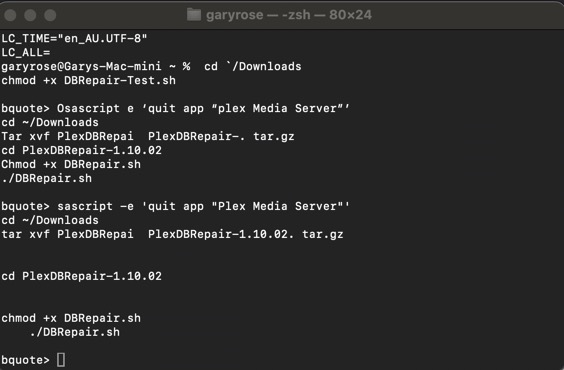
What is the error opening archive?

@ChuckPa

I am in no way an expert with Tar, but from a quick Google search, I think you have your arguments backwards.

To extract a tar file you would just do:

tar xvf PlexDBRepair-Test.tar.gz

And that would extract the contents to wherever the file is located.

In your case, since you want to extract it to a folder called PlexDBRepair-Test-1.10.02, I think you would want to use the command:

tar xvf PlexDBRepair-Test.tar.gz -C ./PlexDBRepair-Test.tar.gz

(Note I am not 100% certain on that, but Chuck is definitely the Linux/shell expert so would be able to confirm.)

The only thing I do know I am definitely correct about is that your tar command did not work properly because if you look at the 2nd error, it failed to change directory to the “DBRepair-Test-1.10.02” directory because it does not exist.

-Shark2k