Server Version#: 1.25.2.5319
Player Version#: 7.26(1744)
Tuner Make/Model: HDHomeRun Connect Quatro
Guide/Lineup name: Local Broadcast Listings (92 channels)
Using XMLTV?:
Channel number/Name: n/a
I’m new to the Plex DVR scene so when I was testing recordings, I manually deleted the show folder from my TV Shows directory like I’ve always done which forces a rescan and the show disappears from the GUI view. Well I did this to a show I recorded but it’s now stuck in the DVR Schedule screen without the Modify Recording button or any other way for me to interact with it. Where can I delete it?
You can’t; that’s just the record of the recording (showing it took place). The schedule shows a rolling 4-5 week (I forget which) window of what has been recorded and what will be recorded. So, that entry will fall outside of that window in a few weeks.
Your server knows that it’s gone (and so do you) because there’s no “Play” button at the bottom-right of that tile:
vs.
Also, it should no longer show in the library to which you recorded it.
[Edit]
Just adding this to pedant-proof my statement. There’s no means provided in the Plex interface to remove such an entry. I’m certain that there is a way to remove it from the view by manually modifying the database.
Small followup…how am I supposed to delete recordings from the app? I’ve owned a DVR before and deleting something was obvious but it almost looks like since the recording becomes part of your library, it follows the Plex client rules where you can’t delete it from a client player. Is that right?
You first need to ensure that you’ve enabled the ability to delete media; the setting for that is found under Settings -> Library -> Allow media deletion.
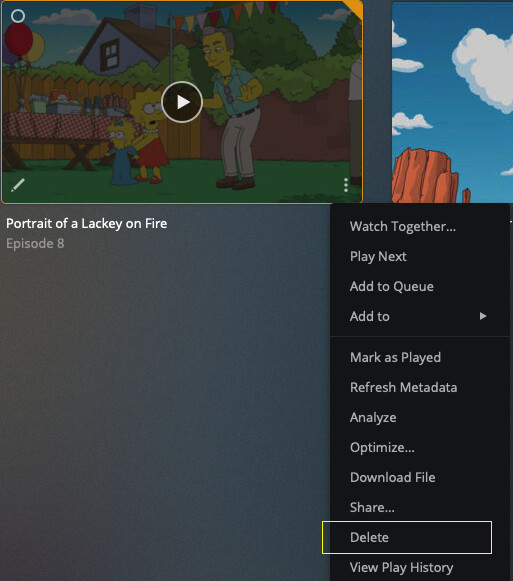
Once that’s enabled, you can delete items from the library to which you recorded it. For example, I recorded The Simpsons to a TV Show library. To delete an episode I’ve recorded using the web client, I would navigate to that library, select the “More” menu on the item’s poster (vertical ellipsis at the bottom-right), and select “Delete.”
And I just noticed you’re using an Apple TV. To delete using its interface, long-click the item’s poster and then select delete from the menu which opens.
Hm I read about all that but I don’t have “delete” in any long-press menu on the Apple TV. I knew about the setting to allow deletion and mine is checked and that you could delete from a web client, which works for me, but I saw someone mention you couldn’t delete from a “TV” client. I saw some others saying the feature once worked but no longer does. I thought maybe even if the feature is hard coded not to allow from the Apple TV interface that there would be an exception made specifically for DVR recordings since they probably tend to be more “record, watch, delete” programs.