On certain movies, watching from any device, in stereo, when the stream is 5.1 audio (which many DVD and Blu-ray rips are limited to), I have to turn up the volume to hear what people say, then turn it down when there’s loud sound effects and music because they’re too loud.
Here’s an example of a movie’s audio stream (they’re all 5.1 and behave the same way):
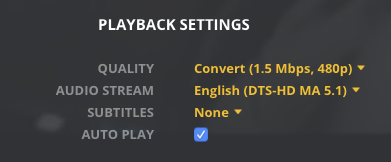
It’s super-annoying and distracting to have to keep adjusting the volume, especially if I’m watching with someone, making the experience basically unworkable.
What is supposed to be done about this?
Can you tell us which app you are using and on what. Is it connected to a reciever or anything? Generally that happens when it thinks it is playing on a 5.1 system but is not. So the voices which would mostly go to the center channel are not because there is no center channel.
I’m using the Mac app… latest version. On iMac speakers. Or headphones, same result. It doesn’t matter if it’s on Windows or phone or which hardware, if it’s stereo, the 5.1 dialog is too quite compared to everything else.
The problem may be the rip or encode of the video, however to rip I’m using either DVD Shrink 3, DVD Fab 9, or if those don’t work, AnyDVD or whatever other ones I find (I don’t remember their names now) to get the discs to rip (and some just will not rip), and then I convert the iso file to m4a using HandBrake latest version each time.
Maybe there’s just an issue with 5.1 being downconverted to stereo, and Plex doesn’t do it right?
Read these before replying please:
https://singletrackworld.com/forum/topic/home-cinema-quiet-dialog-in-multi-channel-dts/
https://forum.videohelp.com/threads/382259-Movie-music-too-loud-but-dialogue-too-quiet-fix-needed
So do you think the issue is the rip, the convert, or Plex? If you think it’s not Plex, then please advise on how the discs should be ripped or converted so dialogue isn’t too quiet from discs that only provide 5.1 audio.
It could be a bunch of things. Files can be encoded in a million different ways. I personally would just use makemkv or handbrake if needed to make files which are free rather than that other stuff you are using.
What are the audio settings in the app. If you what you mean by “the Mac Plex app” is Plex Media Player you will need to look at the the settings in TV mode.
