Direct access enabled but still going through relay (?) (UPDATE: NordVPN partial to blame)

Server Version#: 4.141.0
Player Version#: 8.41 (latest on iOS app store)

Hello, I have a somewhat complex setup where I have double nat due to a router that does failover.

Here’s how it looks like:
[failover router] ↔ [google wifi nest router] ↔ [my plex server]

I then have two plex servers running inside my network (behind that google wifi nest router):

  • one on a QNAP NAS
  • and one more powerful and capable of doing transcoding running on Windows 11

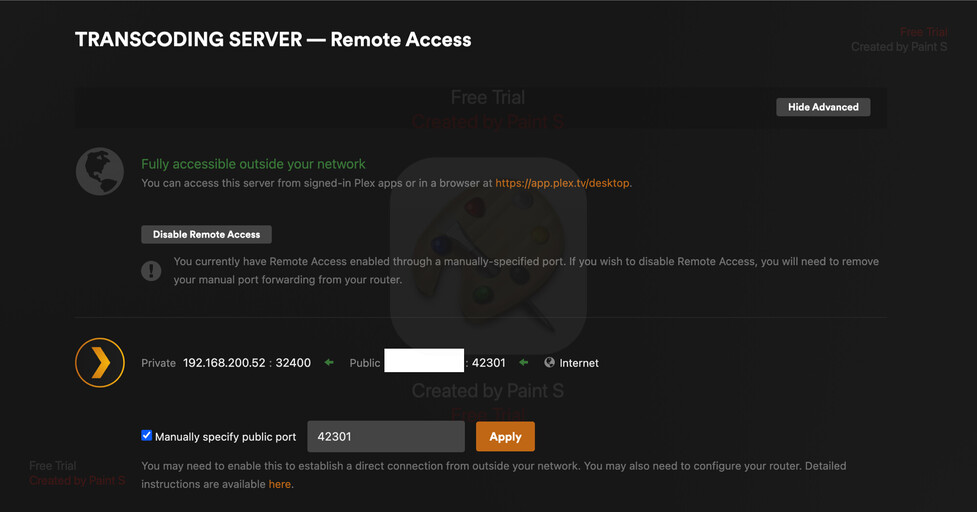
I’ve set port forwarding on my double nat routers and can confirm I can reach the servers from the outside (if I telnet into their external ports, they accept my connection AND even the Plex remote access configuration tab tells me it is accessible from the outside]:
lmsilva@raspberrypi:~ $ telnet 42301

Trying …

Connected to .

Escape character is ‘^]’.

get

Connection closed by foreign host.

lmsilva@raspberrypi:~ $
(this is a telnet connection from OUTSIDE my house, verifying that the transcoding plex server is, indeed, accepting connections on the remote port 42301).

The problem is that, when I connect from the outside on my iOS device (and even from other devices according to a friend I asked to check for me), it says that connection is coming from a WAN and a bandwidth limit is in place.

If I check my quality options, I only see 2Mbps (480p) and lower.

Based on the Relay Server article, this seems to be a limitation of going through the Relay Server:
Plex Pass subscribers are limited to 2 Mbps maximum for streams
https://support.plex.tv/articles/216766168-accessing-a-server-through-relay/?utm_source=Plex%20Forums&utm_medium=Sidebar&utm_campaign=Plex%20Forums

Am I doing something wrong? What else can I possibly configure / look at to understand what is going on and correct this?

I set my maximum upload to 15Mbps and even tried NOT setting it at all so, other than the “relay server explanation”, I don’t understand what else could be happening?

p.s. Both Plex Media Servers run 4.141.0 by the way, and they both have the same symptoms…

Thank you!

Do you have a remote quality restriction set on the client, under Settings → Quality → Remote Streaming? If so, you can try removing that, or setting it higher, to see more quality options.

You can easily test whether or not relay is being used by disabling it on the server. Also, if you play media from a remote client, check the Plex Dashboard in the web client (expand the details). If it is going through relay, the connection will show as “Indirect.” If it is just using remote access, it will show “Remote.”

Based on what you’ve described, I don’t believe relay is being used. It just sounds like normal remote access bandwidth limits are being imposed, likely on the client side (if you’re sure you’ve removed any limits server-side).

1 Like

I believe that was it - I connected via a 5g external connection via wifi and it is working as expected.
I also noticed that, on my regular mobile connection, IF I disable limiting the connection when on cellular, although it doesn’t give me the option to select all possible qualities, I can select a higher quality and it is working as expected.

That was it - thank you!

In case it helps others too, I was having a few other issues (other than what pshanew kindly pointed out), namely:

  • my server used a NordVPN connection
  • when NordVPN was on, my external connection was advertised as the VPN’s external ip
    – to solve this, I made sure Plex was using the correct network card under its network settings
  • however, even after doing this: when the VPN connection was off, it worked as expected, but when the VPN connection was on, it would NOT accept connections on my external ip (the port forwarding failed - I’m pretty sure the reason for this is that the connection would arrive on the regular internet interface but the response would go through the VPN so the packet delivery of the resource would fail)

The final solution was to tweak NordVPN so that:

  • I would use tunnel splitting (only activating the VPN for my apps that needed it)
  • AND, under the connection settings, allow remote connections into my pc (they reference remote desktop in their example but what they mean is ANY type of remote connection)!

Once I did that, everything started working as expected!

This topic was automatically closed 90 days after the last reply. New replies are no longer allowed.