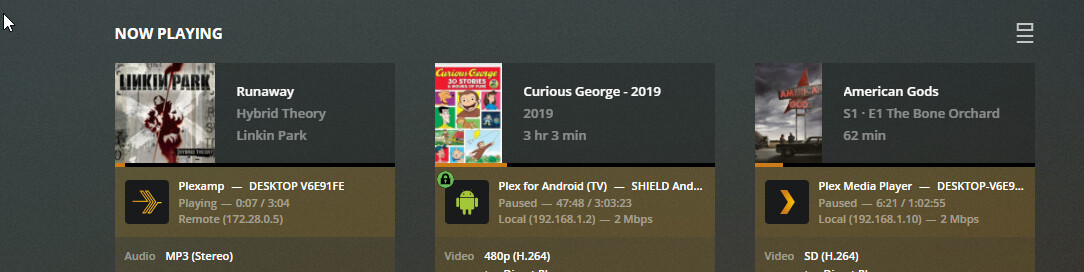
I can’t seem to force plexamp to do a direct connection to my plex server.
It shows up as Remote in the dashboard no matter what I do.
My dns server is handing out the local ip for plex.domain.com, and nslookup returns the correct ip. All the other plex clients I use has the options for direct connection, and that it set for all of my clients, and they all show up as local connections.
As you can see the Plexamp connection shows as remote. It is playing from the same device as American Gods. The Remote IP shown is the IP of my traefik container that is routing traffic when devices connect to plex.domain.com.
If I disable port forwarding on my router for 32400, it shows up as an indirect connection.
If you looked at the app logs you’d see the specific connections it’s trying.
In the release after next, we have a new networking stack which is able to work around some of these issues better, but I’d still check logs to see what URLs it’s trying to hit.
I have secure connections set to Preferred, not Required. DNS Rebinding should not be happening on my router as I already have my pi-hole set as my DNS server that the router hands out to all DHCP clients.
I don’t think NAT loopback is an issue, my router is listed as supporting it, and a lookup on my domain returns my local IP.
I found the logs for plexamp, I see it issuing all sorts of odd lookups on LAN (192.168.1.10:32433 the localhost ip) and (192.168.1.3 my phone IP, which also has plexamp). Are my windows Plexamp logs pulled from the server, is that why I see my phone IP?
I do see one interesting request: https://172-28-0-4.381ea549913d41b1b8d3c19bf65724f6.plex.direct:32400/resources
The IP 172.28.0.4 is the Docker Network IP for my Plex server. I do NOT route to it, since I bind the ports to my server IP of 192.168.1.150. Is plexamp pulling the information you pull from my plex settings which obviously shows my docker IP and not my regular LAN IP? If so, this would explain the issue, and why all my other clients work since I have the manual connections all manually pointed to 192.168.1.150.
it’s pulling from whatever your server publishes. given that you have to manually add IPs to other clients, I think that’s the issue. You can try adding it to “Custom server access URLs” in server settings.