Direct Play and Buffering

The latency is simulated/induced as is the only logical reproduction over LAN
The server was not running in a VM Environment, host OS is windows!

and no honestly any progress toward this is great and any/all efforts toward it are appreciated. Hope you have the best recovery you can.

The test case I gave is entirely reproducible over a VM in a 15~ minute setup though for a completely clean scenario.

Which is to say simulating a fairly reasonable amount of network latency alone is enough to trigger the issue. (Which could happen on a litany of devices naturally without forcibly inducing latency due to interrupts and other limitations that might cause a response time to increase just enough to exceed the tiny buffer being offered)

Also again, the fact this issue disappears completely when the client simply requests data endlessly to fill a set buffer e.g manually setting it to fill 1gb+, which is as you said before, potentially related to the Media Decision Engine.

I’m sorry but there seems. to me, to be contradiction here:

  1. The server was not running in a VM Environment, host OS is windows!

  2. The test case I gave is entirely reproducible over a VM in a 15~ minute

  3. Which could happen on a litany of devices naturally without forcibly inducing latency due to interrupts and other limitations that might cause a response time to increase just enough to exceed the tiny buffer being offered)

Where I am ready to call “Fowl !” at:

PMS in a Linux VM on a Windows host — That’s trouble from the git go.
It’s just not done because

– You don’t gain anything because you’ve got the hypervisor in the way (Hyper V)
– No matter how you slice it, it’s still on a Windows host.
– Add the inherent latency of the Windows kernel and Windows hypervisor and ALL sense is gone.
– Windows networking is terrible.
– Artificially simulating latency / interrupts – I’m calling “BS” on that. There is no scientific approach to this.

IMHO –

  1. Put PMS on the Windows host – DONE
    -or-
  2. Reformat the computer and install Linux then run PMS – DONE

Sorrry but the two environments do not coexist with one in a VM ( I’ve tried it )
If you look at the work Microsoft is doing now – HyperV in the Linux kernel – It’s a disaster.

Please pick one host. Windows or Linux.

Okay so you’ve just made up a load of stuff that isn’t true. That’s an odd approach, but okay.

I never at one point mentioned Linux being the host OS. The host OS being windows for the logs was in a non-virtualized scenario. Virtualizing and running windows > windows or linux > windows doesn’t affect this outcome.

Linux can undergo some pipeline optimizations that can help mitigate the issue, but the issue still persists from a linux host also (albeit the TCP stack handling is a little different and produces some slightly different results)

I merely gave you instructions that you’d be able to reproduce the problem yourself, which is it indeed a problem, as it’s infinitely reproducible in any fresh environment AND EVEN LOCALLY ON THE SAME NETWORK plex server windows pc > plex client windows pc.

IMHO -

  1. Repeat the reproduction steps I gave and measure the results yourself.
    OR
  2. Put this bug down the pipeline and have somebody else narrow it down.

It’s clearly an issue that’s beyond your capabilities to remedy as a forum moderator as this does not include ‘turning it off and on again’.

I don’t see how you can repeatedly ignore things and call “Chicken !” at me being arguably fairly consistent (outside of a minor exaggeration) and you constantly dodging a few simple steps to reproduce the issue globally on all applicable systems.

Please understand, this involves ALL hosts regardless of level of virtualization (none to multi-level).

Artificially simulating network impediments (latency in this case) is LITERALLY how any half-competent network developer does any sort of tests to avoid exposing tests to the world wide web.
Simulating latency is one of the most basic tests and can be implemented by manually coding wait cycles even. Not “BS” Though again, it is understandably not a forum moderator’s wheel-house.

Your tone and aggression toward me spending my time diagnosing and producing everything you asked for is frankly beyond disrespectful, and for you to now to attempt to talk-down my claims or make false claims yourself about information I’ve given you has infuriated me.

Don’t call me a liar, when the only liar here is yourself. This should’ve been submitted as a bug and investigated with the provided reproduction steps, which I’ll repeat in clear concise QA friendly steps:

  1. Install Plex media server on choice host machine, linux / windows of sufficient capabilities

  2. Organize a piece of media with a bitrate exceeding 8,000 into a category on plex that clients can select for playback

  3. Install Plex client on any applicable system where the network can be filtered to simulate latency (this can be similarly achieved via windows using an application such as clumsy/netsim)

  4. Set simulated latency on the client to exceed 150ms round-trip to the server machine.

  5. Attempt directplay playback of the 8,000+ bitrate file.

[Expected result: Playback would work uninterrupted]

[Actual result: Playback exceeds available buffer due to the server awaiting a response from the client and video repeatedly pauses]
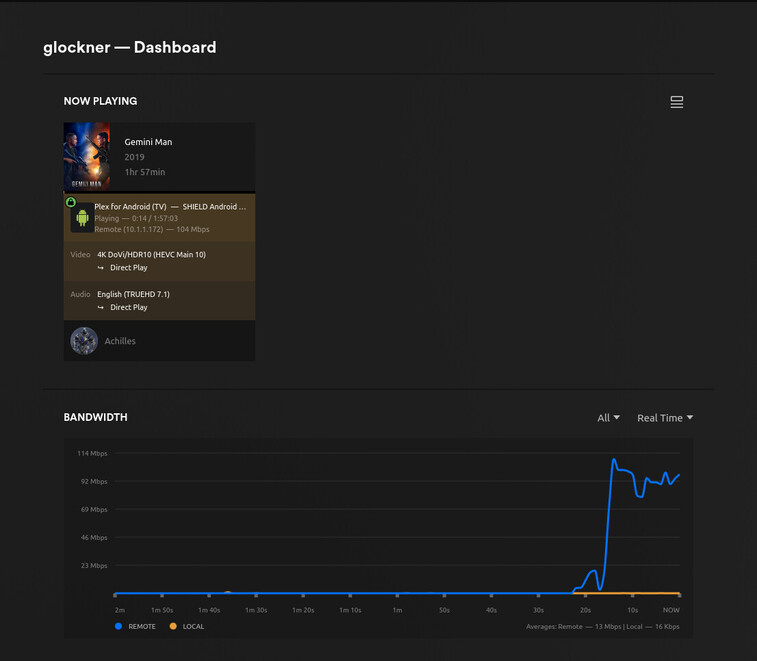
This is the thread i have been looking for for so long

Is there any hope for a resolution? Or even a workaround/bandaid i can apply?

If incompetency rules then how does this work (done today),
Playing through a VPN from Pennsylvania to California.
We played the entire movie without issue.

The host is native Linux and the player is (obviously) Nvidia Shield.

Are you able to see what the latency was though during this playback?

This is the tunnel:

10.0.2.120 – 94.7ms (RTT) – 3.8ms (RTTsd) – 0.0% (loss)

I think that might be the issue, if my connection is ever over 150ms (even with 1gig bandwith), the playback will constantly buffer.

Isn’t that the definition of bad peering between ISP?

The above is a transcontinental tunnel PA → CA

EDIT: Found something here. LOOKING at how the traffic breaks down.

Sorry, I don’t really understand what that means. I’m not really a network person, just have been trying to research the issue I’ve been having and this is the closest I’ve gotten to figure it out.

From what I understand, latency shouldn’t affect video playback once playback actually starts.
My current set up is

Server 1000Mbps Upload (speed test/file transfer confirmed)
Client 1000Mbps Download (speed test/file transfer confirmed)
All files are Direct Playing both video and audio (no subtitles)

On LAN, i have no issues.
On Remote, if my Latency is <100ms, i have no issues. if my Latency is 150-200ms, the video will constantly buffer despite my plex dash still claiming to be at full bandwidth

If i’m doing something wrong, i would love to know because i just want to get this to work. But i feel like ive tried everything.

EDIT: I didn’t see your edit while i was typing
 not sure what Looking at how the traffic breaks down means, but ill standby. I do appreciate the help

This is what we’re looking at (my friend in California and I are on the phone)

Here we are, right now, UDP VPN tunnel, between us.

EDIT: Reaching steady state

Sorry I don’t know what this means. But my plex dash shows the same as this when i’m having issues. It will show the full bandwidth being used, never really dropping, but the playback will still buffer

Okay yes but the dashboard graph would look the same on my end. It doesn’t seem to be an issue of the bandwidth cutting out

@dfiorentine7005

which player are you using?
What’s the source bitrate ?

@dfiorentine7005 150ms will reduce bandwidth across WAN

From the screenshot above of Network Throughput Calculator:
“Expected maximum TCP throughput (Mbit/s): 77.866667”

Okay, so this is just expected behaviour? I guess that is fine, i’m just trying to see if i am doing something wrong. I don’t remember this being an issue in the past.

But anyway, player i have been testing with is both Plex for Windows and Plex for iOS
Bitrate of the file is 95 Mb/s. So based on that calculator, it’s just too large a file to play smoothly with 150ms ping?

Yes, with the calculator, try setting your max upload bitrate to 75 and retest
(let it transcode). 75 is hairy-edge of 77 but it’s a datapoint.

Client and server on same ISP?

I might just not be able to find the correct option, but i only seem to be able to limit my max upload bitrate to 40Mbps or Original (~95). It does seem to play smoothly at 40 however.
