I’m testing on my own, so I’m using a VPN on my iPhone in order to simulate the remote access. Not sure if it ends up showing as same ISP for both. Again, i’ve basically maxed out my knowledge in these areas
You’re looking the client.
Go to the server and set the value where you want it.
Settings - Server - Remote Access - Show Advanced

I’m set for 110 until my upgrade is complete.
Set yours here to 75 and SAVE
Run iPerf3 on the server and then iperf3 on a client on the remote network. Then you can see if its able to sustain an average bitrate required by your DP streams.
AH duh, okay, i did this and it seems to be working. So okay it seems like the high bit rate files are just too much for the 150ms
Chuck is just spewing garbage at this point as in spite of a LAN test over gigabit proving it’s not a bandwidth limitation, and fix to the problem is to literally configure the client to request a larger buffer from the server between the ping-pong RTT that the server is literally waiting for the client to respond before sending more data. Without providing any information on the type of VPN you used, where the server nodes were located, the routing tables, anything you say regarding VPNs is null and void and does not constitute as a reliable network test. Opposed to using tools which are used within the industry to simulate latency in LAN environments which are actively repeatable without any variance.
This needs to be reworked or clients need to be able to configure their own custom cache limits. It’s literally as simple as that. All of these bizarre claims of “well, mine works” doesn’t matter if it’s demonstratably fallible.
This shouldn’t be the case, right now these files are unwatchable AT ALL without client-side modification. Modifying the client does fix the problem, therefore it is a problem that plex can and should remedy. Latency should be calculated or clients should be able to override default behaviour much like the available MPV config options on windows. If a simple piece of config can fix the issue, then expose that tier config to all clients. Pretty simple. Chuck has clearly just received pushback from a plex dev due to it being a lot of work to PROPERLY calculate this automatically and giving users the option in config is a “dirty fix” and wouldn’t alleviate the issues for anyone who just wants to click play and not browse settings.
It’s also funny how chuck claims a 77mbit upper limit but rates under 7x that size are causing issues, which more helps confirm it’s an issue opposed to what I assume he had hoped would discount it, also entering 1000mbit is superfluous in the proposed calculator and well, if it wasn’t already obvious, isn’t overly applicable.

Ping from my MacBook via WiFi to LAN IP of PMS:
30/30 packets received (100.0%) 202.862 min / 205.683 avg / 215.807 max
Server Host: Ubuntu 22.04.3 LTS Desktop
Server Version: 1.25.9.5721-965587f64
Client Version: Plex for Mac 1.79.1.3984-879339ed

Not experiencing any Direct Play issues with 200ms of simulated latency.
Media
- Duration 1:57:03
- Bitrate 89879 kbps
- Width 3840
- Height 2160
- Aspect Ratio 1.78
- Video Resolution 4K
- Container MKV
- Video Frame Rate 60p
- Video Profile main 10
When you’re done, look at Achilles info.
That’s who I was working with.
Then, look at the posts above.
He used a Mac Client? I thought this was an Android client issue/bug?
No…RaptorTurkey used Plex for Windows. I am using Plex for Mac to conduct this test.
From my testing, the client doesn’t matter as it’s a fallacy in the server calculation. But in order to sate a real world scenario I’ll have a friend from the US conduct two tests, running iperf3 both ends. One without the MPV config options, and one with the buffer config options.
Continually ignoring the fact that simply changing the buffer behaviour is fixing the issue is somehow “well it works for me, so it doesn’t exist” is by far the most abhorrent, disingenuous approach. Not to mention using a mac client as your test with the network link conditioner window screenshot without any context isn’t helpful.
The reason this is a problem is because plex sends a set amount of data to the client and waits for a response from the client before sending more data, the way plex negotiates buffer is fundamentally broken in a number of scenarios, it’s not a non-issue and it’s not an “oh well, guess you just can’t do that”. It’s entirely fixable and all we’re doing is asking plex to implement a fix.
A quick test right here, you can even visibly see bizarre network behaviour. Client buffers playback of a 59.4 Mbps bitrate file over LAN with 75ms up/down latency on ALL traffic negotiated between client and server (lag)

Or here was from a more reasonable test. There’s clear breaks/pauses in activity as the plex server waits for the client response before sending more data.
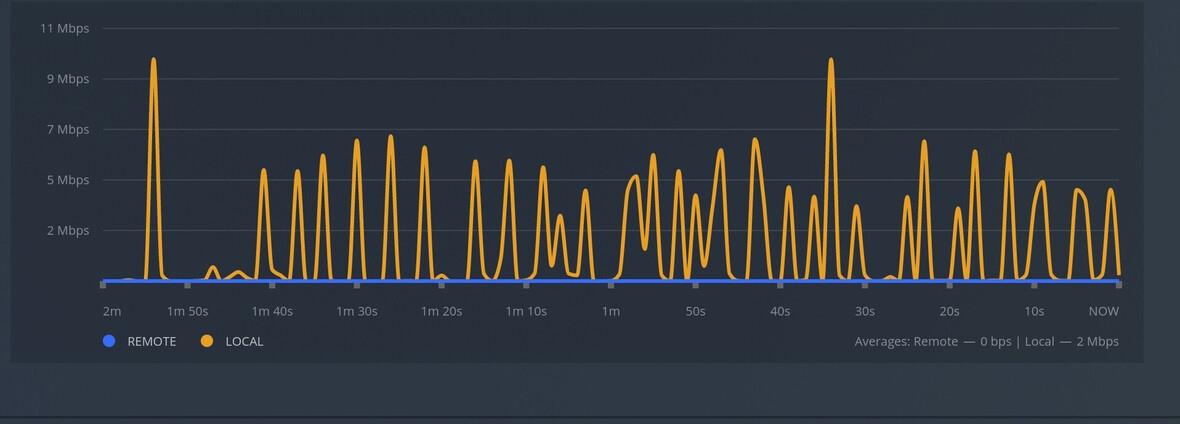
Don’t attempt to chalk this up to “oh well, windows networking is terrible, it works on linux” either, as a solution has already been provided also. I mean come on, I’d given detailed enough cause, effect and remedy.
Plex competitor jellyfin introduced a variable buffer size option for clients (albeit it’s rudimentary in selection; small/medium/large) and that also resolves the issue. Which at this point instead of offering a solution, chuck is suggesting to either, as I can only understand it as “buy a Mac or install Linux desktop to playback 4k media on plex, throw your android and windows devices in the trash” or “just use jellyfin, plex doesn’t fix anything”.
Why would you still try to argue against data I’ve given which is factual and reproducible? At least 2 other users have come in here and reproduced the issue.
So no, I won’t stop repeating things that can be actively proven and reproduced by any and everyone. I like to stick to facts.
@ChuckPa Are you done being pointlessly disrespectful? Because at this point it’s seeming more like you possibly just have zero contact with any of the actual plex staff as when googling any responses all I see are complaints about “blame-shifting” which weirdly seems to be what you’ve been trying to do ever since I gave you reproduction steps. Guess it’s part of the forum moderator handbook.
Another solution to the problem outside of giving clients control is to implement multiplexing data-chunk streaming with automated packet size (http2, modern approach) opposed to sequential HTTP GETs which are inherently limited by more than just bandwidth, as an analogy right now plex hasn’t invented dual-carrigeways yet, their motorway is just a single road with cars going both ways on it.
In the below image you can even see snaps of a lot of variance over even LAN because of the notably aging delivery method, there’s just better alternatives.

I understand that’s a LOT more taxing than client controlled buffers, but just an acknowledgement of it, even it being on a future roadmap of “possibly” would be nice. But plex never even acknowledged issues that even Linus Tech Tips had brought up. Straight up “business suicide” to not respond appropriately to issues.
In the meantime, guess I’m keeping a closer eye on jellyfin.
@RaptorTurkey Chuck has put up with a lot more of your BS than I would expect. Please do not insult him, it just shows your lack of understanding.
Chuck has reproduced your exact scenario and been unable to repeat the issue. Just because you suspect one root cause does not mean that is the actual root cause. Changing the buffer size might fix the unidentified issue you are experiencing, but that is a hack solution. Its better to attempt to isolate and identify the actual root cause, and then have the devs fix that.
He hasn’t reproduced my exact scenario. He’s swiftly ignored all the reproduction steps and introduced a third party, changing out so many of the parts, let’s not create plex’s version of the ship of theseus.
Image 1: plex windows client connecting to plex windows server, direct play of a 4k video. MPV conf unedited.

Image 2: same test as above, MPV conf edited

That’s as far as my diagnosis is required to go. It’s clearly an issue, it’s not my job to figure out the exact root cause. I was able to determine a factor that contributed to reproducing the issue, applying the factor in a tight, enclosed test environment reproduced the same results. I gave those steps and was called a liar opposed to “thanks, I’ll let the team know and they can look into it!”.
But I do appreciate that you think it’s the consumer’s job to isolate and indentify the root cause within plex’s code. If only it were open source and that could be a valid option.
Could it be related to the transfer window opposed to the latency, maybe? as that would be a limiting factor if the transfer window were too short, is it partially a mixture of the window with the interval? These aren’t questions I can answer because I don’t have the ability to change this behaviour and test it…
All I can definitively say is all I’ve said. There’s a hacky solution available to a small number of clients and a complicated solution that only plex devs could implement. There could be another middleground solution which is to change how the transfer window, chunk size and interval are negotiated. No idea. But it’s not like there’s any veteran networking engineers throwing in or even any plex developers who’d be able to better slice things up.
Which step was missed in my reproduction?
- PMS v1.25.9 on Ubuntu 22.04.3 Desktop host
- Media with over 8Mbps
- Plex for Mac 1.79 installed on macOS 14.0 Sonoma
- Network Link Conditioner installed to add 200ms of latency
- Direct Play playback of title with 87Mbps without buffering
Please do pray tell the context that was missing from my post that you are looking for?
Your steps 1,3 and 4 introduce a wild degree of unknowns.
Network Link Conditioner doesn’t function as you intended as your theoretical limit would have been <77Mbps, as calculated by chuck, so your methodology is flawed. Your numbers don’t literally just add up.
The context that’s missing is proving that anything has been tested at all within the set boundaries. No response measurements, no idea what ports, traffic or host you’re throttling.
Pointless going back and forth on the exact same conclusion, there’s a problem and it can be solved, it should be solved.
The stated conditions were satisfied.
- “Install PMS on choice host machine” – PMS 1.25.9 on Ubunutu 22.04.3
- “Media over 8 Mbps” – Test media is 87 Mbps
- “Install Plex client on any applicable system” - MacOS player 1.79 used
- “Set simulated latency to exceed 150ms” – Link conditioner set to 200 ms.
- “Attempt directplay playback of the 8+ Mbps bitrate file” – 87 Mbps file DirectPlay.
Achilles satisfied the conditions as set forth.
Whining and attempting to deflect, after the test results, which satisfy the required test environment, do no support the assertion, – Poor Form / Too Bad.
This is indeed a fruitless hijacking of the thread.
For Reference: MPV is available on GitHub
