Direct Play & Direct Streams Produces Heavy Artifacting/Blocky Video

Server Version#: 1.18.3.2129
Player Version#: iOS 6.5.2, Xbox One X 2.44.2.70, AppleTV 2.11.2

I have noticed that a good portion of my files get significant artifacting every 5-10 seconds (more frequently during action sequences & movies) but only on my Apple TV, iOS iPhone 11 PRO, and my brother in-law’s Xbox One X. This issue goes away when transcoding on my apple TV, and I have not been able to duplicate the issue while direct streaming on my own Xbox One X, so I’m not sure if that’s a remote quality issue or not (it shouldn’t be, since we both have Verizon FIOS Gigabit). I have uploaded a screenshot from my phone, but this happens on appleTV & my in-law’s xbox as well…

Each movie I have in my collection comes in 2 (or 3 if I have 4K) files:
1-1080p RIP makeMKV file, unaltered (usually 15-25GB, bit rates from 15-40Mbps) this is the file we have been having issues with, I have not been able to test 4K files outside of my Xbox, since that is the only TV & device that supports 4K
2-720p file, made with Handbrake using the legacy “iPad” default setting (the idea behind this file, is for compatibility with iOS devices & ability to download to an iPad for viewing on planes, etc. also for remote streaming on cell networks or where high speed is not available) bitrates on this file are in the 2-8Mbps range, this is in an mp4 container, from what i can tell, these files are not impacted by the artifacting issue.


3-where applicable, movies I have in 4k, I also have a MakeMKV file, unaltered ranging from 45-80GB, with bitrates up to 85Mbps, I have not had any issues direct playing these files on my home Xbox, and I have no other devices on my home network to test, but I would assume these bitrates would also produce the same issue

A few additional details about my PC:

Windows 10 Pro 10.0.18362 Build 18362, all latest updates & Drivers
CPU: Core i9-9960X, Not OC’d
Motherboard: ASUS ROG RAMPAGE VI EXTREME OMEGA
RAM: Corsair Vengeance RGB Pro 64GB DDR4 SDRAM 2666
GPU: ASUS ROG STRIX GeForce RTX 2060
SSD: Samsung 970 EVO 500GB
HDD (Media Storage): 10x 10TB WD RED drives configured in Windows Storage Spaces
Keep in mind that the bitrate for your file is the average. Things can go up or down significantly. My guess is that what you see are spikes in the bitrate that is beyond what your devices are capable of handling. This will depend on the device. When PMS transcodes, it lowers these spikes and could explain why that works.

1 Like

Of course, I am aware that is the avg bitrate, but I was just pointing out that it makes no sense that I was able to direct play on my apple TV & iPhone just fine a month ago… I watched all the MCU movies on my Xbox & Apple TV, and never missed a step, so something has changed in that timeframe, the question is what?..

Also, I’m not buying the “devices aren’t capable” reasoning… there’s no way in hell my iPhone 11 Pro cant handle a direct play 1080p movie… that should be child’s play for a brand new phone… And I know its not the server hardware, this CPU is capable of transcoding about 10 4K movies simultaneously, which means i should be able to direct play far more than that, and im having this issue when there is only 1 stream.

Anyone else having this issue, or have any thoughts?..

It was only a guess. There really isn’t a way to diagnose your problem without trying to recreate the issue. My point was that what you see is possible if your bitrates are really high. For example, if your file has a bitrate of 40 Mbps, I’ve seen files spike as high as 10x, especially during high action sequences, which matches your symptom. So for 1 second, the device has to deal with 400Mb of data. This might be more data than the device can handle so it actually ends up dropping some of that to fit it’s memory. This is the player memory, not the device memory. Since it doesn’t have the entire 400 Mb of data, the image gets scrambled like you see. When PMS transcodes, it caps these spike to 2x the average. So for this example, the most the client would ever get is 80 Mb of data, which it may be able to handle so you don’t get any graphic issues.

It’s possible there was something changed in the apps, but since this is occurring on multiple platforms, an app issue would not be my first guess.

That’s a fair point, but like I said, there’s no way that’s the case for the iPhone 11 Pro… maybe the Fire stick, that I could definitely understand bc its a low powered streaming device… but for the appleTV, that’s relatively new, and for a brand new phone to have that issue, I think that’s more related to software than hardware, but I could be wrong… I just wish there was some support to troubleshoot these kinds of issues…

Support is here. Playback that file again, wait for the glitches to show up, let it play for a few seconds, then stop playback and grab the log from the app. Also grab the log from PMS. Upload both logs here.

1 Like

ok, on my iPhone I can’t even get anything to play, I have restarted the app, restarted PMS, rebooted my phone & restarted my server completely… no change… tried multiple files, that didn’t help either. I should note, my version is now 1.18.4.2164 PMS… I have attached the debugging file from my phone, no idea what I’m looking at…PlexDebugInfo-keber007-6.5.2-19000 (2019-12-18 16.21.02 -0500).zip (1.0 MB)

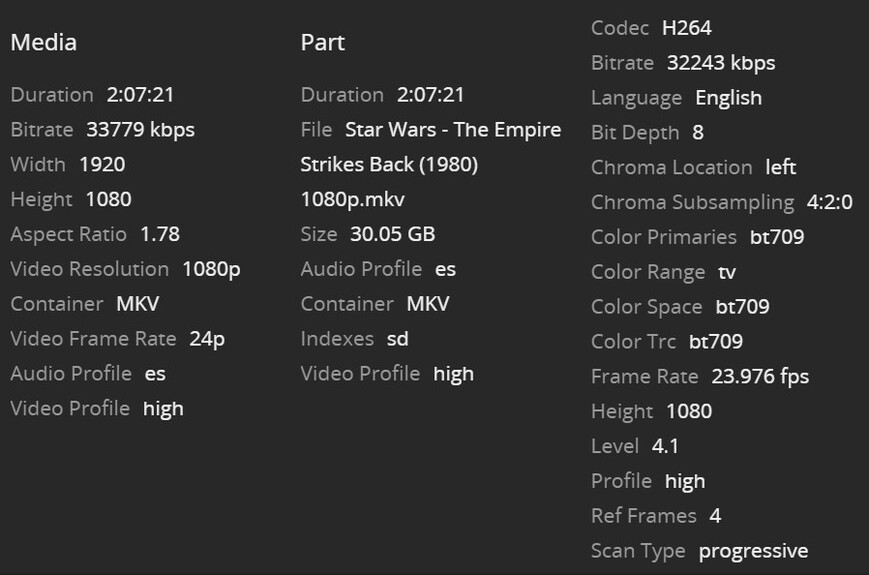
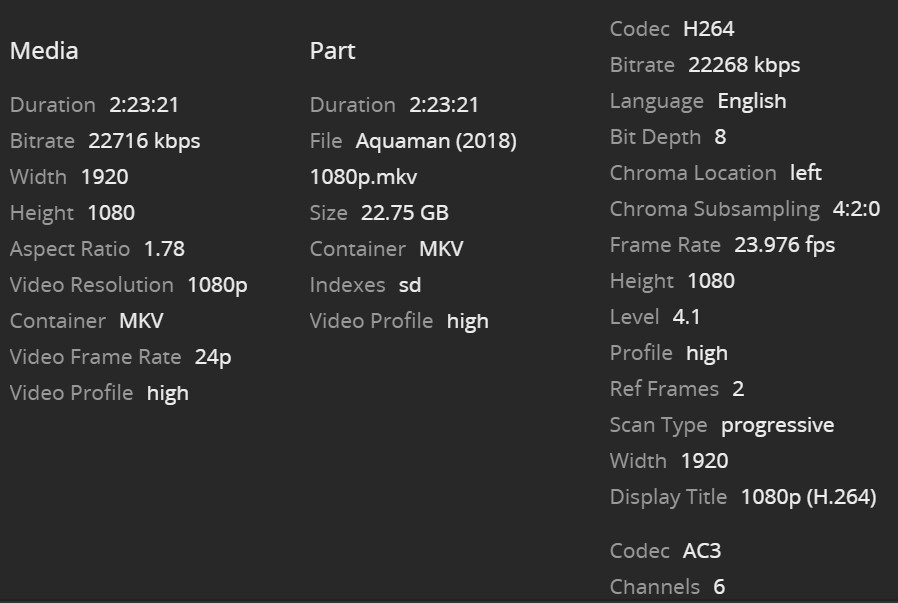
Here, I was able to duplicate the issue with 2/4 movies… Baby Driver & Aquaman display the same artifacting issues as I mentioned above, however, Atomic Blonde & Star Wars Empire Strikes Back do not, all direct play, I also attached the file details for each of those movieslogging.zip (1.1 MB)

As I was posting the previous media info, I am wondering if this is a reference frames issue, not a bitrate issue… Let me know your thoughts, and if there is a possible solution…

Can you post a screenshot of the “Now Playing” view from the Server Dashboard while playing a video that shows the issue?

I’m not seeing anything in the log to indicate something is wrong. I do see that you have the automatic bitrate adjustment feature on. Can you turn that off and see if you get the same result? It’s not that setting itself, but it results in something else and I want to check that.

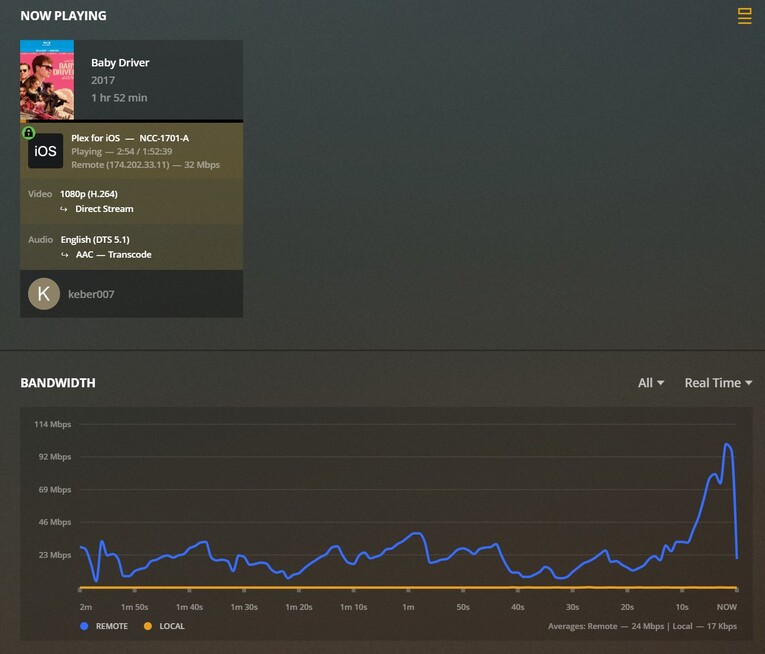
Here are a few “now playing” screen shots, I did not grab CPU stats, but they never rose above 15% or so during any of the streams (as I would expect from a Core i9 :smiley: lol)

Watching Baby Driver on iOS & cell network, still shows artifacting (plus some buffering due to cell network limitations)

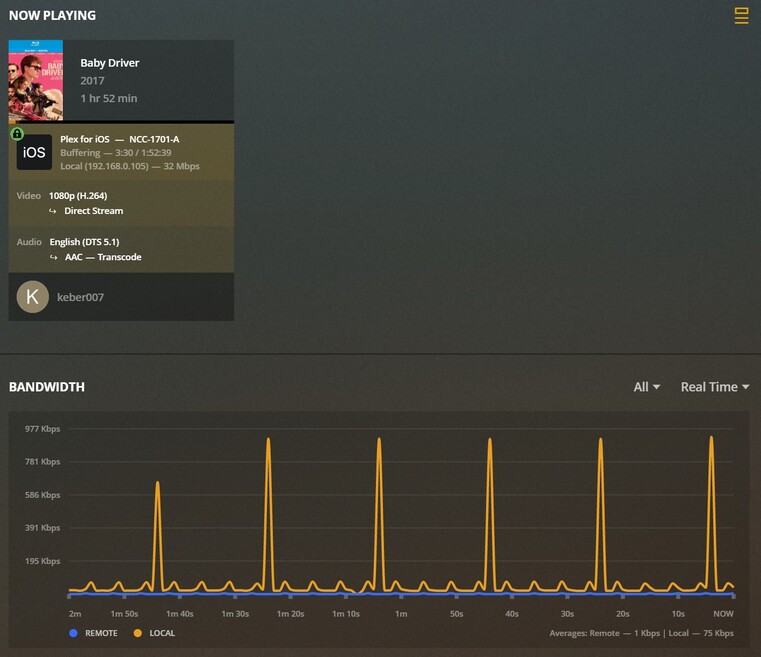
Watching Baby Driver on local network, same iPhone 11 Pro iOS (would NOT play, just kept buffering and sitting there for 5 min)

Finally got Baby Driver to play on my local network after playing another movie that did not show the artifacting issue:


I should note for that last stream I did see some spikes into the 500 Mbps+ range when I skipped around (seems to me that Plex was trying to pre-fill the buffer with data)

I should note, that I see those artifacts whether or not the bandwidth is at a peak or not.. I don’t necessarily think it’s a bandwidth issue, I have a Gigabit connection, and a wireless AC network, capable of far more than what is being used, so there must be some setting somewhere that should fix this without forcing a transcode…

@anon18523487, are you referring to the “Automatically Adjust Quality” setting?

Yes. That’s the one.

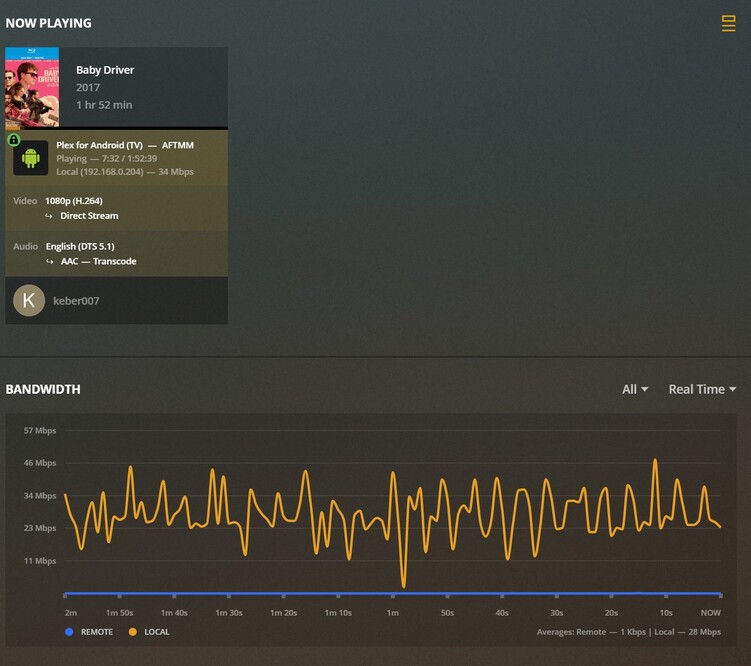
@darcilicious, I think you may be onto something there… Take a look at the profile below…


That is direct play on my brand new FireStick 4K… Same file, no issue… I wonder if there is a setting I am missing somewhere that causes those huge spikes in bandwidth use…

Those bandwidth graphs are network traffic. The important part is the average shown in the bottom right, not the spikes. Both show ~28 Mbps, so the overall traffic is about the same for both clients, so it’s not a matter of getting the data to the client. The WiFi on the Fire devices are not very good so seeing slower transfers from it are not surprising.

I still think it’s how the video is being handled on the client end. Have you tried with the setting off as I asked before?

Do you have the Enhanced (experimental) Player enabled on the Apple TV?

A post was split to a new topic: Direct Play & Direct Streams Produces Heavy Artifacting/Blocky Video

@anon18523487 Yes, that setting is disabled on my iPhone, and still have the issue

@darcilicious On my apple TV I believe I do, but I am also seeing this on my iPhone (that’s the source of the above photos), and this is disabled on that device…

It has always been disabled or you disabled it and it still has the issue?

Please turn this on.

To confirm, try playing back the video with the automatic bitrate adjustment feature disabled and the experimental player enabled.

2 Likes