ZackTex
November 22, 2018, 1:09pm
1
Server Version#: 1.14.0.5468 (unRAID)
Is there a way to Disable “Continue Watching”?
I do not use it and would prefer to just show “On Deck”.
If that is not possible, is there a quick shortcut to remove the item from “On Deck”?
Thanks!
ZackTex
November 22, 2018, 1:27pm
2
Figured it out but it is an “all or nothing” setting.
We have multiple libraries setup - one for regular movies, and one for discreet movies (ahem). I want a way to open the Plex app without images of bits and pieces showing up on the dashboard. Is there a way to do this because I can’t find anything in any of the settings that seem to indicate that you can. I have already removed the discreet folder from showing up on the on-screen list but that didn’t help at all.
Less than satisfying though…
I want “On Deck”
I do NOT want “Continue Playing”
By getting rid of “Continue Playing” I also got rid of “On Deck”. Surely we should be able to configure our dashboard with a bit more granularity?
anyone please help with this
the only way is to server>library advanced make the value 0 for Weeks to consider for On Deck and Continue Watching but then you remove ondeck and continue wathing
1 Like
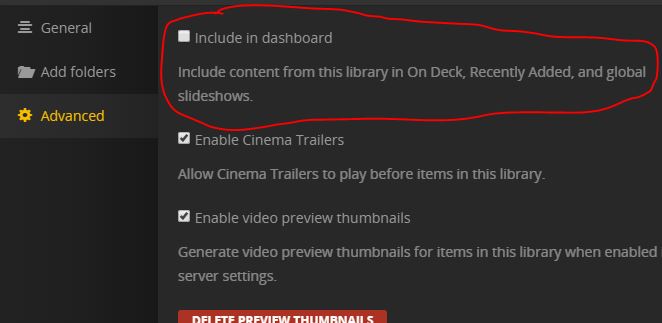
In the advanced library settings there is also a checkbox to decide whether you want to “include” or not include that library:
That has always worked fine for me to keep the “discrete” library hidden.
I also have multiple home users for my family and “discrete” libraries are only shared with certain ones.
The issue with the above is I would like “On Deck” but do NOT want “Recently Added” - this above gives you both or none.
That is true, but if it shows up in “On Deck” it’s not very discrete! lol
system
July 21, 2019, 1:25pm
9
This topic was automatically closed 90 days after the last reply. New replies are no longer allowed.