I have a DS916+ and it has problems transcoding when there are for example ASS subtitles. For this I disabled Transcoding at all so it can only play at original quality.
But when for example you choose an episode and then while watching it select an ASS subtitle, this will make plex start transcoding it gives ‘This server is not powerful enough to convert video.’ Error which is to be expected. But now this error is persistent till you deselect the subtitles in the main menu.
So the only option Plex now gives is to skip the whole episode, then you have to go to the menu and disable the subtitles for that episode. Instead of just disabling the subtitles.
So my question is: Is there anyway to disable every transcoding subtitle or use some other means so that Plex just deselect the subtitle when this happens.
Greetings,
Garcia
No, this is not possible.
If you disable transcoding, it falls onto you to make sure that your files are compatible with your clients. If you have files with ASS subs, you can only use clients which understand these, or you’ll have to disable, or convert them to SRT.
Anyway then to make plex choose SRT subtitles instead of ASS when I add them to same directory?
Try changing the file name extension from .ass to .ssa
If that doesn’t help, there is only this (ugly) workaround: You could intentionally mark one type of subtitle with a wrong language code, so the automatic selection will use the “right” one.
Video Title.mkv
Video Title.spa.srt
Video Title.por.ass
If the preferred language for subtitles is set to ‘Spanish’, the .ass version won’t get selected anymore because it is named as ‘Portuguese’.
the simple way is to search your storage for *.ass files then delete them (or convert them to srt).
the simple way is to search your storage for *.ass files then delete them (or convert them to srt).
And if they are embedded in the file, the only way is to convert the file to remove them, right?
“Remuxing” is suffcient. That way the quality of the video and audio tracks remains the same. It’s faster, too, than re-converting.
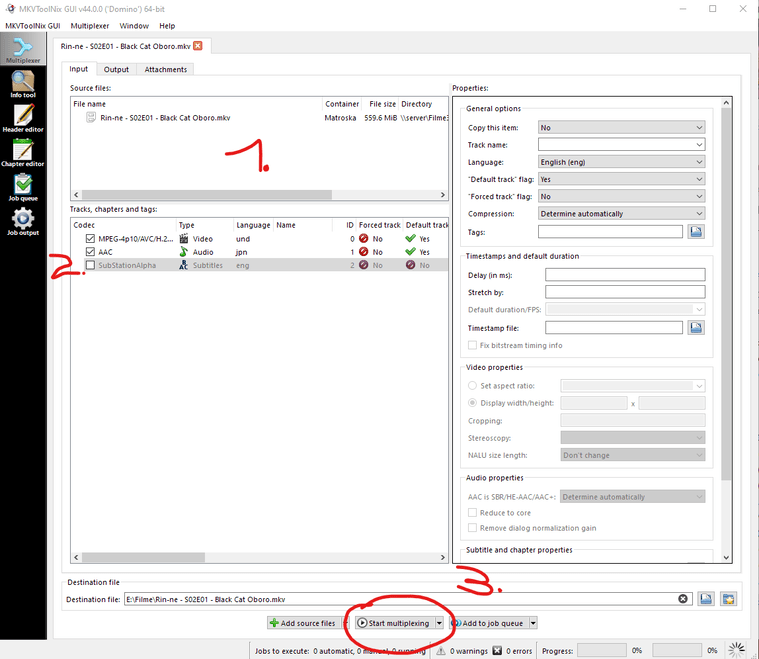
get MKVtoolnixGUI
drag the file into it,
disable the checkbox on the subtitle track
‘Start Muxing’