Do you group movies into seperate libraries/nodes/groups? And if so, how do you do it?

Hi all
I have a library of a few thousand movies to watch and when we’re looking for a movie to watch we find it a difficult to narrow down to something we’re in the mood for, and I was wondering how other people manage their movies. I know you can filter in the apps, but the filtering is limited to only one filter option, and usually we’re looking for something from, say, the last few years and of a certain genre, so there’s no way to select movies that have the year from 2018> AND also have, say, action as the genre; it’s either all movies from 2018> OR all movies with the genre action, which then lists all movies for all years.

So what I’m thinking is grouping them into smaller categories (I’m not sure what they’d be call in Plex, libraries? sub-libraries?) so they’re at least in smaller bunches to search through.

I kepp all our new (as in unwatched) movies in a selection of folders on my NAS, which should make it easier for me to do this;
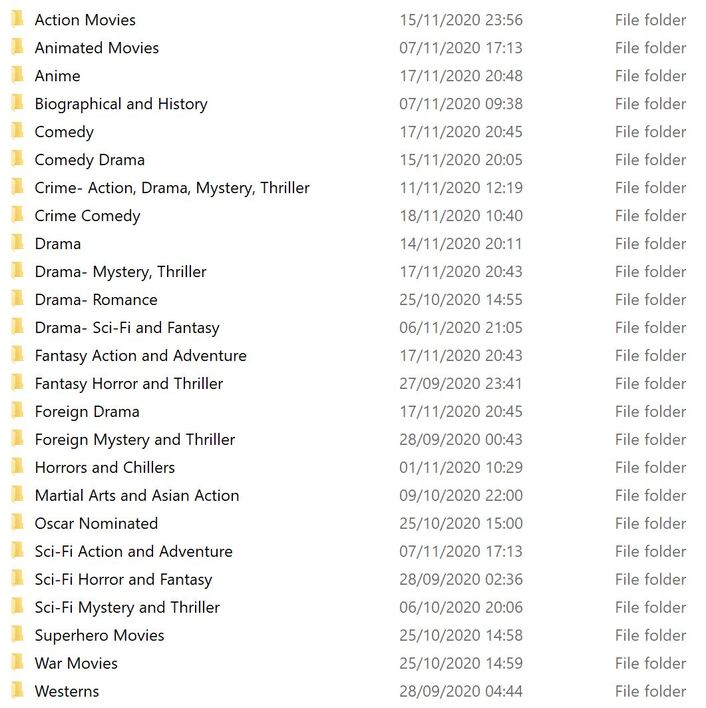
So, I’m thinking of having seperate libraries for Animated Movies, Comedy, Drama, Action & Adventure, Foreign Cinema, Sci-Fi & Fantasy, Superhero and War & Westerns.

How do other people organise their Plex folders/libraries, etc?

Also, how would Plex cope with adding folders to multiple libraries? So, for example, having a seperate library for All Unwatched Movies, which had all those folders in? And how would it cope with watch status on movies in multiple sources? Is doing that a bad idea…?

I then have all our watched movies in one large folder called Movie Archive which has all the movies we’ve watched in (probably another few thousand). The way I manage this is to physically move movie files from the new movies folder it was in over to the Movie Archive; I prefer this as if at any time I need to rebuild Plex (or Emby or Kodi) I know which are the watched movies and which we haven’t seen.

I just wondered how other people deal with large collections and thought I might be able to get some suggestions or recommendations.

Thanks!

Collections work quite well for what you want. Movies can appear in multiple collections and it is easy and pretty quick to add movies to and edit collections.
There are other ways to accomplish similar things but none I have found that do the job as well or as easily as collections.

By using collections there is no need to try to seperate movies that have been watched from others.

It is not perfect but Plex allows sorting and showing movies using the “watched” flag so I see no need for your “Archive” folder. I also use Trakt to help if there is a rebuild.

Collections and other tools mean there is no real need for folder structures beyond the simple basic structure. I just keep all my movies in one big folder (with sub folders to separate movies by group like “Alien Movies”) but the sub folders is just to make it easier for me to perform maintenance if needed. Using collections and the other tools available in Plex is really all that is needed for Plex to present an ordered movie display.

How about using a custom filter…

Ah, great, thanks! That sounds good then.

The reason I prefer to move watched movies into a seperate archive is because I use a number of devices and players to access my media and I’ve often found I needed to uninstall and reinstall and reconfigure apps, plus if at any time I want to use a new app to access them I always know which are our watched and unwatched movies. Just my preference I guess, works well for me.

Re Trakt; I thought that was only one way at the moment? Scrobble from Plex to Trakt via webhooks, but no way to get plays, etc from Trakt to Plex?

And the other tools like custom filters are fine but still limiting; I can create smart playlists with multiple filters, but I can only do that in the web UI, not on the TV clients (Android TV, Fire TV), so no good for my wife when she wants to browse for a couple of options in front of the TV. Also, playlists are no good for creating a shortlist or even general lists for narrowing down as when they are viewed you cannot see any movie info; they’re literally a playlist of queued items and displayed like a music playlist, it’s not possible to look at each movie on the list to read it’s info, play trailer, etc, selecting anything on it just plays that movie.

That is true for Plex. I just use Trakt to store watched states so I can recreate them if I need to reinstall Plex from scratch. But that has not happened to me since Plex dropped support for plugins and the sometime later I was unable to get the old Trakt plugin to continue to work.

Since Trakt does store watch history it would not be hard to use it to restore watched history but it would be a time consuming and tedious task.

To be honest I mostly use Emby now because Plex has gone ways that I really detest. It still works very very well for playback but Plex seems to spend more time adding crap to their system than they do actually making things work correctly.

In the ways you want to use a media manager Plex offers more options than Emby but I still use Emby for over 90% of my media consumption. It just works without getting in the way.

I use both Kodi, Plex and Emby. I actually prefer Kodi for its interface as I like to be able to customise it as I like it, but I’ve had loads of problems with it over the last few months on my Shield TV, constant crashing, not playing as it should, plus there’s no centralised database with Kodi (well, not one I want to be spending time on!) so I’ve been preferring Plex and Emby recently as I have a number of other devices and it makes it really easy to have a user for my 3 year old and all her shows only available to her.

On Emby and Plex I really can’t decide which I prefer. Both have some things I prefer on one and not the other but neither quite ticks all the boxes yet, and neither have many customisation options.

I prefer the basic look of Plex, but I prefer Emby being able to have smaller movie/TV show thumbs, as on a 60" TV they look massive on Plex and navigating through hundreds isn’t much fun. Plex is better for subtitles in that you can adjust the sync of them if they are out, but that’s only on external subs and it’s still a bit clunky (nowhere near as well done as Kodi). Emby has better subtitle search options, but then you can’t adjust them if theyre out of sync.

I also wish Plex would let me hide libraries for the main user account as I get to see all my daughter’s libraries - Emby does let you do that. I could set up a managed account for me to do that, but then I can’t have Trakt scrobbling on a managed account.

Plex is also inferior with Trakt, with it only one way syncing. Frustrating to have to pay for Trakt VIP to get Plex scrobbling one way, but even more annoying given that Kodi and Emby have two way syncing and you don’t have to pay for it!

I find the Plex login system way better than Emby’s. With Plex we’re all logged in and users can pin shares from other Plex servers (I have two at home, one at my mums and one at my sister’s!) Emby’s login system is useless for multi-server setups, I gave up trying to use it as I kept having to remember and enter my Emby Connect credentials.

Emby has better movie filter options than Plex, but from an aesthetic point of view it needs a lot of work; using it suddenly feels like you’re using an app from 10 years ago.

So I find myself using Plex for a number of weeks, then trying Emby and using that for a bit, and then going back and forth for a few weeks at a time. I wish one ticked all the boxes… my wife probably does as well as she has to keep asking me which one we’re using now!

Back to my original topic, I’m just adding new libraries whilst keeping the one “All new movies” in there and see how it all looks. I was reluctant to have too many library menu options down the left hand side, but even though it looks less tidy I think it will make it all more manageable!

If I was going to do what you want to do, I would start a fresh library for movies, and then slowly add your folders to it. If only to make sure that each movie was properly represented in each actual folder when you build your collections. If you do it by the “Genre” that Plex matches the movie to, your action movie may actually be in Sci FI folder, etc. Once done adding each folder, I would do the “watched” group and dump them all in a “watched” collection. Then when moving newly watched films there, you can either erase the genre tag and replace it with the “watched”, or add the “watched” tag so it shows in both collections.

I’ve sort of done what you are inquering about, only not based on genre. Everything appears in one “Movie” library, but broken into separate folders for ease of backing up to hard drives. As a library gets to big, it gets split off to a new folder that is added.

This topic was automatically closed 90 days after the last reply. New replies are no longer allowed.
