Hi everbody,
does anybody know the diffrence between these two docker images?
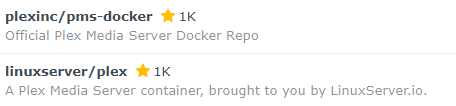
Currently i have installed the linuxserver.io image.
Thanks in advance.
Funkmaster
Hi everbody,
does anybody know the diffrence between these two docker images?
Currently i have installed the linuxserver.io image.
Thanks in advance.
Funkmaster
All I know is that the plexinc/pms-docker is from Plex itself whereas linuxserver’s from that guy. I think, in theory, they should be the same but they could be packaged differently. I guess you could scour dockerhub and compare the two packages. Not sure if that’ll answer your question but I am equally interested in learning about any differences. I usually use linuxserve’s docker images but I got the plexinc one and got it set up and am able to use hardware transcoding on my Synology Plex setup so in a way I don’t want to mess with it.
plexinc/pms-docker:
public and plexpass tags do auto updates of the plex version when the container (re-)starts - but they are rarely build and therefore contain eventualy outdated os packages.linuxserver/plex:
If you use docker-compose or watchtower to replace the container with a new container whenever the image the latest tag points to, I would stick with the official image.
If you plan to leverage the in-container auto update, I would suggest to use the linuxserver images, as their os-level patches will be more up to date - though you still have to use the “container repace” approach on top to make sure the os level packages are not outdated.
DSM 6 or DSM 7 ?
If DSM 7, may I offer
Question: For PMS running in Docker, when there is a new version and auto-update is active, does the server owner get any notification that an update is available or that an update was auto-updated?
It depends on the image and tag!
PlexWeb has a notification that indicates if new updates are available - so whenever you use PlexWeb you will know when an update is available.
With plexinc/pms-docker:latest you would need the pull the new image either from the Syno Docker-UI or the commandline. Then you can stop your existing container, select the container and use the action “reset”, which will make the Syno Docker-UI replace the container with a new container that uses the exact same parameters as the existing container based on the new image version.
With plexinc/pms-docker:public and plexinc/pms-docker:plexpass it is sufficient to stop/start the container from the Syno Docker-UI.
With linuxserver/plex:latest images it should be sufficient to stop/start the container from the Syno Docker-UI. But keep in mind that you need to perform the “reset” action from time to time to make sure the underlying image gets replaced with one that has a more up to date patchlevel for the os level packages.
This topic was automatically closed 90 days after the last reply. New replies are no longer allowed.
