I’m wondering if anyone has found a workaround or if the feature is coming soon to, at the very least, display the appropriate text to denote whether or not a movie has a Dolby Atmos track or if it is indeed a TRUEHD 7.1 track? Maybe if someone knows how to permanently edit the XML file per movie to manually go into each if I know it’s stated on the back of the movie case that it has Dolby Atmos? Could just edit the movies I know for sure do myself.
As far as playback and actually getting the track to be passed through to my Marantz AVR, no issues there. I’m using a Shield TV Pro and a brand new Marantz SR6015 which handles Atmos.
Any insight or help would be appreciated! Thanks
Longstanding feature request. Add your vote!
There is a partial work around for Plex Web & Plex for Windows/Mac. Unsure if this works for other clients. It does not for Android mobile.
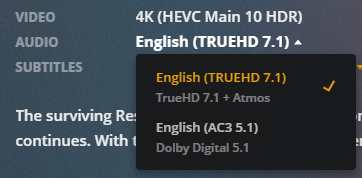
In Plex Web and Plex for Windows/Mac, Plex displays the Name field of the audio track. Add “TrueHD + Atmos” etc to the field and Plex will display it. This only works if there are multiple audio tracks in the file. Plex only displays the name in the drop down menu, and there is no menu if there is only one audio track.
You can modify the Name field of MKV files with MKVToolNix.
Plex Web:
MKVToolNix Header Editor
Voted! Thanks
The renaming in MKVToolNix is definitely helpful, thanks. For the movies where I just have the top tier audio track though, won’t have a need to drop down.
I will wait patiently as I’m sure you and many others are as well!
Does anybody know how I can ask a question about Plex? It seems like I have 2 accounts and want to delete the one and all the directions on how to do this do not apply.
Generally open a new thread and ask. You’ll get replies.
For this specific case…
If the account owns any Plex servers, login to the server and sign out of the server. Settings -> server_name -> General. Click on Sign Out.
Then go to Settings -> your_account_name -> Account, and choose Delete Account (at the bottom, below Privacy section).
That should do it.

