Server Version#: 1.18.1.2019
I am trying to set up port forwarding. I know this is a common issue, and I am sorry for asking. Any help greatly appreciated. I have read up, and tried to be logical, but clearly I am going wrong somewhere. I have fiddled around with all sorts of combinations and ports, but each time I fail.
The port forwarding screen on router 1 (the one connected to the internet) looks like this:
The screen for router 2 looks like this:
I would really appreciate some help.
Thank you
PS Port on Plex in currently set to 32401.
nokdim
November 14, 2019, 8:52pm
2
Not sure why you have on router 1 trigger start 32400 end 32401.
I am assuming your Plex server is 10.0.0.11?
Not sure why you have on router 1 trigger start 32400 end 32401.
I have now changed all ports to 32400. I thought the ins and outs had to be different. Can I set them all the the same?
I am assuming your Plex server is 10.0.0.11
That is correct. I have made this a static IP address.
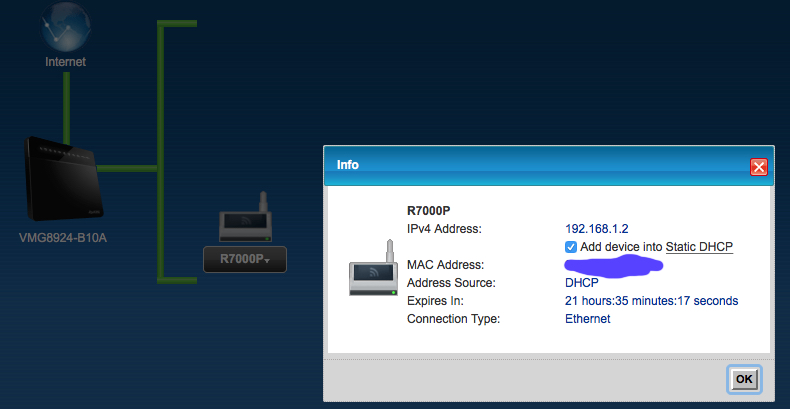
is 192.168.1.2 router 2 wan interface
This is where I got that address from. You can see I also made this a static IP address.
is his gateway 10.0.0.1 which is router 2?
I am sorry, I do not understand this question.
Thank you for replying.
nokdim
November 14, 2019, 9:43pm
4
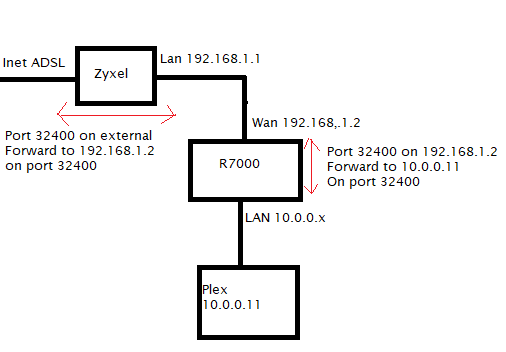
I am assuming this is how your setup looks?
Yes use port 32400 all the way through is fine, make sure in Plex it still says 32400
Thank you for replying again
Yes use port 32400 all the way through is fine, make sure in Plex it still says 32400
Yes, all done.
On your R7000 on your LAN you must have 10.0.0.x? is it .1?
And on your R7000 I am assuming you have a 0’s route or default gateway pointing to 192.168.1.1 which is your Zyxel?
I am sorry, I do not understand this. Does the screenshot help?
Based on the screenshots, should the LAN from the Zyxel be 192.168.1.2?
nokdim
November 14, 2019, 10:32pm
6
For your plex machine that is 10.0.0.11
Did it get that IP via DHCP?
What is its gateway set to?
Since 192.168.1.2 the “Internet Port” got its IP via DHCP it probably got its default route via DHCP as well, so dont worry about the 0’s route thing.
No the LAN on the Zyxel should be 192.168.1.1 as it is and the R7000 should be 192.168.1.2 so those both look right.
And you have ADSL right not Fibre Optic right? If you have Fibre optic you need to select VDSL not ADSL on the Zyxel drop down in the port forwarding.
You did it!!!
Thank you for spending so much time with me. I really appreciate it.
I am properly grateful! It takes a lot of patience to work through these things over text. You are a star.