Server Version#: 4.43.1
Player Version#: 8.6.0.20351
Hello I have a question: My PMS on my Nvidia Shield does not direct play movies with DTS audio anymore. They are all being transcoded. Normally they play just fine but I noticed just today that all of my movies with 5.1 or 7.1 DTS audio are being transcoded. This was never before an issue (the files are still the same, nothing has changed).
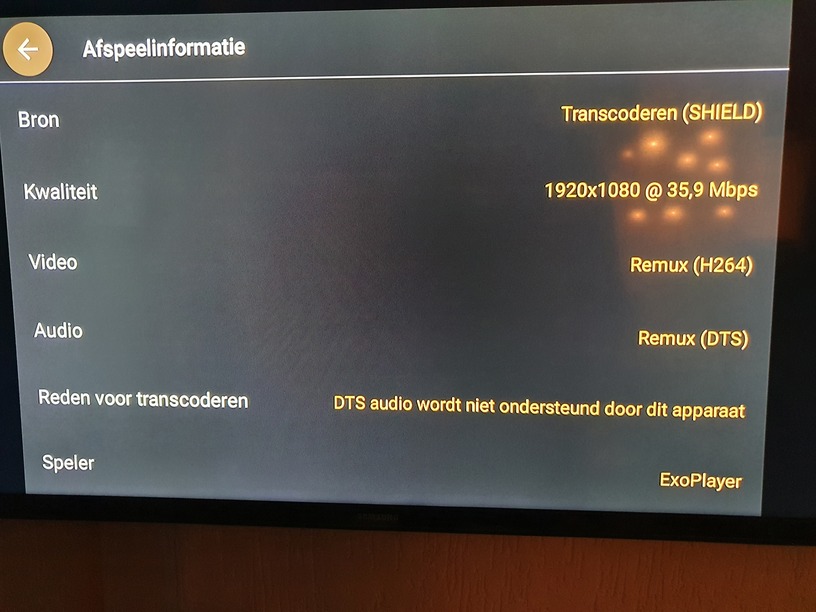
I get the message that my device does not support DTS audio. Thats the reason its being transcoded.
My question is why?? Is it a Plex update or a Nvidia update thats causing this? I can’t play my movies properly anymore!
Thanks in advance!
Nothing as changed as far as I am aware regarding that. I just checked and played a DTS 5.1 and a DTSMA 7.1 file fine.
Do you have your Shields audio setting set for your configuration. Also passthrough enabled in the app?
Hey man thanks for the reply. Its currently a little late here in Holland so im gonna check out my settings first thing tommorow!
But to my knowledge i did not change anything and i am the only user. Could it be that with a possible Shield Experience update I installed that some settings are changed? Because i dont recall that I updated the Plex app recently.
Im gonna get back to you soon! Thanks!!
I suppose it might have changed defaults if you never edited it. I change settings all the times to test things so don’t remember what defaults were.
Hello sorry for my late response. We had a family issue so I kinda forgot this. I have never messed with the audio settings and audio passtrough was always off.
I tried to switch it to HDMI (the audio passtrough), not helping.
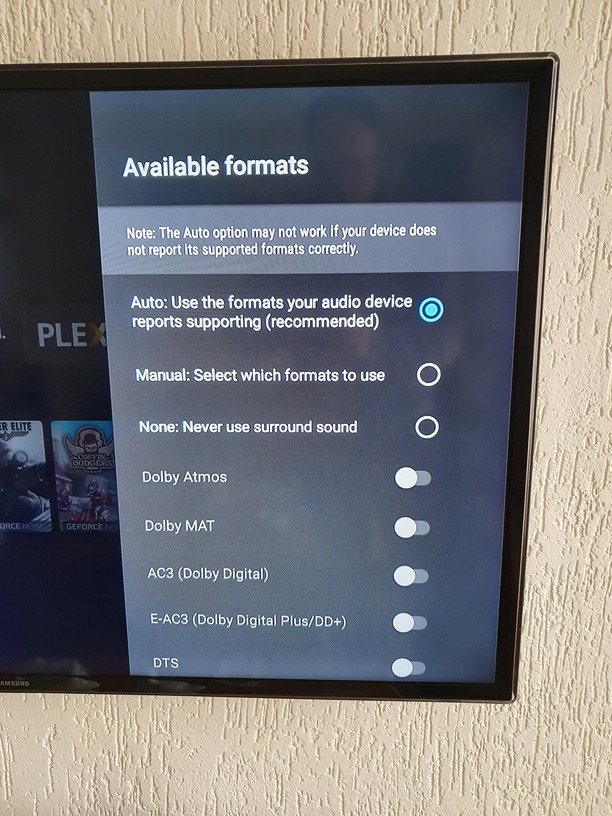
There is a option with advanced audio options.
But it is already on default (and that is reccomended it says). I can select manual to select the audio types that I have but is that the right thing to do?
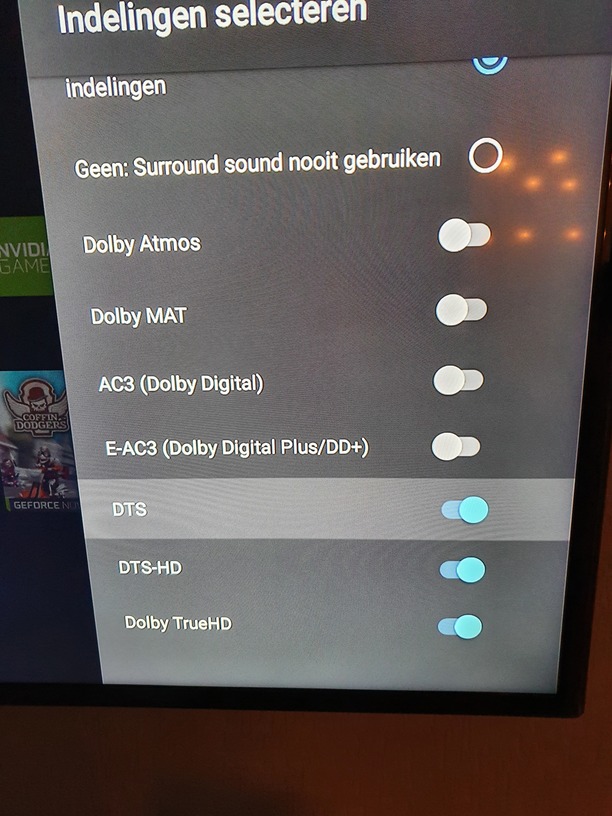
I have selected manual and selected all of the DTS sliders. Tried again but still says its transcoding because the device does not support DTS audio.
how exactly is your shield connected to your TV. Is it connected to the receiver/soundbar or directly to TV?
Directly to the TV using HDMI. Never had issues with this setup.
This does sound like it has to do with SHield Experience update but TV’s often report what they can process incorrectly to devices. I would just change the Available formats menu you have open from auto to manual and enabled the ones you think it can do. If it doesn’t work you can always change it back.
If you do have a receiver I would connect the shield to that, then that to TV.
Ok I will try that again because I already did change it to manual (in my previous text under the photo) and then all of the DTS sliders/buttons.
Unfortunately I dont have a receiver or soundbar. You did backup my idea of the Nvidia Experience update being the problem. Dont u or maybe someone else who also installed that have the same problem? Or did you not updated your Shield yet.
That last screenshot has me confused. It says it DTS not supported but is remuxing the DTS which means it is sending it as is afaik.
Is it possible to get the player logs from the playback. Enable network logging. Start playback then copy log to a text file and attach it here and we can see what is going on.
I personally think remux is the name of the audio and video track since it is a bluray rip and remuxed.
I have never done logs so thanks for the help. I will see if i can get the logs for you!
Ok I think I got it.
I did set the setting netwerking logging on.
I did play a file.
I did go to plex, troubleshooting and downloaded a zip.Plex Media Server Logs_2020-09-30_20-21-22.zip (2.8 MB)
the server logs are helpful but need the player logs to see why it is requesting that of the server. After you enabled network logging in the player if you look at any of the settings screen you will see a URL at the bottom right of screen to go to access the player logs in your web browser. it will be something like LocalIPofShield:32500/logging
My bad! I typed it with the [ and ].
Here it is all of the 30 september logss file.
I did not select any other dates.LOG.txt (27.8 KB)
Terrible sorry sir for the confusing. I thought the recent logs where above but then i looked at the date and it did not match up. Apperntly the recent logs are in the bottom of the huge text file! Sorry!
This log LOG2.txt (93.5 KB) matches my times.
FYI i have not forgotten about this. Just waiting for one of the Android devs to get online so I can ask them a question.
I did mean to ask if subtitles are enabled in the playback and if turning them off changed anything.
Thanks man I apreciated it very much!!! Thanks for the update  No problem!
Yeah the subtitles are enabled. Im gonna try to see what happens when I switch them off. Tommorow  It just turned night here so im gonna check tommorow if that makes a difference.
I hope the logs are helpful. I have had a little trouble getting the right ones. I was playing the movie “The Mule” recently for the test. Maybe u can filter on that because its a lot of text  I did not understand a lot of it reading it myself. I did not quite see where a moviefile is being played and when it stopped lol I’ll just hang on until you get back from the android dev.
Hello @BigWheel I tried today to turn subtitles off and see what happened. No difference im afraid.