OK thanks.
Starting to look like it might be a bug but not sure if the app or the device. It might take some time to figure out.
Is it possible to get the XML for that movie The Mule so I can add to report. https://support.plex.tv/articles/201998867-investigate-media-information-and-formats/
can’t hurt. Your soundbar definitely supports those?
ok. We are starting to think it might be trying to transcode something like DTSHD down to the core DTS for devices that only might be able to use the core. but still looking
Thanks for the reply! I will see if I can get the xml of The Mule.
But it is with all of my DTS files. 90% of my media are Blurayrips with 5.1 DTS audio and the other are AC3, EAC3 and AAC. They all play fine (except EAC3 ofcours but that I know)
1 Like
I hope this helps.
As requested the XML.txt file from The Mule.
XML The Mule.txt (48.9 KB)
Hey guys Im just testing sort of all my media because I noticed that I can play even less than I thought. I said previous that AC3 are safe and the issue is with DTS only… Well scrap that because the Harley Quinn Birds of Prey movie has Dolby Digital 5.1 (AC3) audio and that is also transcoding because its not “supported”. Again was never an issue.
Zombieland Double Tap (with DTS 5.1 audio not working). Watched that movie on 2 of August, was not a issue then.
So:
-DTS-HD.MA 5.1 not direct play (The Mule)
-DTS 5.1 not direct play (Zombieland 2)
-Dolby Digital (5.1 AC3) not direct play (Birds of Prey)
All of them where watchable before and without transcoding.
The media that I can watch is now limited to some 1080p or 720p files with AAC, mp3 or AC3 stereo audio.
I hope that the issue will be found. I really appreciate the work you guys are putting into this to help me! I can still watch some files and I got Netflix so Im good for now  Thanks again, I’ll just wait until the next response!
Change the Shield audio back to Auto.
I’ve the Shield 2015 Pro. If I change the audio off Auto, then all audio transcodes in Plex. Even those that are enabled on the Shield.
1 Like
Hey man thanks for joining. If you are reffering to the picture I send earlier, I did already change it back to auto. Because manual did not fix the issue for me.
I got the Nvidia Shield Pro 500GB (2017) version myself.
I have never touched this setting and everything was working just fine.
Good evening @BigWheel. I have updated my Plex client app and the PMS app on the Shield as of now with the new update wich I received today. Unfortunately it did not fix the DTS issue im having. The only thing that changed was that a row beneath the “Continue Watching” has dissapeard (i dont know the English name, it was Actueel). I did not use it so no problem.
Any luck regarding my problem? Have a nice day!
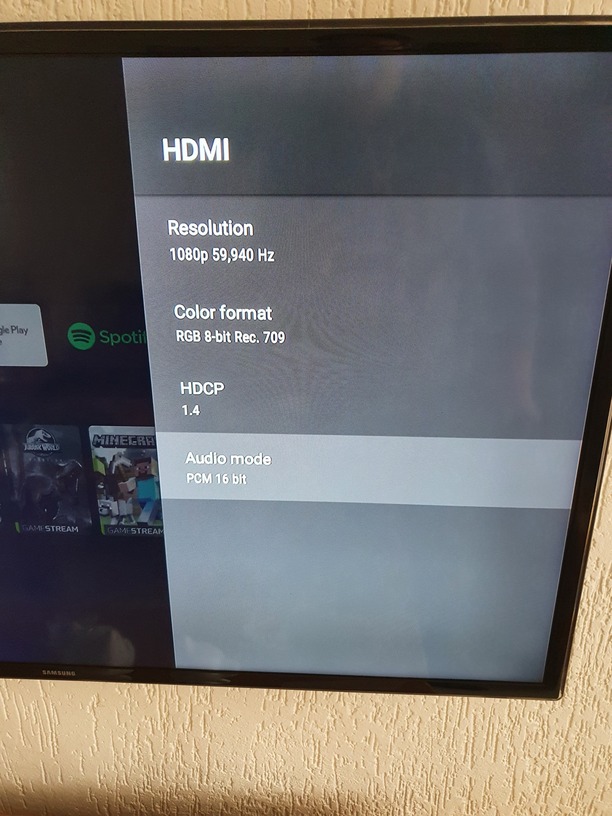
In the Shield settings, go to Device Preferences -> About -> Status -> HDMI -> Audio mode.
Audio mode lists the formats detected by the Shield. Does it show DTS & DTS HD?
For example, my 2015 Shield Pro lists PCM 16 bit, DD, DD+, DTS, DTS HD, Dolby TrueHD, DD+ Atmos, TrueHD Atmos, which is expected, as those are supported by my Denon receiver.
1 Like
Thanks for the suggestion! I will check it first thing tommorow because its night time over here.
It says only PCM 16 bit for me?
Interesting. One would think Dolby Digital would be on the list as well.
What is the make/model of your TV?
Maybe something happened with the HDMI handshake between the Shield and the TV?
Only thing I can think of is to double check settings and then power cycle the equipment.
- Double check the audio setting on the Shield. Make sure it is on Auto.
- Check any relevant audio settings on the TV. Look for anything that would restrict audio to PCM, disable surround sound, etc.
- Power down both the Shield and the TV.
- Remove the power to both for ~30 seconds.
- Restore power to the TV, turn it on, and switch to the HDMI input for the Shield.
- Restore power to the Shield, power it on, check the list in Audio mode.
- Play a movie/show on the Shield and see what happens.
Hey man @FordGuy61 thanks for the help! I will follow your instructions tommorow to see if it fix it. But I doubt that my TV is the problem. Because the message on Plex says that the device does not support DTS. The device would be the Shield itself. But the Shield always supported it. So im guessing its a Plex bug/issue. Because I tried today to open the same movie with the VLC app on my Shield and it played without a problem.
I have the Samsung UE46F6100. An 6 year old 3D TV Full HD. But again I doubt its the TV. It was always working. So im guessing an update to either Plex or the entire Nvidia Shield is causing the problem.
Thanks for the info.
I don’t think anything is wrong with the TV. I just think between the two devices something could be in a weird state.
The TV manual lists dts as a supported codec, so it should direct play.
Before you go through pulling power, etc. try unplugging the HDMI cable from the Shield or TV for a few seconds. That should force the TV & Shield to do the HDMI handshake, where they exchange info on supported formats. Hopefully the TV will report it supports dts and the Shield will understand.
I might be wrong, but here’s what I think could be happening:
- HDMI handshake is somehow faulty, and the TV does not tell the Shield that it supports dts, or the Shield ignores what the TV says and defaults to PCM.
- The Shield tells Plex.
- Plex transcodes the audio.
The reason for removing power is that turning off a TV really just puts it to sleep. If you remove the power, then the TV has to re-initialize everything when it powers up (same for the Shield). That ensures a fresh HDMI handshake.
1 Like
Thanks for the support! I really appreciate it! I never knew about the whole handshake thing. I really thought it was the device that was faulty. Never crossed my mind the link between my tv and the Shield could be the problem. I mean I tried turning it on and off (both the Shield and TV) but that did not fix it. I did not test it with removing the power , only tried rebooting on the device itself.
I dont know what could be causing this if it is the handshake thing. I mean sure I turn my TV and my Shield on and off some time but who does not haha  Don’t know where this is coming from so sudden.
I will be doing the HDMI trick first and then the power thing first thing tommorow.
Again really appreciate you, being a fellow user and not a employee, that you are trying to help me! Thanks!!
Hey man. I did everything you said. I started with the HDMI trick.
- I pulled the HDMI out of the Shield.
- Waited a few seconds and put it back.
- no changes on audio mode
- did not fix the transcode issue
Then I did the remove power thing.
-
i checked my TV settings.
-
There was an option called “Soundeffect”. I saw some DTS things but when I turned that on it did not help so I turned it off again. Now its back at default.
-
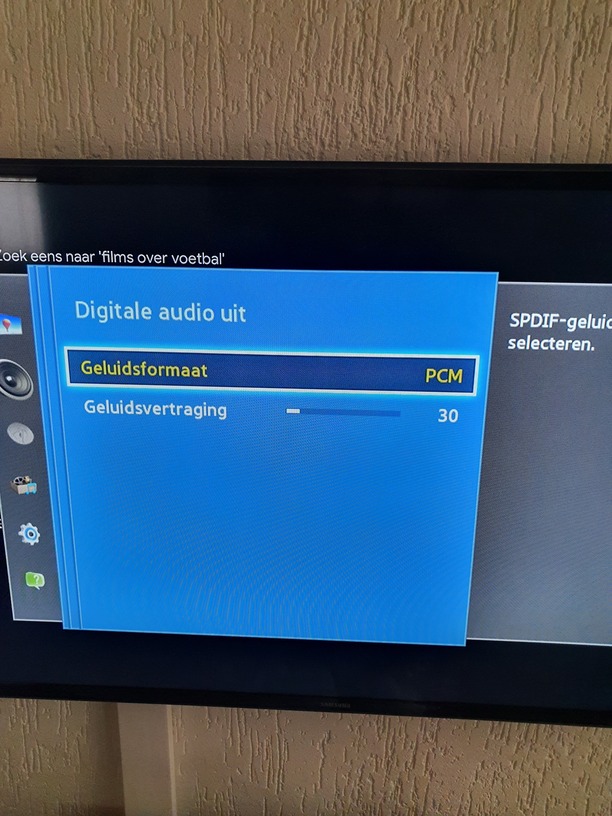
on “Advanced settings” I saw the line “Digital audio off”. I clicked on that and it gave me a screen with “soundformat: PCM” and “sounddelay: 30”
-When i clicked on PCM I could see other formats like DTS but it was all grey I could not select any of them.
-
so I left everything as it was before and I started to remove the power.
-
First the Tv and then the Shield. 30 seconds.
-
I reconnected the TV first and switched it to HDMI 2 for the Shield
-
Then I reconnected the Shield.
-
It booted up but unfortunately it did not help.
-
Audio mode still says PCM 16 bit
-
Plex is still transcoding
I put some photos below