Duplicate "SRT External" subtitle options causing playback issues

Server Version#: 1.21.0.3711
Player Version#: All players (Fire Stick 4K and Nvidia Shield TV)

(File removed)

Some of my media have duplicate English (SRT External) subs like this:
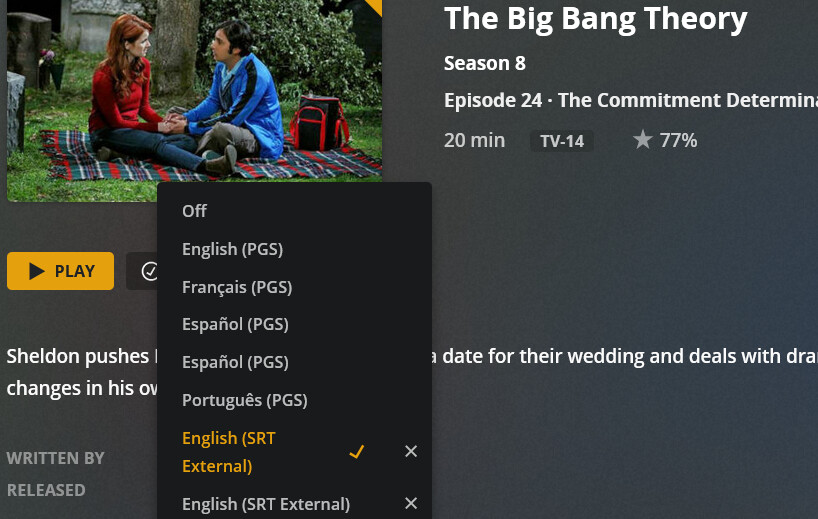
But I only have one .srt file in the same folder as that media file itself. With this, more often than not Plex picks the option that does not associate with any existing SRT file and causes playback issues (will not play at all). As soon as I choose the other SRT External option, it plays just fine and when I stop and check the subtitle options again the duplicate will be deleted.

Before using the correct option, I also did try re-analyzing and refreshing the metadata of that file and it did not do anything with the duplicate. I’m also not sure if the Sub-zero plugin that I have installed has to do something with this issue because I have it scheduled to look for better subtitles for both current and next episode media files.

@panni, I’d appreciate it if you can confirm. Thanks.

It probably has. Something might’ve changed with the metadata handling, I’ll have to take a look.

Ok, thanks. Let me know if you need me to upload more logs to get to the bottom of the issue.

Is setting SZ to look for subs for current and next episode usually the best option?

@panni Did you see anything?

@panni

As I was trying to play some episodes today, I was getting transcoding failures. I checked the logs and it was trying to transcode the file with the duplicate external sub that is not existing. As soon as I chose the second external SRT option, it played just fine. After I finished the episode, I checked again the file and true enough I don’t see the duplicate anymore.

Any udpates here please? This is really affecting most, but not all, of my media? Do I need to do the dreaded Plex Dance to fix this?

@panni @anon18523487

This topic was automatically closed 90 days after the last reply. New replies are no longer allowed.