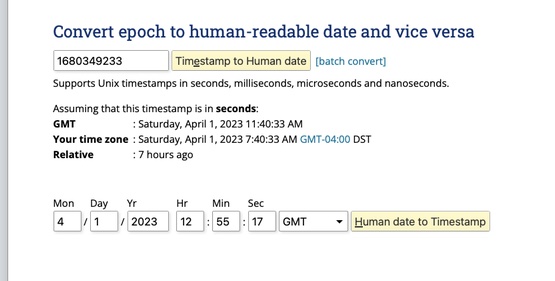
During scheduled tasks, Plex is changing the "addedAT" date to the current day and time of scan

Server Version#: 1.31.3.6868
Player Version#:
Every time Plex runs through the automated tasks, it’s scanning my movie folder where all the movies added at date is changed to the current day/time the scan is happening. It doesn’t happen during manual scans, The output is the ‘recently added’ section ends up with the same movies in the same order every time, I’ve tried fixing via the Plex SQL database but the problem reoccurs; so every week or so my ‘recently added’ shows the exact same movies in the same order. The files in the file system show the correct dates as far as when the file was originally added, modified etc, It’s only Plex reading the added dates as new each time.

I’ve gone through the commands listed of repairing and reindexing the database, and even deleted the database itself and started over but the problem reoccurs each time like clock work.

Is there any setting or something I could be doing to cause/fix this issue? Any guidance or suggestions would be hugely appreciated. It’s been driving me crazy. Thanks a lot.

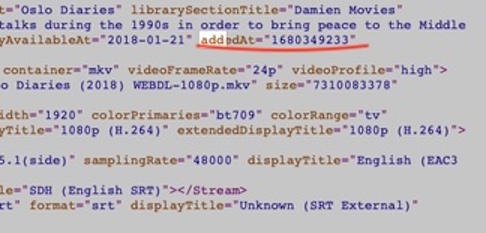
Using “Oslo Diaries” as an example here to show the ‘addedAT’ date being changed to the current time.

oslo adddedAT

oslo_epoch

While you wait on others more knowledgeable than I to review two things jump out …

Migrations never seem to finish or at least I don’t see it reported in your log as completing …

Apr 01, 2023 08:52:26.790 [0x700000c53000] INFO - SQLITE3:(nil), 283, recovered 790 frames from WAL file /Users/damienburke/Library/Application Support/Plex Media Server/Plug-in Support/Databases/com.plexapp.plugins.library.db-wal
Apr 01, 2023 08:52:26.822 [0x700000c53000] INFO - Running migrations. (EPG 0)

Apr 01, 2023 08:52:29.313 [0x700000c53000] INFO - Running migrations. (EPG 0)

Apr 01, 2023 08:54:24.947 [0x7000009c4000] WARN - [Req#110/Req#122] SLOW QUERY: It took 210.000000 ms to retrieve 1 items.

Apr 01, 2023 08:52:31.354 [0x700000c53000] WARN - [DatabaseFixups] Held transaction for too long (/data/jenkins/server/1785926601/Library/DatabaseFixups.cpp:360): 0.330000 seconds

Network stuff which may or may not be normal:

Apr 01, 2023 09:40:56.270 [0x700001f42000] DEBUG - Network change for advertiser.
Apr 01, 2023 09:40:56.270 [0x700001f42000] DEBUG - NetworkService: Network change for browser (polled=0), closing 2 browse sockets.
Apr 01, 2023 09:40:56.270 [0x700001f42000] DEBUG - NetworkService: Setting up multicast listener on 0.0.0.0:32413
Apr 01, 2023 09:40:56.270 [0x700001f42000] DEBUG - NetworkService: Browsing on interface 127.0.0.1 on broadcast address 127.255.255.255 (index: 0)
Apr 01, 2023 09:40:56.270 [0x700001f42000] DEBUG - NetworkService: Browsing on interface 192.168.1.166 on broadcast address 192.168.1.255 (index: 1)
Apr 01, 2023 09:40:56.270 [0x700001f42000] DEBUG - NetworkService: Network change for browser (polled=1), closing 2 browse sockets.
Apr 01, 2023 09:40:56.270 [0x700001f42000] DEBUG - NetworkService: Browsing on interface 127.0.0.1 on broadcast address 127.255.255.255 (index: 0)
Apr 01, 2023 09:40:56.270 [0x700001f42000] DEBUG - NetworkService: Browsing on interface 192.168.1.166 on broadcast address 192.168.1.255 (index: 1)
Apr 01, 2023 09:40:56.270 [0x700001f42000] DEBUG - NetworkService: Network change for browser (polled=0), closing 1 browse sockets.
Apr 01, 2023 09:40:56.270 [0x700001f42000] DEBUG - NetworkService: Setting up multicast listener on 0.0.0.0:1901
Apr 01, 2023 09:40:56.270 [0x700001f42000] DEBUG - NetworkService: Browsing on interface 192.168.1.166 on broadcast address 239.255.255.250 (index: 0)
Apr 01, 2023 09:40:56.270 [0x700001f42000] ERROR - [NSB] Error in browser handle read: 89 (Operation canceled) socket=-1
Apr 01, 2023 09:40:56.373 [0x700001f42000] INFO - [NSB] Abandoning browse socket, it was closed.
Apr 01, 2023 09:40:56.373 [0x700001f42000] ERROR - [NSB] Error in browser handle read: 89 (Operation canceled) socket=-1
Apr 01, 2023 09:40:56.473 [0x700001f42000] INFO - [NSB] Abandoning browse socket, it was closed.
Apr 01, 2023 09:40:56.473 [0x700001f42000] ERROR - [NSB] Error in browser handle read: 89 (Operation canceled) socket=-1
Apr 01, 2023 09:40:56.573 [0x700001f42000] INFO - [NSB] Abandoning browse socket, it was closed.
Apr 01, 2023 09:40:56.573 [0x700001f42000] ERROR - [NSB] Error in browser handle read: 89 (Operation canceled) socket=-1
Apr 01, 2023 09:40:56.673 [0x700001f42000] INFO - [NSB] Abandoning browse socket, it was closed.
Apr 01, 2023 09:40:56.673 [0x700001f42000] ERROR - [NSB] Error in browser handle read: 89 (Operation canceled) socket=-1
Apr 01, 2023 09:40:56.778 [0x700001f42000] INFO - [NSB] Abandoning browse socket, it was closed.
Apr 01, 2023 09:40:56.778 [0x700001f42000] ERROR - [NSB/SSDP] Error in browser handle read: 89 (Operation canceled) socket=-1
Apr 01, 2023 09:40:56.883 [0x700001f42000] INFO - [NSB/SSDP] Abandoning browse socket, it was closed.
Apr 01, 2023 09:40:56.883 [0x700001f42000] ERROR - [NSB] Error in browser handle read: 89 (Operation canceled) socket=-1
Apr 01, 2023 09:40:56.985 [0x700001f42000] INFO - [NSB] Abandoning browse socket, it was closed.
Apr 01, 2023 09:40:56.985 [0x700001f42000] ERROR - [NSB] Error in browser handle read: 89 (Operation canceled) socket=-1
Apr 01, 2023 09:40:57.085 [0x700001f42000] INFO - [NSB] Abandoning browse socket, it was closed.
Apr 01, 2023 09:40:57.085 [0x700001f42000] ERROR - [NSB] Error in browser handle read: 89 (Operation canceled) socket=-1
Apr 01, 2023 09:40:57.185 [0x700001f42000] INFO - [NSB] Abandoning browse socket, it was closed.
Apr 01, 2023 09:40:57.185 [0x700001f42000] ERROR - [NSB] Error in browser handle read: 89 (Operation canceled) socket=-1
Apr 01, 2023 09:40:57.286 [0x700001f42000] INFO - [NSB] Abandoning browse socket, it was closed.
Apr 01, 2023 09:40:57.286 [0x700001f42000] ERROR - [NSB] Error in browser handle read: 89 (Operation canceled) socket=-1
Apr 01, 2023 09:40:57.386 [0x700001f42000] INFO - [NSB] Abandoning browse socket, it was closed.
Apr 01, 2023 09:40:57.386 [0x700001f42000] ERROR - [NSB/SSDP] Error in browser handle read: 89 (Operation canceled) socket=-1
Apr 01, 2023 09:40:57.491 [0x700001f42000] INFO - [NSB/SSDP] Abandoning browse socket, it was closed.
Apr 01, 2023 09:40:57.491 [0x700001f42000] ERROR - [NSB/SSDP] Error in browser handle read: 89 (Operation canceled) socket=-1
Apr 01, 2023 09:40:57.594 [0x700001f42000] INFO - [NSB/SSDP] Abandoning browse socket, it was closed.

and also this … Apr 01, 2023 08:52:31.337 [0x700001e3c000] WARN - MyPlex: Invalid connection URL 'xxxx:yyyy'.

I would suggest leaving the server running but idle for a while and see if the migrations finish cleanly. Don’t start any scans etc …

Could you also say a little more regarding this? Wonder if something has gone wrong :disappointed:

thats fascinating. thanks for pointing that out. When I run the command, nothing really happens. I get a prompt like something is about to occur but nothing does, it just sits there and I assume I’ve done something wrong . I wonder if I’m killing it too early thinking that it didn’t work. it wold explain a lot bc I couldn’t for the life of me understand why it wouldn’t work. it’s pretty straight forward.

so during automated tasks/scans (not every one, but often enough), plex is changing the “addedAT” date to the current date/time of the scan as shown in the examples). It’s strange because the order stays the same, I guess they can get scanned in the same order.

just to be clear, this is occurring every time I run a manual scan on the movies folder (not as a scheduled task). There are the same roughly 500 movies, where the ‘addedat’ date is changed to the date/time of the current scan. So every time I scan my movie folder, this same 500 movies end up on top of the list as being ‘recently added’ that day. Per my original example the Oslo diaries, my folder was scanned yesterday and there it is top of the list again (a long with the rest).

I’ve read quite a bit about changing the ‘addedAt’ via the plex internal SQL database as it’s not an uncommon issue. I’ve had no luck so far. I’m simply not writing the commands correctly (most of the examples I’ve seen have been using windows our another OS but not Mac).

I would be eternally grateful to anyone that could help me resolve this. It’s driving me and my OCD crazy. thanks a lot.

Edit- PS, since my original post, I actually deleted plex and the database all together and started from scratch. Doesn’t resolve issue. Any testing I’ve tried since has always been on a copy of the database outside the plex folder, using DB Browser for SQL to test the commands. So the original new database is still in tact running currently.

To rule out embedded metadata in your files can you check and see if Prefer local metadata is enabled in the advanced settings on your movie library ? If so disable it and perform a scan with refresh metadata to see if it helps with your problem.

re: prefer embedded data, that’s been unchecked. Sorry Im not sure what you mean buy what you suggested before. can you elaborate?

FYI- I appreciate your trying to help me

Could you upload a new set of server logs please so we can see what is happening now. Grab the logs after a scan is done and give us an example of the movie which is changing the addedAt date.

Also, did the database migrations I mentioned above ever finish ? If not then you might just have a bad db and its in need of repair → GitHub - ChuckPa/PlexDBRepair: Database repair utility for Plex Media Server databases

Running through chucks repair commands/utility is one of he first things I did. It never showed any type of corruption but I followed it through as suggested. Anyway, like I said since my first post, plex was scrapped and built from new.

Sure I’ll post the logs. I appreciate your trying to help. Would you mind doing me a favor and removing my WAN:port you referenced earlier in this thread? It’s a security issue, Id appreciate it.

Logs coming shortly.

Done… Let me know if there is anything else you want deleted.

Can you answer a couple of questions, please?

  • What is the type/location of your media storage: NAS, internal drive, external USB drive, etc…?
  • How do you have Settings -> [Server Name] -> Library -> Empty trash automatically after every scan set?

If you’re using some form of external storage, and that setting is enabled (checked), and your media is for some reason inaccessible during a scan, it’s possible that it could be removed from your library temporarily and then re-added, causing the ‘added at’ date to be reset.

1 Like

Plex is hosted on a Mac mini (Intel) and the storage is hosted on an unraid nas and a synology nas. So two network storage devices are hosting my movie library where the added date us being changed.

The movies are there and if I run a scan of the library, the same 500 or so movies get their added_at date changed to the time of the scan and move to the top of recently added every time.

If I open the db on db browser, all the other metadata, ie ‘originally available’ etc date remain static. Only the added_at date is being changed.

I’ve been testing commands on a copy of the plex database to change the ‘added at’ date to = ‘originally available’ but haven’t figured it out yet. There’s a lot info on windows but nothing I’ve found on Mac so far.

Edit- I do have the trash automatically emptied after tasks are run. It’s not ideal but I can change it to not auto empty it to see if it helps. Ultimately I think the issue would still be present as it’s changing the date of a specific group of movies. But I’ll try it.
My tv folder is hosted on the two same servers but haven’t had the issue there. It’s really puzzling (and driving me crazy).

Thanks for that, but the questions and comments above are still relevant. I should have stated it more explicitly, but if you’re using any form of external storage, that setting should be disabled (unchecked).

1 Like

Ok I’ll uncheck it and see if that helps. Thanks lot for jumping in to help.

1 Like

it’s early but it seems like this will resolve the issue of recently added movies reappearing. Curious, does plex empty the garbage at any any other time automatically or do you have to do it manually?

I researched it and didn’t find an answer as far as when the trash is emptied automatically other than if you check it off to do during the scan?

thanks again for your help with this.

With “Empty trash automatically after every scan” disabled, you must manually empty the trash for libraries. It no longer happens automatically. With it disabled, Plex will leave items in your library indefinitely even if the corresponding media’s file is missing, until you manually empty the trash.

You’re welcome :slight_smile: .

that’s what I was guessing. Im guessing you’re right, there’s a scan happening for some reason at a time when those files aren’t available and then they’re scanned in as new. I was wrong before, it’s happening with TV as well. Which probably proves your point. Im guessing it has something to do with the fact that SMB isn’t super reliable with Mac but that’s just a guess. Anyway I really appreciate it.

1 Like

This topic was automatically closed 90 days after the last reply. New replies are no longer allowed.