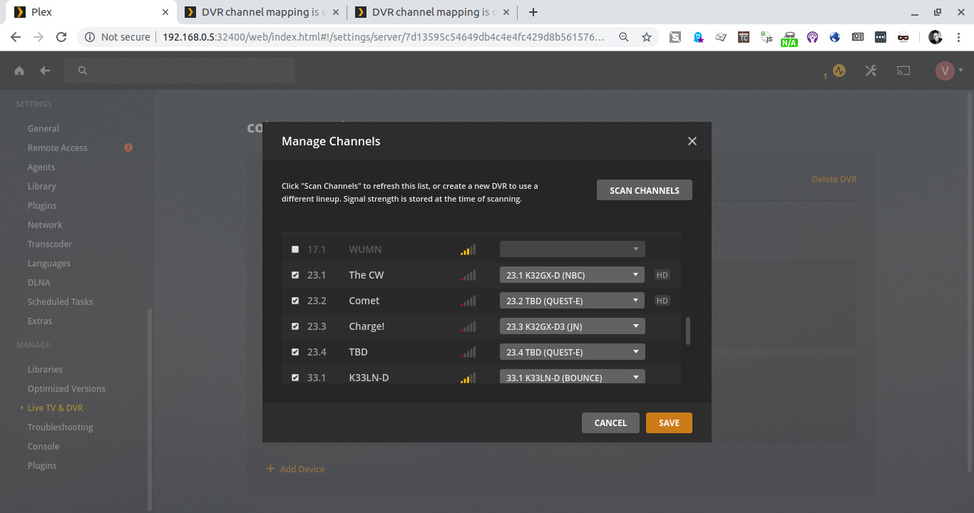
The channels frequency changed recently here in Minneapolis, and several of the channel mappings aren’t accurate anymore. It seems like the frequencies seem to be mapped to the channel identifier (like say Comet) rather than being mapped to the number, like 23.2.
One I noticed is that channel 23.2 is Comet, but it’s mapped to the wrong provider on the program guide (23.2 TBD QUEST).
Someone, somewhere needs to update their data, and hasn’t. I’ve tried re-scanning, and this doesn’t seem to fix anything.
What tuner /DVRis this? A frequency change affects what channels get seen by the tuner. If channel numbers change then the EPG needs to allow for those changes
I need to understand if the EPG lineup is wrong for the channel numbers - if the channel numbers changed
Need to know zip code, if it is antenna / OTA or cable or satellite ? and whar is the name of the lineup and list of channel numbers and names for the channels that are mapped incorrectly
Sure, my zip code is 55418. The tuner is a WinTV-quadHD, and I’m receiving OTA.
Here’s a screenshot of the tuner. I don’t know exactly which channels are miss-matched, but I do know that 23.2 (Comet) is miss-matched.
The incorrect channel 23.2 is mapped to TBD QUEST-E. You should be able to see this in the screenshot. The correct mapping is Comet.
I guess I can’t be certain that the frequencies changed, but I did notice that when I recorded Comet a couple weeks ago it recorded a completely different channel.
Here’s another screenshot of Channel 9.2 being miss-matched to Comet