Server Version#: 1.18.7.2457
Player Version#:
Tuner Make/Model: HD homerun
Guide/Lineup name: big bang theory
Using XMLTV?:
Channel number/Name: 20.1
this has been going on for a while. I have this setup and it was successfully recording but has recently stopped. Although the activity monitor shows the episode is recording checking the file structure shows it’s not there. for instance today i should have just gotten season 4 episode 6. I don’t even have a season 4 folder among the other three season folders from when it was working. i deleted the schedule and re added. no help. I have other schedules that work fine. just this one is an issue.
What does this screen look like for the series properties in your library:
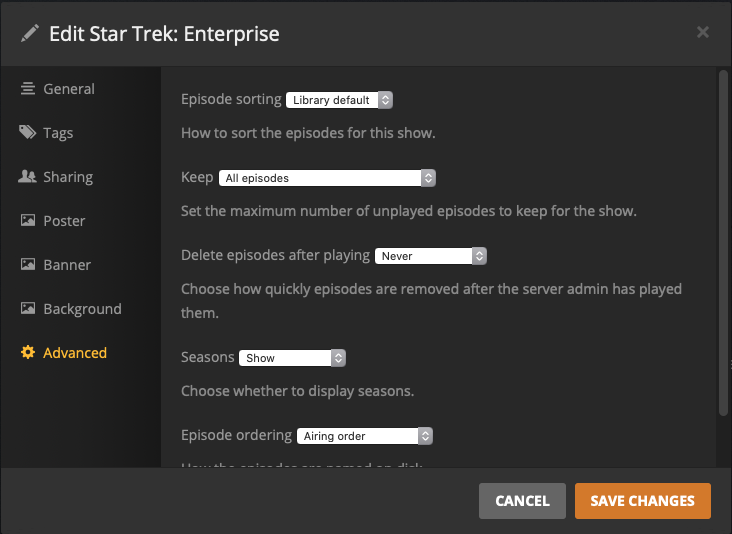
Specifically, to what is “Delete episodes after playing” set? My experience has been that if it is set to anything other than “Never,” and a recording is scheduled of an episode which was previously watched, it will go through the motions of doing the recording but it will never move it into the library since it would just be immediately deleted anyway.
Also, recordings aren’t made directly into the show/season folder. They’re made into a hidden “.grab” directory at the root of whichever folder holds your DRV library. It’s only after the recording is completed and post-processing has been done that it is moved into the final path.
I have the “delete” set to the a day after played. I have three others set that way also. This is the only one that is failing. Oddly it was working fine. I am aware that the recording does not show in the proper folder until it’s done recording. And I have seen the temp folder in the root of my “TV” directory. I’ll change it to never and see if it makes a difference and report back.
Sorry for the late reply. the change in the settings as suggested made no difference. Still no new recordings. I see there are newer posts with people having similar but not exact same issues.
