Server Version#: Current
Player Version#: Current
Audio issues with TrueHD again. You JUST resolved this in the previous update and you’ve managed to break it again somehow. Guess I’ll be downgrading again until it gets fixed, but come on guys. Why is this happening again?
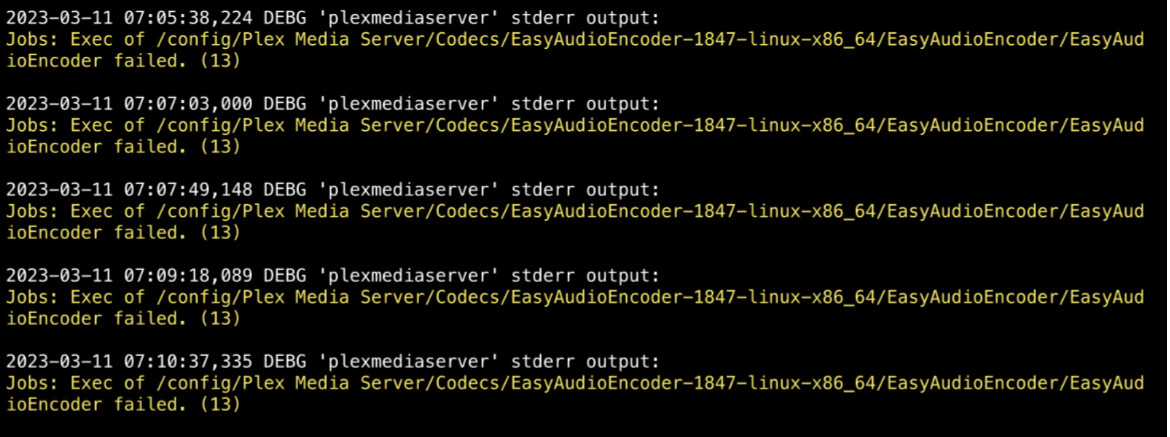
Movies can’t play with TrueHD audio codec. The easyaudio encoder fails:
We had this issue a couple of versions ago with a different error, but under the same category. It only fails with movies that have the TrueHD audio codec.
Here’s the link to the previous issue: link
See the error ? (13) ??
[chuck@lizum ~.2001]$ perror 13
Exit code(13): error “Permission denied”
[chuck@lizum ~.2002]$
What’s wrong with your container storage ?
I’m not sure. I think I have PTSD from the last issue so I quickly assumed it was Plex. If it something that I can fix on my end please let me know.
I have plenty of storage so I don’t know why there would be an issue with that. I check the temp file and it’s completely empty.
The error snippet you posted shows “permission denied”
It tried to download the EAE but couldn’t unzip it.
It’s going to be a silly permissions / ownership issue writing to the Codecs directory
What’s strange is this didn’t happen until I updated the Plex Server. I don’t even know what permissions I need to change. Everything that deals with Plex is under the same umbrella of permissions.
 This is when it would update.
Can you give me a ls -la of the Codecs directory ?
Is this what you are looking for?
Not quite.
under the “Plex Media Server” directory
- get into the container command line
- cd “/config/Plex Media Server”
ls -lals -la Config
you can highlight the console output and copy it
then paste here in your reply. (easier than a screenshot)
Here’s what it gave me in the container command line:
sh-5.1# cd “/config/Plex Media Server”
sh-5.1# ls -la
total 32
drwxrwxrwx 1 nobody users 215 Apr 3 17:54 .
drwxrwxrwx 1 nobody users 31 Nov 16 12:33 …
drwxrwxrwx 1 nobody users 233 Apr 3 17:45 Cache
drwxrwxrwx 1 nobody users 39 Apr 3 16:51 Codecs
drwxrwxrwx 1 nobody users 35 Apr 3 16:54 ‘Crash Reports’
drwxrwxrwx 1 nobody users 6 Nov 17 02:01 Diagnostics
drwxrwxrwx 1 nobody users 6 Nov 15 09:43 Drivers
-rw-rw-rw- 1 nobody users 42 Apr 3 16:54 .LocalAdminToken
drwxrwxrwx 1 nobody users 4096 Apr 3 18:06 Logs
drwxrwxrwx 1 nobody users 23 Nov 15 09:49 Media
drwxrwxrwx 1 nobody users 20 Nov 16 20:31 Metadata
-rw-rw-rw- 1 nobody users 2 Apr 3 16:54 plexmediaserver.pid
drwxrwxrwx 1 nobody users 6 Nov 15 09:44 Plug-ins
drwxrwxrwx 1 nobody users 35 Nov 15 09:44 ‘Plug-in Support’
-rw-rw-rw- 1 nobody users 1339 Apr 3 17:54 Preferences.xml
drwxrwxrwx 1 nobody users 39 Feb 15 02:53 Scanners
-rw-rw-rw- 1 nobody users 12330 Apr 3 16:54 ‘Setup Plex.html’
drwxrwxrwx 1 nobody users 6 Nov 15 09:44 Updates
sh-5.1# ls -la Config
ls: cannot access ‘Config’: No such file or directory
Ooops… “Codecs”.
The “nobody” bothers me.
What’s the PUID/PGID , or PLEX_UID/PLEX_GID, ? mapping as “Nobody” isn’t a good sign.
sh-5.1# ls -la Codecs
total 996
drwxrwxrwx 1 nobody users 39 Apr 3 16:51 .
drwxrwxrwx 1 nobody users 215 Apr 3 17:54 …
drwxrwxrwx 1 nobody users 31 Apr 3 16:51 2584b51-4483-linux-x86_64
-rw-rw-rw- 1 nobody users 36 Nov 15 09:43 .device-id
drwxrwxrwx 1 nobody users 30 Nov 21 08:45 EasyAudioEncoder-1847-linux-x86_64
-rw-rw-rw- 1 nobody users 1011734 Dec 9 14:12 EasyAudioEncoder-1847-linux-x86_64.zip
Here you go! I haven’t messed with permissions and the default was nobody. Do you have a preference as to what I should change it to?
I have Unraid now and the container I have looks like this:
root@BabyNUC:~# docker container list
CONTAINER ID   IMAGE                COMMAND   CREATED       STATUS                   PORTS     NAMES
1060595ada26   plexinc/pms-docker   "/init"   6 weeks ago   Up 6 minutes (healthy)             Plex-Media-Server
root@BabyNUC:~# docker exec -it Plex-Media-Server bash
root@BabyNUC:/# ls
DBR.sh  config  etc             home              lib    libexec  mnt             plex_service.sh  run   sys        usr
bin     data    glock           init              lib32  libx32   opt             proc             sbin  tmp        var
boot    dev     healthcheck.sh  installBinary.sh  lib64  media    plex-common.sh  root             srv   transcode  version.txt
root@BabyNUC:/# cd /config
root@BabyNUC:~# ls
Library  glock   transcode
root@BabyNUC:~# cd Library/Application\ Support/Plex\ Media\ Server/
root@BabyNUC:~/Library/Application Support/Plex Media Server# ls -la
total 40
drwxr-xr-x 1 plex users  4096 Apr  3 21:52  .
drwxr-xr-x 1 root root     39 Feb 17 16:36  ..
-rw------- 1 plex users    42 Apr  3 21:52  .LocalAdminToken
drwxr-xr-x 1 plex users  4096 Apr  3 21:53  Cache
drwxr-xr-x 1 plex users   115 Feb 28 20:27  Codecs
drwxr-xr-x 1 plex users   301 Apr  3 21:52 'Crash Reports'
drwxr-xr-x 1 plex users     6 Feb 17 16:36  Diagnostics
drwxr-xr-x 1 plex users    40 Feb 17 17:32  Drivers
drwxr-xr-x 1 plex users  4096 Apr  3 21:58  Logs
drwxr-xr-x 1 plex users    31 Feb 17 17:17  Media
drwxr-xr-x 1 plex users    48 Feb 17 17:41  Metadata
drwxr-xr-x 1 plex users   120 Feb 17 16:37 'Plug-in Support'
drwxr-xr-x 1 plex users     6 Feb 17 16:36  Plug-ins
-rw------- 1 plex users  1312 Apr  3 21:52  Preferences.xml
-rw------- 1 plex users 12330 Apr  3 21:52 'Setup Plex.html'
drwxr-xr-x 1 plex users     6 Feb 17 16:36  Updates
-rw-r--r-- 1 plex users     3 Apr  3 21:52  plexmediaserver.pid
root@BabyNUC:~/Library/Application Support/Plex Media Server# cd Codecs
root@BabyNUC:~/Library/Application Support/Plex Media Server/Codecs# ls -la
total 12
drwxr-xr-x 1 plex users  115 Feb 28 20:27 .
drwxr-xr-x 1 plex users 4096 Apr  3 21:52 ..
-rw-r--r-- 1 plex users   36 Feb 17 16:36 .device-id
drwxr-xr-x 1 plex users 4096 Feb 28 20:27 2584b51-4483-linux-x86_64
drwxr-xr-x 1 plex users   38 Feb 17 17:50 EasyAudioEncoder-1847-linux-x86_64
root@BabyNUC:~/Library/Application Support/Plex Media Server/Codecs# uname -a
Linux BabyNUC 5.19.17-Unraid #2 SMP PREEMPT_DYNAMIC Wed Nov 2 11:54:15 PDT 2022 x86_64 x86_64 x86_64 GNU/Linux
root@BabyNUC:~/Library/Application Support/Plex Media Server/Codecs#
Would changing it fix my issue?
Either way, they are all under the same user “nobody” so I wouldn’t think changing that would fix it.
I’m rebooting my server for other reasons, but once it’s back up I’ll send you my PUID/PGID numbers.
I just figured out what you’re showing me…
You’re showing me outside the container.
cd /mnt/user/appdata/Plex-Media-Server/Library/Application\ Support/
root@BabyNUC:/mnt/user/appdata/Plex-Media-Server/Library/Application Support# ls -la
total 4
drwxr-xr-x 1 root   root    39 Feb 17 13:36 ./
drwxr-xr-x 1 root   root    41 Feb 17 13:36 ../
drwxr-xr-x 1 nobody users 4096 Apr  3 18:52 Plex\ Media\ Server/
root@BabyNUC:/mnt/user/appdata/Plex-Media-Server/Library/Application Support# cd Plex\ Media\ Server/
root@BabyNUC:/mnt/user/appdata/Plex-Media-Server/Library/Application Support/Plex Media Server# ls -la Codecs
total 12
drwxr-xr-x 1 nobody users  115 Feb 28 17:27 ./
drwxr-xr-x 1 nobody users 4096 Apr  3 18:52 ../
-rw-r--r-- 1 nobody users   36 Feb 17 13:36 .device-id
drwxr-xr-x 1 nobody users 4096 Feb 28 17:27 2584b51-4483-linux-x86_64/
drwxr-xr-x 1 nobody users   38 Feb 17 14:50 EasyAudioEncoder-1847-linux-x86_64/
root@BabyNUC:/mnt/user/appdata/Plex-Media-Server/Library/Application Support/Plex Media Server#
Inside the container, you see
root@BabyNUC:/# cd /config/Library/Application\ Support/Plex\ Media\ Server/
root@BabyNUC:~/Library/Application Support/Plex Media Server# cd Codecs
root@BabyNUC:~/Library/Application Support/Plex Media Server/Codecs# ls -la
total 12
drwxr-xr-x 1 plex users  115 Feb 28 20:27 .
drwxr-xr-x 1 plex users 4096 Apr  3 21:52 ..
-rw-r--r-- 1 plex users   36 Feb 17 16:36 .device-id
drwxr-xr-x 1 plex users 4096 Feb 28 20:27 2584b51-4483-linux-x86_64
drwxr-xr-x 1 plex users   38 Feb 17 17:50 EasyAudioEncoder-1847-linux-x86_64
root@BabyNUC:~/Library/Application Support/Plex Media Server/Codecs#
Whose Plex image are you using ?
It’s not Plex
I’m inside the container’s command line, so I thought I was showing you within the container, not outside it.
I’m using the binhex image.
I will spin up a binhex container and see what happens but using the official, I can’t replicate your issue with EAE downloading / permissions unzipping.
Good to know. I might have to use the official, but to have to rebuild my media all back together would be an absolute nightmare. Hopefully you’re able to replicate. Keep me updated.