Server Version#: 4.57.4
Player Version#: 1.33.0.2444-a220eae4
Hi there,
I’ve recently spent a lot of time sorting all the content rating filters to so that they are all matching and inline with UK ratings. However the content rating filter list still shows all the previous options. When I select them I get “The active filter has no matches” so I know that it’s empty. But I cannot for the life of me find a option to remove them. I’ve ran a library scan, optimization, restarted plex server, the actual server and lastly tried it on web based, desktop and android app but all still show the old content rating filters that are empty.
Those old content rating filters should usually go away when you fully reload the Plex Web app. At least they did for me when I recently did some housekeeping.
So turned out that is the issue. Do you know of any bulk options to update the collections from the movies or even remove them all? I’ve thousands of collections now. Will take months to sort. I can bulk sort movies but no option for it on the collections.
@Volts@OttoKerner Thanks for that. Yeah I had done the above before but was really hoping for a remove option.
Is there a way to remove the collection tab as a whole? I do not use collections, so to set them all as say GB/18 and then remove would be fine with me.
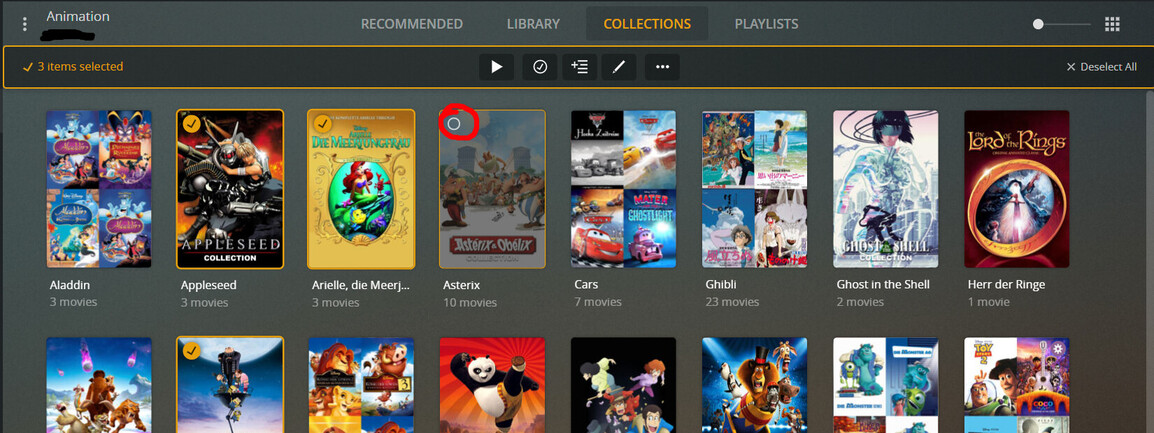
You can’t remove the Tab - but you can remove everything in it in (almost) one step. Go To Collections Tab, Select the first one, Hold down shift and Select the last one…
mmm, no I don’t think so… that’ll just remove the Collections. The Content will still be in the library with all their ratings intact… I expect to be corrected shortly if that’s wrong, but content ratings should be tied to the Media, not the Collection it’s in.
I have a feeling my only option is to systematically manually edit them all.
There is loads of stuff in collections with a single movie in it. Seem this was a setting that was turned on not by me. If I change the setting to create collection with 2 or more do you know or a way for it to update and remove all created collections that now have a single movie or is this a manual job too?
Turns out I have thousands of collections cause there must be 60% of them from “Single movie collections” which is incorrect setting. I’m just working my way through removing them now. I tried library scan but did not work to remove after changing setting.
I’m moving from Emby, I’ve spent all my years making that library perfect and massively neglected Plex so not starting the task with that. Never used collections but having an unused tab will drive me nuts haha
Ideally, and on that Perfect Planet - a long way from this one - if you didn’t have any collections that Tab wouldn’t show up, but… this place is called Earth.
Weird you should say that. I have a “Stand ups” library that doesn’t have that tab on it. So I guess if the settings are disabled on creation before adding media it won’t add the tab?
As long as there is not a single collection defined in the library, the “Collections” tab won’t appear.
But I don’t think it will disappear after you have removed the last collection.