ALL
Please restart your PMS.
The operations team found the issue with Digicert and has addressed it.
Please let us know if there are any residual problems.
ALL
Please restart your PMS.
The operations team found the issue with Digicert and has addressed it.
Please let us know if there are any residual problems.
Thank you it works after few restart and deleting cache folder on Linux. I can’t do the same for pms on NVIDIA shield TV but it’s resolved also by restarting the server
I seem to get this error from any device I connect to, web browsers as well. “server does not allow secure connections”
Thanks for the update. I didn’t realize this is the linux forum as I simply did a search lol. My server runs on Windows and is having this issue.
As it turns out… The issue was Cloud side.
The certificate provider (DigiCert) and the Plex.tv server were not on speaking terms 
It has been remedied
I’m in a similar situation to @faganm24. I’ve built a new PMS, and am migrating the config and libraries to the new host. The migration has been successful, but I also have an issue with SSL access to the PMS. HTTP via local-hostname:32400/web works fine.
I’ve followed your steps above - you don’t mention the choice of name for the new PMS, so I’ve re-used my old one (since I’d like this to be seamless). Sadly, it hasn’t worked. The re-run of the Setup Wizard does find my shares, and I do see something promising in the logs (see below), but sadly the https access via app.plex.tv does not start working.
Logs:
Nov 26, 2018 23:40:19.632 [0xb461be30] ERROR - CERT: Could not fetch certificate from the cloud: 401
Nov 26, 2018 23:42:07.474 [0xa4b7e400] DEBUG - CERT: Certificate or intermediate did not exist, fetching a new one.
Nov 26, 2018 23:42:07.474 [0xa4b7e400] DEBUG - HTTP requesting POST https://plex.tv/devices/44012442ae788d193e76750f05440e7de6f05c8b/certificate?version=2&X-Plex-Token=xxxxxxxxxxxxxxxxxxxx
Nov 26, 2018 23:42:07.759 [0xa4b7e400] DEBUG - HTTP 200 response from POST https://plex.tv/devices/44012442ae788d193e76750f05440e7de6f05c8b/certificate?version=2&X-Plex-Token=xxxxxxxxxxxxxxxxxxxx
Nov 26, 2018 23:42:07.761 [0xa4b7e400] DEBUG - HTTP requesting GET https://plex.tv/devices/44012442ae788d193e76750f05440e7de6f05c8b/certificate/authority?version=2&X-Plex-Token=xxxxxxxxxxxxxxxxxxxx
Nov 26, 2018 23:42:07.962 [0xa4b7e400] DEBUG - HTTP 200 response from GET https://plex.tv/devices/44012442ae788d193e76750f05440e7de6f05c8b/certificate/authority?version=2&X-Plex-Token=xxxxxxxxxxxxxxxxxxxx
Nov 26, 2018 23:42:07.980 [0xb20ff400] DEBUG - CERT: Installed certificate with fingerprint 83:60:10:f4:91:5e:f4:5b:3b:1d:7f:d7:5f:01:44:5b:a3:c0:2e:3d.
Nov 26, 2018 23:42:07.980 [0xb20ff400] DEBUG - CERT: Installed new private key.
Nov 26, 2018 23:42:07.981 [0xb20ff400] DEBUG - CERT: Subject name is /C=US/ST=California/L=Los Gatos/O=Plex, Inc./CN=*.eb4408c42b374493b3d1b1336a9e99d5.plex.direct
Nov 26, 2018 23:42:07.981 [0xb20ff400] DEBUG - CERT: OCSP requests for stapling will be made to 'http://ocspx.digicert.com/'.
Nov 26, 2018 23:42:07.983 [0xb20ff400] DEBUG - CERT: Installed intermediate certificate.
Nov 26, 2018 23:42:07.983 [0xb32ff400] DEBUG - HTTP requesting GET http://ocspx.digicert.com/MFEwTzBNMEswSTAJBgUrDgMCGgUABBSnVdbEyh8T3xvVlkPGHNCJxnqCPgQUlIuJ90hyifJRStmIe%2BVhtaqc1QECEA%2F9gtckBxoLJjJ26qjXd5U%3D
Nov 26, 2018 23:42:08.374 [0xb32ff400] DEBUG - HTTP 200 response from GET http://ocspx.digicert.com/MFEwTzBNMEswSTAJBgUrDgMCGgUABBSnVdbEyh8T3xvVlkPGHNCJxnqCPgQUlIuJ90hyifJRStmIe%2BVhtaqc1QECEA%2F9gtckBxoLJjJ26qjXd5U%3D
(I think those logs are safe :P)
Any ideas on what my next steps are?
EDIT just saw your update @ChuckPa, so I reset Preferences.xml a second time and tried again - still no dice.
I didn’t do anything and it just started working.
They corrected the issue between Plex and the certificate provider (DigiCert).
When PMS queried again, it got what it needed
I left it overnight and it seems to have finally sorted itself. Sorry for the noise
Still no luck for me, left on overnight and secure connection issue remains (as well as weird URL redirect loop in Chrome on OSX). Built a test VM last night after reboot didn’t do the trick (as was recommended), installed a brand new instance, no copying of prior DB (also removed the old device from Plex account). That had the same issue. Servers had different names both in Plex as well as system hostname.
Is there any way to make a pull request for a new cert for my server? I’m running on Windows 10, so I understand I might need to post this request elsewhere.
Windows is a different animal AFAIK.
Best to just restart the works. (seems the be the answer to anything windows anyway… ahahhahaha)
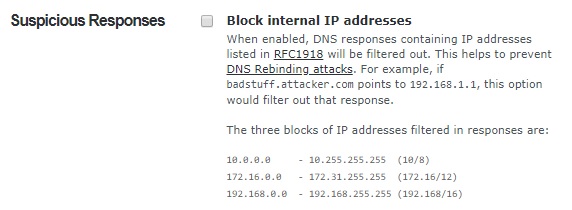
Lesson learned about checking boxes to improve security without reading carefully and considering the consequences. Had this checked in OpenDNS. Unchecked and everything was up and running within an hour.
(-‸ლ)
This topic was automatically closed 90 days after the last reply. New replies are no longer allowed.
