Server Version#: 1.16.1.1291
Player Version#:
I’ve noticed excessive uploads on my network coming from Plex since updating to server version 1.16. A few others on reddit have had this issue too so I figured I’d go ahead and mention it here. In the last 24 hours my plex machine has uploaded 4.5 GB of data, mostly between 12am and 6 am local time according to network traffic. No remote users, no syncing that I am aware of. Just started after updating to the latest version of plex. Any suggestions?
1 Like
Verify in all your clients that the server is not marked as ‘indirect’ and/or has a yellow exclamation mark on it.
Nope, everything is local and Tautulli shows no remote usage.
As he mentioned a few users on reddir reported a similar behavior after updating to server version 1.16.2.1297.
Here is the link to my reddit post:
Also here is my data usage without a stream between 23:00 and 6:00 there was still a continous upload of around 14Gb. That means it used my full 5MBit/s Upload speed.
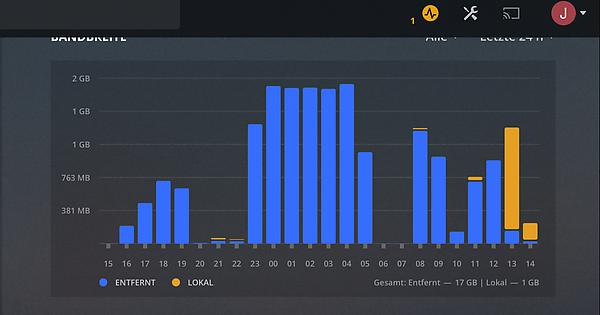
Also here a screenshot of the capped upload without a user streaming:

1 Like
Do you know what type of data is residing in
C:\\Media\\Music\\Album Artwork\\Cloud Purchases
and which software is responsible for this?
It appears to confuse the music scanner.
Looks like that is an iTunes album artwork folder. The files are itc2 (encrypted). Might be there from a previous machine using the music directory. iTunes isn’t installed so I might deleted the folder. Weird that the scanner would get hung up on something like that though and upload gigs worth of data.
I am not saying that this is the cause. But it is responsible for the majority of logged events, so it might.
I went ahead and deleted that folder. In the past 7 days my media machine has downloaded 2 gb of data and uploaded 39 gb. I’ll monitor for the next few days to see if that is it. Very strange. I don’t like the idea of gigs worth of data going out of my server daily and not knowing where/who it’s going to.
I was looking at your logs and saw that there may be a sync job that appears to be stuck in some sort of loop. I have seen where a bad sync will continue to repeat itself. This sync is going to a device called Dustin’s iPad. Try clearing out any pending sync jobs and see if that helps. If not, maybe clear out all sync jobs for that device.
That’s a good point but my iPad would be on my internal network. Shouldn’t be sending data remotely.
Removing the album artwork folder for iTunes actually seems to have resolved my issue. VERY STRANGE.
Your iPad may be accessing the server as remote, even if the iPad is on the local network.
This topic was automatically closed 90 days after the last reply. New replies are no longer allowed.
