With smooth fades disabled, skipping to next track or previous track causes the current track to fade out, and begins playing the new track. There is an overlap. I would prefer there to be no overlap, but that isn’t the focus of this bug report.
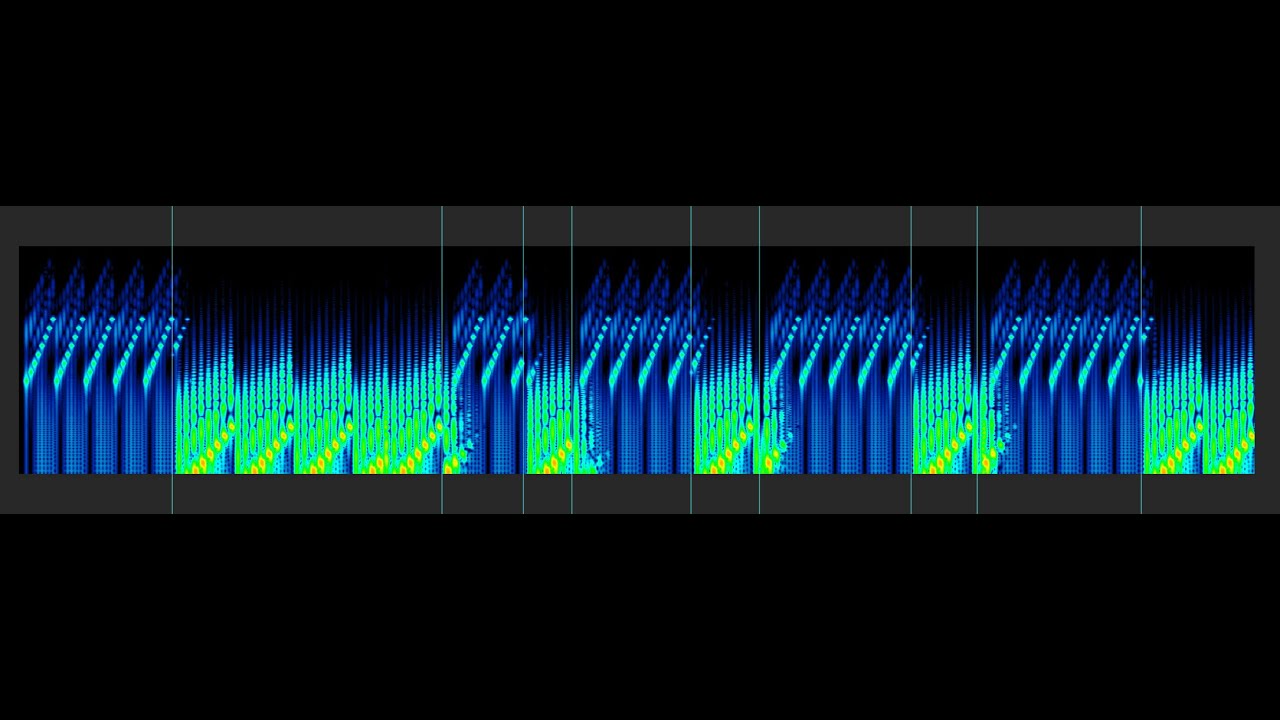
When a track fades out, there is a small skip which causes a very obvious continuity error in the beat. I have created some sample files to demonstrate this clearly.
Here is a video of me recreating the bug.
You can hear the error as a small portion of the track is skipped each time the track is skipped in either direction.
I have run this video through a spectrogram, and marked the areas where track skips occur. You can see gaps in the arp pattern, and the faded section obviously doesn’t align to the beat.
As an aside, I strongly feel as though there should at least be an option to prevent the new track from playing until the previous track has faded out completely. My view is that music deserves to be able to be heard purely, as the artist intended, and having the previous track bleeding in is disrespectful. I say that as a professional DJ. I get the purpose of mixing, but music should be able to be appreciated without forced crossfading.
Wouldn’t make such a deal out of this if the app weren’t so bloody fantastic otherwise. Happy to keep paying if this little issue can be resolved. Otherwise, I’m outies c:
the fade overlap is a really annoying issue to me, also, the previous button should go to the beginning of a track on first tap if it’s not already, then on second, skip to previous
That feature actually already works, as you can see at the 17 second mark in my video. I think the threshold is quite a bit longer than similar apps, but I actually quite like the implementation.
I have Smooth Fades enabled and ran into this the other afternoon and after checking it wasn’t corrupt FLACs , realized I had encountered a bug but wasn’t sure what steps I did to try and reproduce so… thank you for this, I will reattempt on my side because sounds like it might not be related to fades on/off
Hey Elan! The issue occurs regardless, Sweet Fades on or off, when I manually skip between tracks. I tried the Windows app recently and can confirm the windows one works fine. Is it an Electron app? Weird to have different behaviour between platforms if so.
Not just in albums. Any track swapping will do it.
Regarding the mandatory crossfading, I’d look at Spotify, which hard stops tracks, has a small gap, and then hard starts the next track, when manually skipping. I absolutely prefer that to the forced crossfading, even if I have to wait. Gapless playback still works fine on Spotify too.
I would definitely prefer an option that stops the start of the song from being overlapped with the previous song when manually skipping.
If you need more recordings or samples, I can provide them
yes, it is, and the underlying player code is the same. i’m actually incredibly surprised/confused to hear the behavior is different. i don’t suppose using AAudio makes any difference (advanced > audio interface)?
i think in general hard stopping is evil, as you can generate quite a harsh sound as the level goes from X to 0. possibly what sounds like a hard stop isn’t actually one.
i’m confused as to why Windows is working correctly…
Yeah, that’s super weird. I’ll try it in an emulator and see if the issue is there, or if it might be hardware related.
I tried the alternative audio engine. The issue is present, and it also seems to not do the fadeout seemingly at random.
I agree. My ultimate preference would be to include the fade out, but delay the new track by 500ms or so to let the fadeout progress before starting the new track. Overlapping tracks can be more jarring than any hard stop.
we made a fix for the next release which reduces the fadeout time when skipping/stopping, and also should fix that glitch. so try it again and let us know.