
This is Watch From start

This is fully recorded

This is live (not recorded) 1080i
Sorry about the delay.
Server Environment:
Dell Optiplex 9020 Micro FF PC
i5-4590T @ 2GHz
Debian GNU/Linux 11 (bullseye) - updates are current
Kernel: Linux version 5.10.0-18-amd64
DVR Library drive:
WD 4TB My Book Desktop External Hard Drive, USB 3.0 - WDBBGB0040HBK-NESN
My Book verified operating as USB 3 via lsusb
Obviously no video hardware capable of offloading the transcode to.
Plex server Version 1.28.2.6151
Playing on CCwGTV.
Home Streaming set to 720 HD in Plex CCwGTV client settings.
Source is a “Currently recording” 1080i NFL footbal broadcast.
Watch from start (During record):
Video, 1080i (MPEG2VIDEO) → 720P (H264) - Transcode
Audio, English (AC3 5.1) → OPUS - Transcode
Notes: Solid but eventually FWD/REV skipping will crash client
Watch live (During record):
Video, 1080i (MPEG2VIDEO) → 720P (H264) - Transcode
Audio, English (AC3 5.1) → OPUS - Transcode
Notes: Solid but eventually FWD/REV skipping will crash client
Watch (Post record):
Video, 1080i (MPEG2VIDEO) → 720P (H264) - Transcode
Audio, English (AC3 5.1) → OPUS - Transcode
Notes: Rock solid any amount of FWD/REV skipping
Source random 1080i broadcast not recording watched live:
Video, 1080i (MPEG2VIDEO) → 720P (H264) - Transcode
Audio, English (AC3 5.1) → OPUS - Transcode
Notes: Seems solid. Probably since skipping wildly is not required
Source random 720P broadcast not recording watched live:
Video, 720p (MPEG2VIDEO) → Direct Stream
Audio, English (AC3 5.1) → Direct Stream
Notes: Seems solid. Probably since skipping wildly is not required
So my thought that watching currently recording content bypassed the transcode setting was incorrect.
I can’t explain it.
Perhaps the progress bar weirdness that I see playing via Plex Web is here too and causing problems.
Things that I understand might be weak links with my server:
- underpowered CPU
- Perhaps external USB 3 drive is not the best choice for holding the library.
- No video hardware to help with transcoding
Couple things I see different
You are transcoding down to 720P.. There are 2 places to set this. When you are watching via playback settings and from the main settings menu. The same settings are not available from each. From the main settings menu I have convert autmatically turned off and quality set to 12MB 1080P. Try that and see if it helps.
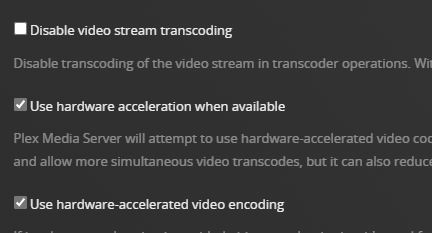
The other thing is I have HW transcoding capability. This may also have something to do with it. I assume your HW cant support this?


A note on HW transcoding. I think your CPU supports quick sync and should support it? You have to enable it
Using Hardware-Accelerated Streaming | Plex Support
Thanks for the follow up and continuing suggestions sjmplex.
I have my transcoding set to “4Mbps, 720p HD (High)” in the main settings.
Not in the place you can get to while watching.
I settled on the biggest 720p resolution is because I found that setting to a 1080p resolution would cause 720p recordings to be NOT transcoded.
My assumption is that Plex decides to not do the upscaling and just lets the TV do it.
I was finding that un transcoded 720p content was crashing the CCwGTV during FF/REV skipping.
Sometimes I use the playback settings available while watching video to pick 1080p transcoding for 1080p recorded content that I care about seeing better. Just transcoding to a lower bitrate than the original recording does fix the FF/RW skipping issues for me in this case.
When I watch local MP4/MKV/etc… content I mostly use the “while viewing” playback settings to turn off transcoding and stream original which always has worked great for me.
I hope I explained all that well enough.
One thing that I found interesting is that my settings for Passthrough, Refress Rate Switching, and Resolution Switching are Disabled, Off, and Off.
I’ll see if changing to your values make any difference for me.
Thanks again.
Regarding the HW decoding tip, thanks for that.
I’m looking forward to turning that on and seeing how that goes.
I just have the built in graphics but it sounds like it may support doing transcoding.
Will report back.
thanks again
I got involved with this because i was curious why forcing transcoding on my CCGTV is a 100% fix for me but not for you. We use it every day and never a single issue since the change.
12M 1080P does indeed force a transcode to H264 as can be seen in the screenshots provided. I have not tried the 4M 720P setting as I see no benefit of the lower quality transcode. Perhaps that lower quality transcode is more work and is counterproductive.
Glad you’ve been curious and given me things try explore.
That said, I am about to loose my mind on this issue.
If I bump up the system home streaming setting to a 1080p resolution I then don’t get transcoding for 720p recorded content. The FF/REW skipping problem is then an issue.
Most of the time it wont even transcode 1080p recorded content unless the original content bitrate is very high and the chosen transcode 1080p bitrate is really low , like 8Mbps.
Seems like most of the recorded 1080i content simply plays direct play.
I’m giving up and sticking with 720p transcoding for the global setting so that ALL TV content playback is stable. I’ll continue to use the while watching | playback settings to bump if I care to for the particular content.
One dissapointing note on testing HW decoding as suggested.
I was happy to see that checking the box did, in fact, use HW decoding.
I my CPU utilization certainly did go down, way down, but the video quality is dreadful.
SW Transcoder

HW Transcoder

I know it’s not the same frame but it is the same show and believe me its very representative of the quality of HW transcoding at this 720p resolution.
I did do some digging and do understand that HW transcoding via Quick Sync at low bitrates can be lower quality…but holly smokes that is bad.
I understand your frustration. It seems your combination of components is not working well. In my case the CCGTV I bought to use in a Samsung TV with an absolutely unusable Plex native client. Really terrible. With the settings I am using the CCGTV is good enough for our use.
The other TV is a Sony Android TV. This works perfect. Direct Play. video and audio. No transcoding needed at all.
I would say since your server transcoding is not a good option, maybe a different client that can direct play or direct stream would be a better bet. Nvidia Shield perhaps. yes more $ I know…
I have tried something else that initial test has eliminated the crashing when skipping forward. In the advanced options - enable I/O caching set to off. I have the video quality set to Maximum/Original with the setting and I have no problems. Try this setting. I went into the app management and cleared the cache and force stop the Plex app just for good measure,
Im interested to see if this works for anyone else.
Interesting.
I’ve set it to off and reset the Home Streaming back to max/original.
So far so good.
Watched the 1/2 hour national news and went wild with FF/REV skips. No crashes.
Watched several recorded hour shows, skipping marked commercials. No crashes.
Had a solitary crash watching another show while doing some FF/REV skip testing.
Had one crash watching a show while doing absolutely no skipping. Weird.
Video quality is really much improved!
Server CPU load goes down to almost idle as expected. This is nice.
Network bandwidth is WAY up and has some REALLY BIG spikes at startup or after skips.
My family room setup has the ethernet adapter and handles this just fine.
My bedroom setup is wifi only and not in a great spot. It barely handles the transcoded 720P stream as it is. Just ordered another ethernet adapter since I do have a port close by.
All in all I’m pretty happy with this situation. It’s not perfect but now that I’m done stress testing the FF/REV skips it’s actually pretty reasonable.
Thanks for digging this up as something to try!
Craig
Glad to see confirmation from someone else that this helps. Not exactly sure what that option does. Maybe some local device caching that the CCGTV doesnt work with.
After further testing (just usage really), I need to report my findings.
It’s still mostly good but certainly not 100% stable.
If I am sticking to simply watching, skipping marked commercials, or manually skipping forward one measured click at a time then I have a high percentage chance of getting through an hour recorded show with out crashing. This is pretty reasonable compared to where I started.
Add REW skipping, fast/multiple FWD skipping, viewing a longer show like a football game and I’m more likely to get a Plex crash. Not all the time but it’s never a surprise.
The restart of Plex is fast and the show being watched is always first on the list of “continue watching” shows at the top of the default Home tab. Moreover, the crash location is always correct and available to start watching from. (currently recording shows are very much harder to find the spot to continue from)
Honestly, I can live with this while I wait for Plex to fix it someday…a guy can hope, Right?
I also have a small HTPC hooked up to the AV system and will use it to watch stuff if I’m not feeling like dealing with the CCwGTV fragility. I use Plex Web in a browser on the HTPC and it’s very close to problem free. Frankly, the picture, sound, and dolby pass-through to the AV system are all better when using the HTPC.
Just wanted to sum this up for “the historical record” here in the Plex forums,
My thought at this point is that the server end is also in play. Mine is an M1 Mac mini which is a pretty powerful device. With either of the two fixes mentioned I can rapid fire FF/REW continuously and never have a crash. It seems you at least have a Workable setup now. It it becomes not, there are other devices you can use
Believe me I’ve had the same thoughts about the potential role of my server in this MCF (Mongolian Cluster F%$k).
Server things on my list of (way) future tests are :
A beefier HW platform. I have an old Core 2 Quad (q9550) desktop system.
A different Linux distro.
A Windows based system for the server.
I’m not ignoring the Apple/Mac note you made but I’m just not experienced in things Mac nor do I have ANY Mac hardware to play with. I don’t want to add another architecture of stuff I need to keep running around here. ;-0
Things that make me lean towards it not being my server are that I get good behavior on client platforms other than Plex on CCwGTV and the fact that I clearly am not alone. I see my story repeated so many times in other threads here. Also it seems to be generally accepted that Debian (bullseye) is a great environment for the running a Plex server.
I also have a more powerful NUC to setup to use as my HTPC box. I’m happy with the Plex Web player performance and behavior on my current HTPC but it was inadequate to run the Plex Windows application. Playback was very choppy and impossible to enjoy. I have to stick with Windows on the HTPC box because I use it for web streaming of Xfinity content. Comcast specifically and actively blocks streaming to browsers running on Linux platforms. I think their issue is that HDCP is generally not there in Linux client environments. From what I’ve read one can compile a kernel with it enabled. I’m not just keen for the brain damage of taking that path and not even being sure that it will make a difference that Comcast will recognize as a “safe” environment.
The root of this issue is shown below. The CCGTV does not support MPEG2 and must use transcoding. A device that supports MPEG2 that can direct Play or Direct Stream wont rely on transcoding. You can see FTV and Shield both support MPEG2 and do not need transcoding.
Chromecast with Google TV
- H.264 High Profile up to level 5.1 (4Kx2K/30fps)
- HEVC / H.265 Main and Main10 Profiles up to level 5.1 (4Kx2K@60fps)
- VP9 Profile-2 up to 4Kx2K@60fps
Supported Media for Google Cast | Google Developers
Amazon FireTV
- Dolby Vision. Dolby Vision support for Profile 4-MEL, 5, 8, 9. (Up to Level 9 for profiles 5 and 8. Up to Level 5 for Profile 9.)
- H.265 (HEVC). Hardware accelerated up to 3840x2160p (4K) @ 60fps, 35 Mbps, Main 10 Profile Level 5.1, Color space 8-bit and 10-bit input with HDR10, HDR10+, and HLG.
- H.264. Hardware accelerated up to 3840x2160p (4K) @ 60fps, 20 Mbps, High 10 Profile Level 5.2
- H.263. Hardware accelerated up to 1080p @ 30fps, 6 Mbps, Profile 0 Level 70
- VP8. Supported up to 1080p 30fps. Baseline profile, non-secure
- VP9. Hardware accelerated up to 4K @ 60fps, Profile 2 up to 30 Mbps
- MPEG-2. Hardware accelerated up to 1080p @ 60fps
- MPEG-4. Up to 1080p @ 30fps, Simple and Advanced Simple Profiles Level 5, non-secure
- AV1. Hardware accelerated up to 3840x2160p (4K) @60fps, 100Mbps, Main Profile Level 5.1, Color space 8-bit and 10-bit input with HDR10, HDR10+, and HLG.
Device Specifications: Fire TV Streaming Media Player | Amazon Fire TV
nVidia Shield
4K Ultra HD ready
4K playback at 60 FPS (VP9, H265, H264)
4K capture at 30 FPS (H264, H265)
Supports: MPEG-2/MPEG-4/Xvid/DivX/WMV9/ASF/AVI/MKV/MOV/M2TS/MPEG-TS/H.263/H.264/H.265/VC-1/VP8/VP9
NVIDIA SHIELD | Android TV - SHIELD - See Full Specs
That is interesting.
Although I just picked a random live TV station and played it. Here is what my dashboard shows:
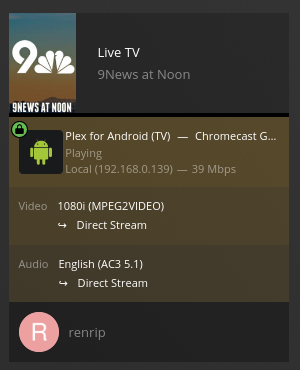
It’s the same dashboard situation for fully recorded TV
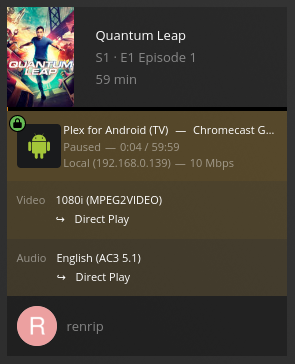
This dashboard info is for the Plex server to Plex app communication, I think.
Does this mean that there is a transcode process happening on the CCwGTV that is somewhat fragile?
Also weird is that playing fully recorded TV is nearly completely stable and watching currently recording TV is a disaster.
My server load is not tremendously high with one client device doing either of these things.
Edit:
Just noticed that the live one is “Direct Stream” and the recorded is “Direct Play”
My understanding is that:
“Direct Play” is the server just sending a file/container as is to the client.
“Direct Stream” is the server putting streams as-is in a different container structure.
Probably does the container setup as the show is completed recording and put in the library.
Live TV is probably in temp storage/buffers and put into a “container” on the fly. (Direct Stream)
Perhaps the on the fly containerization in the server is the problem.
This is crazy. I ALWAYS get h264 transcoding even though I am set for original/maximum quality. The Google specs I posted above dont show MPEG2 support so how is it Direct Play/streaming MPEG2? I would rather it direct played than the h264 transcode. I will mess with it some more and see it I cant figure something out.
