Wait…maybe it depends on the TV capabilities too. Could be what the TV supports on the HDMI input not just the streaming device.
The capabilities of the HDMI port that the CC plugs into had not crossed my mind at all.
I have the CC plugged into a cable that hangs out of a closed chest under the TV where my AV reciever and Tivo sit. The Tivo is inactive/canceled because I started using Plex tv/DVR functions instead. Great choice right? The wife does not agree. 
I’m going to move the TV and open the chest to get my Tivo Roamio OTA out of there and rewire stuff.
I can’t really remember but I think that I might have the CC connected to an HDMI switching box in front of the receiver because I previously had more things than HDMI ports.
I will do the reorganizing and testing and report back.
I’ll try the CC plugged right into the receiver as well as directly into the TV.
It may be a bit since I have back burnered this for the sake of my sanity.
I disable transcoding on the Plex server and video fails when I try to watch a channel. The CCGTV is plugged into a Samsung One connect box. Im going to move it to one of the other TVs and see it I can direct play/stream MPEG2.
In your case, it you are direct play MPEG2 then you dont need transcoding which eliminates that issue. Does that work well?
I connected the CCGTV to the Sony TV. Nothing I can do will make it direct Play/Strem MPEG2. It always transcodes to H264. Tried every option I could think of… At a loss here
What is your Plex client version? Mine is 9.8.2.35221
What is your tuner? I use HDHomerun
Recorded file is MPEG2 with a .ts file type

After all that messing around, watching fully recorded it is direct streaming in MPEG2. The crashing is now back. Its like when i change to original quality it doesnt really take for some reason but now finally has. Im going back to transcode medium 12Meg setting which is stable for me
So “Direct Play” is what I get when I play fully recorded shows. It must be muxing it all together into a .ts file. And yes, this situation seems to be quite stable for me. Not 100% but very close and acceptable for now.
“Direct Stream” is what I get playing live or show that are recording. This is not all that stable and I try to avoid this. Watching live and leaving it alone is reasonable but not without crashes. Trying to watch currently recording shows is basically a disaster. I think that the server is dynamically muxing rather than having a nice tidy .TS file that is available after recording finishes.
I’m still set on “Maximum” and have IO Buffering disabled.
I’m running the same Plex client version as you 9.8.2.35221
My tuner is a HDHomeRun Flex Quatro.
I get .TS files when I record shows too.
I too found some weirdness with the transcode settings. Most times my server doesn’t look like its stepping down the bitrate of 1080i content even if I set it to 1080p transcoding at a much lower bitrate. It seems to definitely honor my 720p settings for 1080i content but often does not try to adjust the bit rate of 720p content .TS files that are very clearly higher than the bitrate I have requested.
Hope I answered all the questions that you posed.
I have not found any way to make a Direct Play happen. Direct Stream at original quality crashes. After playing around, I see that the “global” quality setting is often not obeyed. The setting from the content is but is limited in quality options. 1080P high global setting will transcode 1080i to H264 but 720P will direct Stream. The only setting that is good for me is 1080P medium which will transcode on either. My Plex server is perfectly capable of doing the transcoding so that is the fix for me. Thankfully on the TV the CCGTV is attached to the use case for Plex is pretty limited to this will work.
Anyone else who wanders in here I WOULD NOT recommend CCGTV as a good device to use with Plex.
As an aside, the reason I have the CCGTV is to work around even worse problems that Samsung Tizen Plex client has and Tizen uer experience is just poor in general.
I am pleased that “Original Quality” is generally working for me in my primary use case for Plex DVR. I love the video quality and super low server load!
Sorry you are having issues after fiddling around with your setup. I’ll do some fiddling at a later date but I’m going to roll with what I’ve got for now.
Thanks for sharing your experiences with the inconsistent ways that Plex does and doesn’t adhere to global resolution and bitrate settings applied. It mystifies and irritates me.
I agree with your advise that people considering using Plex DVR in combination with a CCwGTV device should seriously reconsider…at least with the current state of things.
If I ever see things get resolved I’ll come back here and give the “all clear”.
As I’ve said before, I’m not holding my breath on that.
Back to the topic of the server. My server is a Dual Xeon 4 core 8 (16 threads total) thread work station. Running at 4 Ghz. So I don’t think this is an issue.
Plus, now that I have switched to WebOS with my new TV. I haven’t had any issues with any of my files.
So, now I am sure it is CCWGT Plex app. And/Or the device itself.
Yeah, Toolcrazy, you have plenty of server side oomph to rule out server speed as an issue.
I’m with you in pointing to the Plex app running on the CCwGTV device as the weak link.
Manipulating Plex app settings can change the behavior drastically.
Not having experienced any other trouble with the CCwGTV device or with any other app running on it, it seems clear that its most likely problems with the Plex app itself.
Understanding that the Plex server to Plex app interface has Plex code on both sides leaves room that software updates on the server side could also affect some of what we see going on here.
I’ll continue to keep my CCwGTV software, Plex server and Plex app updated and watch for improvement.
Basically, echoing above, The CCGTV is a good device. Normal streaming apps work well. I have a Sony Android TV, NV Shield and the CCGTV all running same Plex client. Only the CCGTV has this issue. My gut says Plex needs to tweak something in their code to work better with it. Direct Stream crashes and you have to prevent that from being used. Again, in my use case, the workaround is perfectly acceptable. If I had a larger scope of uses for Plex on this TV, it would not be.
Bonus tip that Im using right now. Tonight’s NFL game (Cincinnati is my local market) kickoff is 8:15. Guide data is 8:00 start. To not record that 15 min at the start, set the min before for -15 to start 15 min late

I have a solution that is now working for me.
I finally learned how “Adjust automatically” and “Home streaming” work together and that got me there.
The main problem was that I was attempting to use reasonable values for “Home streaming” and could never get both 1080i and 720p TV content to start under H264 transcoding. This also kept me from seeing how “Adjust automatically” works.
The key for me was to pick an unreasonable value of “1.5 Mbps, 480p” for “Home streaming” . This forces both 1080i and 720p TV content to start transcoded into H264.
With that solved, “Adjust automatically” set to on quickly causes the bitrate and resolution to be negotiated up to what your network connection can support.
No more MPEG Direct Stream/Play related crashing in the Plex app. So far no amount of FF/REV skipping has caused an app crash for me.
The negotiation will honor your “Limit remote stream bitrate” server setting in “Remote Access”.
The in-player quality settings don’t reflect the current negotiated resolution and bitrate. They simply show the unreasonable 480p value.
The Dashboard will show the current elevated H264 bitrate but does not seem to indicate the current resolution for me.
I hope this is a general solution for all.
P.S.
I still have “Enable I/O cache” set to OFF. I may test if that makes a difference sometime later but for now i’m just leaving that alone.
I tried this and it does not work for me, It plays at 480p. The converautomatically does not override it.
Something Else I see. 5.1 Vs stereo audio make a difference
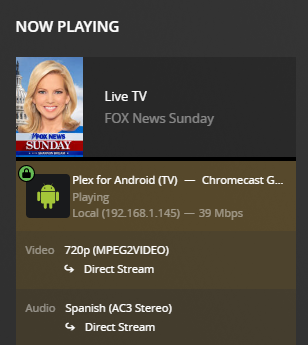
Picking the stereo audio stream changes video to Direct Stream

Using 5.1 audio the video transcodes
Of course it’s behaving differently for you.
It’s so “Plexy” ™ 
I left my own settings alone and just for a test chose the Stereo audio stream.
Home streaming → 480p
Adjust Automatically → ON
Here is what my dashboard shows within a minute of “Adjusting automatically”
(with the stereo audio channel selected)
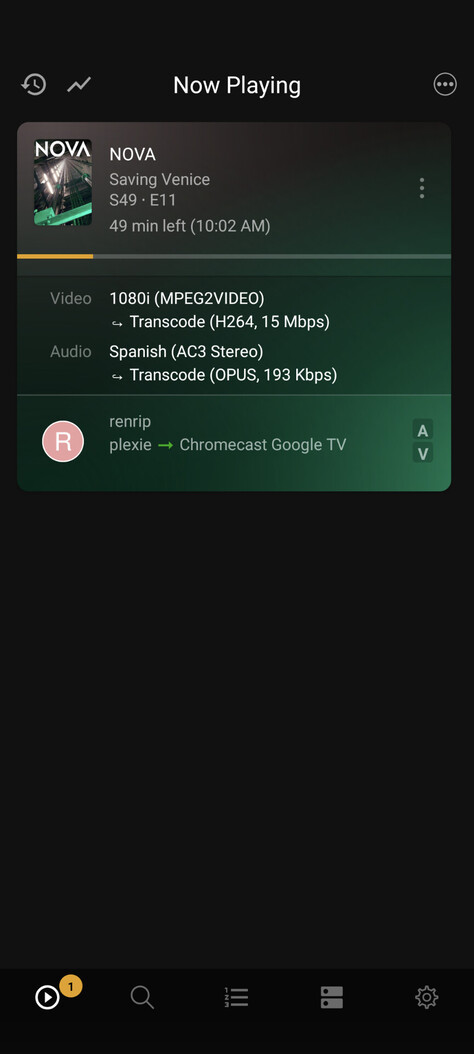
There is not a clear indication ANYWHERE that I check that the resolution has been negotiated above 480p but visually I can see that it has and also the video streaming bitrate sort of gives it away.
Here is a link to the Plex support page that helped me arrive at this setup.
I had to spend time reading and re-reading, trying stuff that did not help before I stumbled upon what wound up working for me.
Also still crash free after watching lots of live and recorded TV (have not yet tried currently recording TV yet).
I’ve not held back on using FF/REV skip functions or the skip marked commercials button.
I did have one app crash when I skipped off the end of a recording but that feels like something different.
One thing this thread has done is give me a chance to try everything. Originally 20M High would transcode 1080i but 720P would direct stream so I had to use 12M Medium to force both to transcode. what this would give me for playback is:
720P !0M H264
1080P 12M H264
The 720p was not quality limited by the medium setting but the 1080I was
Now I tried 1080P 20M high again and they both transcode
720P 10M H264
1080P 19M H264
720P plays the same but I get a better bitrate for 1080i

“…or the skip marked commercials button.”
Ok here is something different. I am not using commercial detection
Also different is that I’m NOT using HW decoding.
Also potentially different is that my Advanced | Passthrough option is set to HDMI
I have no good reason for it being set like that…just a relic of trying everything.
I installed the CCwGTV Android 12 update, turned my streaming quality settings back to default.
This ensures that TV content gets Direct Steamed/ Played.
I still get all the same Plex app crashes as before the system update.
Back to the settings that force transcoding.
Here is a reply to keep the thread alive and to add information.
- This problem also exists on the new CCw/GTV HD version
I thought that perhaps the new hardware with some new microcode could change things.
NOPE. Same Plex app crashes in the same scenarios.
Standard setup of the new CC, install Plex, login, play recorded TV, and let the crashes flow.
- I am now using HW accelerated transcoding on my i5-4590T Linux Plex server machine.
The video quality gets better at the higher end transcoding bitrates.
It’s not perfect but good enough.
I’m just so over messing with this issue.
My CPU utilization generally stays below 20% streaming 2 recorded shows while recording a show or two at the same time.
sjmplex,
I also have the problem of the quality not ramping up but only for live or currently recording TV.
The bitrate always ramps up when watching fully recorded TV.
I mostly avoid watching live or recording TV if at all possible.
If I “have to” I use Plex Web in a browser with good success.
