We can only hope
Ah, thanks. I haven’t hit that issue, thankfullly. Would be interested to know what scenarios are triggering it.
Certain profiles seem to not always work, but I’ve been away for a few weeks, so bit of catching up to do!
I’ve just received the latest Sonos update which now supports LPCM. The sound now works great. However, it has broken Dolby Vision support. I don’t know why. None of my files will now play in Dolby Vision. @DaveBinM Any ideas?
I don’t have any experience with Sonos stuff, so not sure sorry, particularly without any logs to look at. Perhaps worth opening a new thread.
Actually, my bad. When I updated the Sonos ARC my NVIDIA shield reverted to turning off Dolby Vision. I turned it back on, and things work again. Note it does take a few goes to get Dolby Vision playing on a movie. Running latest beta. @DaveBinM
Yeah, I believe that’s due to an issue with the decoder, which we’re working to resolve with Nvidia.
Since you guys are working directly with nvidia, please also try to urge them to fix dolby vision colors https://www.nvidia.com/en-us/geforce/forums/shield-tv/9/346685/wrong-colours-in-dolby-vision/
This. Nvidia have gone quiet on this issue for the community - if you have a direct contact in nvidia it would be great to know if it’s still be worked on.
Sorry, but in reality, even if Dolby vision plays consistently, it is pointless if the colours are wrong. Might as well watch HDR 
Originally it was all content, but as of v8.2, it is supposedly fixed for streaming services aka profile 5.
Profile 7, which is what we talk about with uhd disc mkv backups, have the issue.
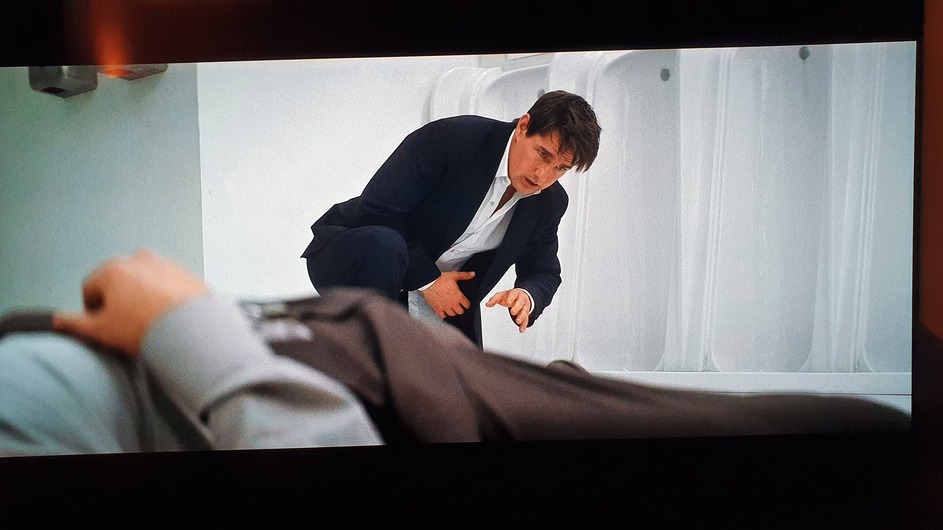
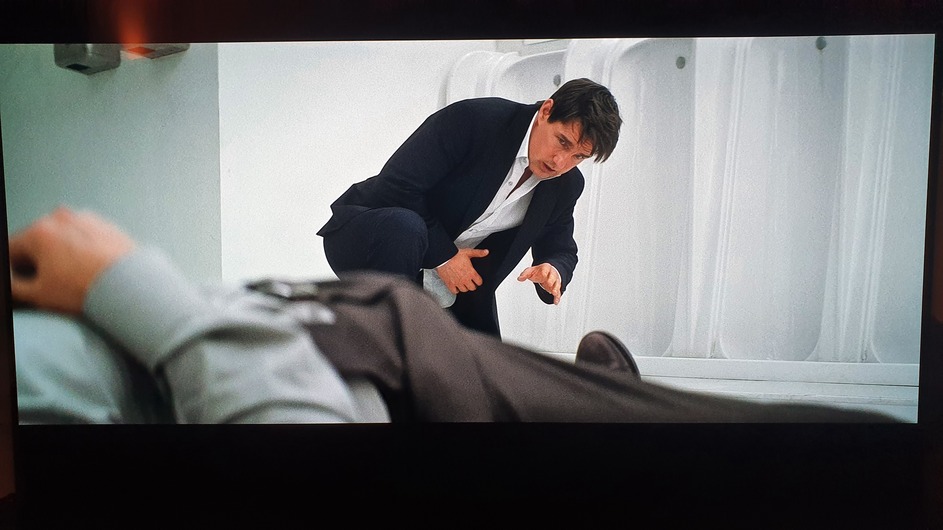
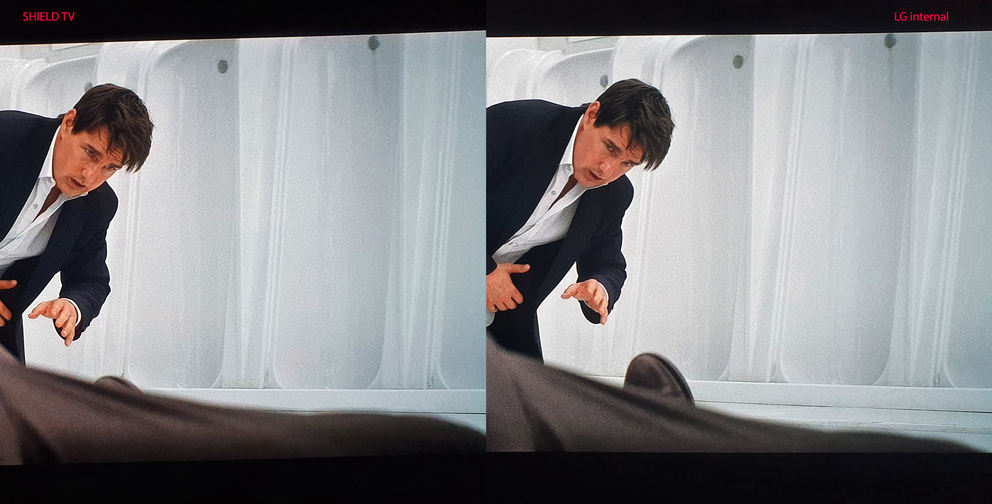
It’s possible if you have nothing to compare it to that you might not notice it everywhere. The biggest thing you will see all over the place is red artifacts, whether it’s on a persons skin or a white wall. If you haven’t seen the same thing played back in Dolby vision on something else, it may not be possible to notice it - though as soon as you see it I’d be surprised if you unsee it. I didn’t have any thing to compare it to originally and could easily see the red artifacts, after playing back the same files on a fire stick it’s nearly impossible to go back. Would rather watch HDR.
The colours are also slightly off, but in that specific case you would probably have to do a comparison to see.
Doctor sleep and Mission Impossible 6 (bathroom fight scene) are two that are regularly mentioned on the makemkv forums. If you want comparisons check this post here for the latest: https://www.makemkv.com/forum/viewtopic.php?p=97549#p97549
But really, pretty sure it’s present in any title you choose. Just need to be able to compare it to something else.
Do you really can’t see these red spots  Shield Vs X700 : Screenshot Comparison
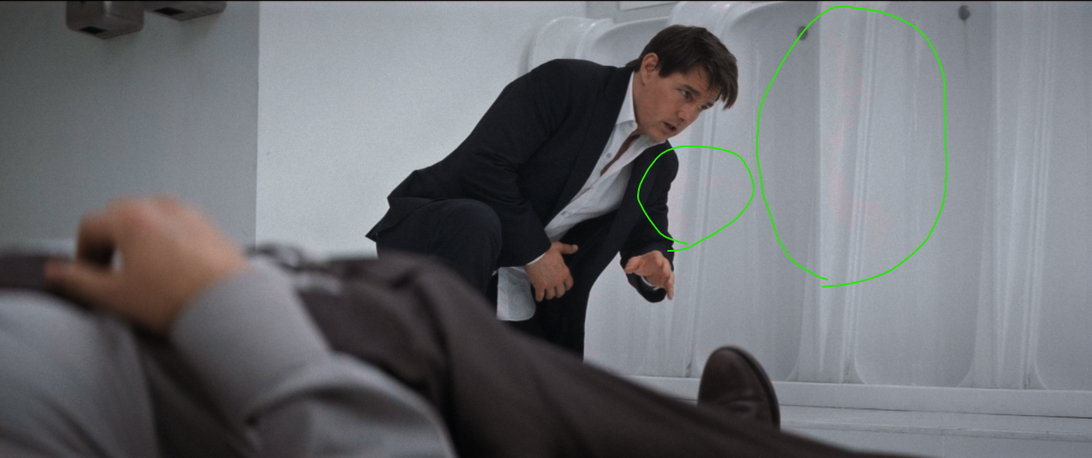
To be clear, you can not see them when played back on the shield?
I also have a cx, haven’t tried filmmaker mode, been using cinema home, but I could easily see those red spots all over the white wall.
If by some chance you actually don’t have that, it could be fixed in the hotfix image?
The whole point of Dolby vision is to watch it in the best quality and look the closest it can be to how the directors etc want it to. If the colours are wrong and/or red artefacts all over the place, what’s the point? I’d love to use the shield but my trust in its colour accuracy has been shot 
The thing is, the wall is just where it’s really obvious. If you go look at the sky fall comparisons, you’ll not only see them on the white but also start to spot them bleeding into other colours. The office image for example, right above the doorway/under the screens you can see how the colour is wrong and it’s a similar to one of these ‘spots’.
Brightness difference could be caused by DV dynamic metadata and TV’s tonemapping processing for HDR10 static metadata. In some scenes DV can be dimmer. DV to HDR10 comparison varies from TV to TV
After updating to support DV in MKV form the ts files only play as HDR10. Has this been addressed? I have looked but didn’t find any mention of this. I certainly appreciate the update for mkv but I am not sure why this would break ts files unless it only plays certain dvhe profiles now even. I am trying to avoid the arduous task of converting all my ts files to mkv.
after updating ts is working again for only dvhe 07.06. dvhe 06.06 still does not work in a ts file.