No news yet?
I will probably buy a different player where list is shown.
Is it possible to know which player allow to see the actors list?
I am surprised this still is falling behind for as long as it has.
I’m 99% confident it will never be added. It was a requested feature 18 months OR MORE from when I created this post. Almost three years and nvidia user’s don’t get any love.
1 Like
Just throwing my hat in the ring to keep tabs on it. Please add the actor list for ATV, it would greatly improve the searchability and the experience when deciding what movie to watch.
3 Likes
So, it’s a new year…
Can we please get this on Android TV and mobile?
The data is on the server, and other clients, it just needs to be exposed.
Who does the Plex community need to talk to to get this happen?
ping removed
1 Like
Please don’t mass ping people. That among other things are on the todo list. I have no info to share about when that might be.
3 Likes
Ok, sorry about that!  goes to corner of shame
Thanks for replying!
1 Like
@marcjt you shouldn’t feel bad at all for asking about this. There are pages of people complaining for years now about this exact topic and your post has finally gotten someone at Plex - @BigWheel to speak up and let us know it’s in the works. I’m not sure why it has taken over two years to get some traction, but I’m grateful for your post and getting pinged.
3 Likes
Thx @gleep52!
I feel bad because I don’t want to abuse the privilege / ability to ping the devs.
I personally have spent close to $500 on lifetime Plex passes, and avidly support the Plex team, and encourage others support them, as well. Including family, we’ve bought more than $1k in lifetime passes over the past couple years, and plan to continue to do so.
I just get frustrated about some of the little things (actor images - client side), and not so little things (lack of robust classical music support (PMS side))… I understand that the devs have a lot to work on, and appreciate that… And that they are working on these things.
The Android app has gotten some massive upgrades in the past year:
(1) Amazing new music player (engine and UI)
(2) Sweet new video player UI / UX (in beta on Android TV still)
(2a) PiP (for Shield)
(2b) Upgrades to Exoplayer v2
(3) UNO UI on Mobile and TV
(4) Live TV Guide - grid view
… and …
(5) AVOD support
(6) Tidal support
Lots of other little things too… So, I hope that bigwheel and the other devs understand that we really do appreciate their work, just anxious for additional features / improvements. =)
1 Like
@marcjt, I just cut the cord with DirecTV and am new to PLEX. I have an Nvidia Shield Pro/w 1Tbyte SSD connected via USB for DVR storage. The Shield Pro is also my streaming device for our Primary TV.
I also have two 2nd Gen 4K Fire TV Sticks connected to our bedroom TVs. These are all Android base devices but the PLEX functionality is different for the Fire TV Sticks than the Nvidia Shield Pro.
You say “The Android app has gotten some massive upgrades in the past year” and I have a few questions related to PIP and the Live TV Guide.
- How do we setup PIP.
- I get several days of Guide details using the Nvidia device, but I only get 12 hours worth of Guide details on both my Fire TV Sticks. How can I expand the Guide details on the Fire TVs?
- Recordings are listed and grouped by Date. If we are looking for all recordings of a specific show, we have to scroll through all past dates to find the earliest recording. Is there a way to group the recording by Specific show and be able to open or collapse the Specific show to see all recording of that show?
@marcjt, One other question related to deleting recordings. I found no way to delete recordings using the PLEX app on the Nvidia or Fire TV Sticks but was able to delete then using my Windows PC. Even though I deleted this weekend’s Wildcard Payoff games, using my PC. I still see the recordings in all 3 clients. I initially though the recordings were not deleted but when I select them, I get a message that those recordings cannot be found.
- How do I delete recordings using the PLEX App on the Nvidia and Fire TVs?
- How do I remove deleted recordings from showing up in the PLEX App, once they are deleted?
It just seems like a relatively small thing to add to this app. It has been 2 years since this has been repeatedly asked for. I have this feature on my ROKU 3.
2 Likes
I believe that is shield specific. Fire devices are not true android (they are a fork of android specific for amazon devices).
probably fire specific, either the fire app is not as current as the shield/android app, or perhaps due to memory limits the guide is reduced on fire devices.
not quite sure I understand, can you post a screenshot? you can paste an image/file directly into a reply here.
are you looking at the dvr schedule view?

if so, then you should try instead to navigate to the applicable library you configured the recording to go to (tv or movie library).
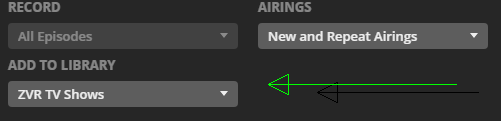
tv shows can be configured to show or hide the seasons, depending if you want to see all episodes or you want them divided up by season.
to delete something within plex, it must be enabled in the server settings, only the admin user/account can delete.
- settings > library > allow media deletion
not sure about fire, but on the shield, on the pre-play screen (the one that shows the movie/video info), there should be a ‘more’ or similiar button, which should let you delete.
on Plex Web you can delete from 3 dot context menu

plex can also delete episodes automatically, these can be set in the show’s advanced settings.
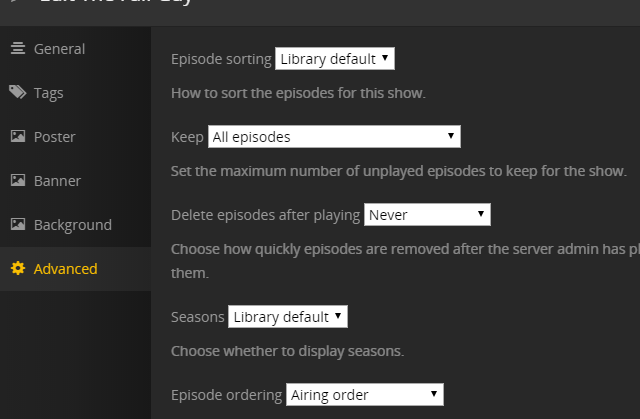
if you have deleted any files outside of plex (ie from windows explorer or nas or whatever, you need to do some library maintenance and ‘empty trash’.
you can do this from the plex web server context menu
Plex Web > click MORE at bottom left > click the 3 dots > manage server > empty trash

1 Like
You beat me to it @TeknoJunky… I was in the process of writing a response and then saw you had already done it.
=)
1 Like
Thank you, @TeknoJunky and @marcjt.
I was able to follow your suggestions using my Windows Laptop login into Plex.tv. I will take it home tonight to see the difference between online version and the Nividia and Fire TV Apps.
@TeknoJunky, @marcjt, et al,
I verified the Fire TV devices had the most up to date firmware last night. I had about 1G of free memory but deleted KODI, which bumped the free memory to just under 2G. This should have been enough to get additional Guide content beyond 12 hours (if that was the problem). After resetting the devices, I checked again and this didn’t help, so I am thinking the PLEX APP for Fire TV devices or the devices themselves are the issue.
I am wondering if anyone has a preference of replacement streaming devices that the PLEX app provides the best User Interface and User experience? I don’t care if I need to move away from an Android device. The Nvidia Shield Pro is too expensive a device just to stream. I want to choose wisely.
plex is moving towards having a fairly consistent UI across all devices (search the forum for UNO).
the three best devices tend to be;
- the shield (obviously expensive, but handles pretty much all types of content including 4k/hevc/hdr and the ONLY device that supports HD audio (truehd/atmos etc)
- apple tv 4k
- roku 4k devices
the memory you refer to is not memory, but storage. This would not have any effect on the guide.
storage is not ram.
and if the fire device ram was a limit for the guide (it was just a guess or idea on my part, I don’t know why the guide is limited on the fire), you would not be able to upgrade it anyway.
+1 on this feature request.
1 Like
yeah… the whole androidTV interface lags of functions. it’s a peace of sh**t
Crazy how long ago this has been requested and still not here 
1 Like
