Already did in the post above
Like I mentioned, dual track remuxes are not common these days because no software creates them like that anymore.
MakeMKV combines the two video streams into one now.
And not many use other software to rip their discs, because MakeMKV has become the de facto one to use.
Not sure who you were responding to, but the test file I attached has them all in a single track. The problem is Plex ignores the HDR10+ part of it.
I’ve noticed a lot of bad info in this thread. One important thing to really note.
HDR10+ is an open standard and is royalty free. This should be the standard everyone uses as it is free and all TV manufacturers can use it openly without paying anything to anyone(unless you want to use the logo and even then I don’t believe it is a per unit cost). DV is a proprietary standard that is controlled by Dolby (not even fully documented anywhere publicly) and requires per unit payments to Dolby for software to master content or use in a TV or other device.
I’ve noticed a lot of bad info in this thread. One important thing to really note.
HDR10+ is an open standard and is royalty free. This should be the standard everyone uses as it is free and all TV manufacturers can use it openly without paying anything to anyone
Talking about bad info …
HDR10+ is not a cost-free standard, a false info that is spread over and over again and does not correspond to the facts.
The annual fee varies depending on the category of the adopter.
In addition, manufacturers of displays, for example, must undergo a certification program for which a significant fee is charged.
Therefore, your statement is simply wrong that TV manufacturers do not have to pay anything to anyone.
Not to mention that HDR10+ support naturally incurs additional costs in implementation and maintenance.
You should do a little better research before making statements like yours.
1 Like
My apologies. I thought I knew what royalty-free meant but apparently it means something else when applied to HDR10+. I really need to read I guess all of the legal docs/licenses. The way it was explained to me was it was free unless you want to use the logo but like all legal stuff I guess the details are in the contracts.
It’s okay, we can all be wrong once in a while, but that’s why it’s also dangerous to make absolute statements like you did. 
Anyway, I hope that the problem this thread is actually about will be fixed one way or another. Unfortunately, there seems to be no progress and I can’t see that the Plex developers are interested in solving the problem from their side.
Of course, they can make it easy on themselves and say that it’s something Amazon needs to solve - but that’s also letting them off the hook too easily, and I would expect more from a good support.
This problem is becoming more prevalent every week as Profile 8.1 & HDR10+ combo movies become more common, and it affects every Fire TV user. I imagine there must be thousands of Fire TV users that can’t figure out why their movies are showing them a black screen and likely thinking something is wrong with the file (since they don’t know about this thread and possibly don’t have access to another client device).
I think the best fix here is for Plex to drop HDR10+ metadata if DoVi is supported or drop DoVi if only HDR10+ is supported.
If it’s not easy to detect this (via EDID), then there could be a toggle under Video Display settings on Android to Prefer Only DoVi or HDR10+. I’d think that a good default would be to prefer DoVi only given how much more common it is and to allow the user to swap that setting over to HDR10+ if they’re using a Samsung TV.
4 Likes
While you’re technically correct about it not being 100% free, it doesn’t really matter
A large TV manufacturer isn’t worried about a small fee for licensing or certification. It may sound significant to us, but it’s what Sony pays for an office pizza party on Fridays
Dolby Vision on the other hand is charging a per unit cost for every TV or device that goes out the door. The license for HDR10+ doesn’t cost several millions of dollars per year
This is why all the articles that chad_s78 read didn’t even mention it and why you’re seeing all this “false info” being spread “over and over”
In the grand scheme, it’s not even worth mentioning
This does not change the reality that facts are often omitted in this context, simply in order to have a better argument for one’s own point of view. Such one-sided reports cannot and should not be taken seriously.
I don’t agree with you there. While the annual fixed costs of licenses for large manufacturers with high sales is certainly lower for HDR10+ compared to Dolby Vision, the additional required implementation effort is constantly overlooked.
The cost of integrating and maintaining HDR10+ support in a display product is high. The integration of HDR10+ support is neither free nor trivial.
Of course, manufacturers make decisions based on the market relevance of a standard in addition to other criteria. Therefore, it is understandable if manufacturers currently decide against integrating HDR10+ support because it is simply less relevant compared to Dolby Vision.
From a technial point of view, both HDR10+ and Dolby Vision have their advantages and disadvantages. Anyone who says otherwise is just participating in the completely stupid camp fights that you can find everywhere, Google vs Apple, AMD vs nVidia, Windows vs Linux, LG vs Samsung etc.
These battles are rarely fought by users based on facts.
Since we already drift too much from the actual topic of this thread just one last comment on this from me:
Of course, it would be nice if manufacturers supported as many market-relevant standards as possible. Ultimately, however, it is we as consumers who influence what prevails on the market and what does not through our purchasing behavior.
But now, please, let’s get back to the actual topic. None of that helps us here, in particular we are talking about a product (FireTV) that already supports both HDR10+ and Dolby Vision. But due to codec problems, the described problem occurs in connection with Plex.
We’re talking about AV player problems here, not display problems.
I couldn’t agree more. Since Plex’s philosophy is anyway to transcode or repackage source data on the server side when needed, something like this would be something I would expect Plex to have as a feature as well. The implementation for this should not be too difficult.
I have already shown one way to remove HDR10+ data with ffmpeg earlier in this thread.
1 Like
I’ve just arrived at this thread as a recent purchaser of a Fire TV Stick 4K Max who was hoping to get a much better Plex experience than running the native Plex app on my LG OLED TV, and now I find that there’s a whole bunch of files that simply show a black screen. I also see that no Plex developer has replied here since Feb 22 on whether they plan to do anything on their side to help resolve this. Is that too much to ask? This is very frustrating for us users…
1 Like
All Android devices are currently unusable for me as Plex clients between this issue and the two issues linked below:
My recommendation would be to return the Fire TV Stick and replace it with an Apple TV 4K Gen 3, and ideally use the Infuse app as well if you want Dolby Atmos JOC and Dolby Vision Profile 8.1 support with Plex.
I have a 2017 shield, 2019 shield pro, appleTV 2022 4k, and LG OLED and by far, the LG OLED works the best at least in terms of playing files and compatibility. It plays everything no problem and direct plays. With every other device, certain files just don’t play or renders it wrong, or crashes and stops playing or stutters like crazy or tries to transcode files it should be direct playing.
And this is with trying all those other players with the same LG OLED tv.
Go figure. I’m just waiting for the player on the LG OLED to get an update and break at some point…
#meetoo
Same issue here on a 4k fire stick. Latest firmware and latest Plex android app. Video is black, audio plays.
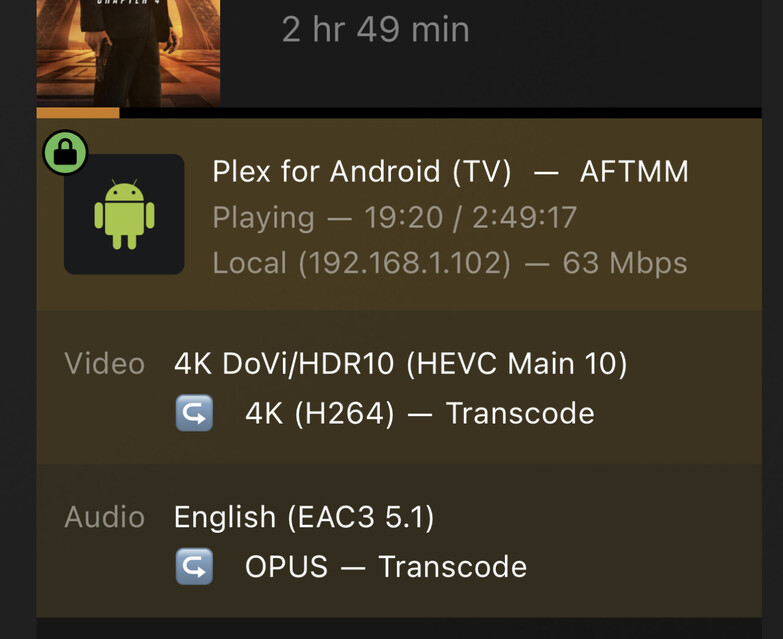
1 Like
Bumping this as i can verify that it is still an active issue.
1 Like
I think most of the people were having trouble with a black screen.
I’m going to link your post just in case this is new information for the devs
1 Like
I don’t have a black screen issue, mine is the same as above, with about 1.4 of the screen split and placed the wrong way. Firestick 4K Max, it must be a newish issue as I’ve only been seeing it for about a month or so. Is there anything at all in Plex settings I can turn off to avoid this issue until something is implemented on the Plex side, (I can’t see Amazon doing anything somehow)
2 Likes
Same issue as listed here. HDR enabled 1/3rd of the screen is split. HDR disabled, no picture only sound. Bought a 4K max to get away from the Samsung native tv app and this happens. Bloody annoyed!!
1 Like
If it’s not too late, return it for a CCwGTV4K in hopes Plex will eventually fix this issue too (it won’t affect you if you don’t keep multiple versions):
Even better… just get an Apple TV 4K Gen 3, get the Infuse Pro app, and enjoy everything working.
