I’m switching from using Home Sharing with iTunes to Plex. I imported all my movie files which is a mix of DRM files and DRM free files. Is there a way for Plex to give me a list of the DRM files that it can’t play so I can remove them?
In a word: No.
Plex won’t know about your content until it tries to play it.
You can see that in iTunes Windows, not sure about Mac.
In iTunes list view, enable the Kind, iCloud Status or Purchase Date columns (right click on column headings). Movies purchased via iTunes have:
Kind = Protected MPEG-4 Video File
iCloud Status = Purchased
Purchase Date = date you purchased the movie
Non DRM movies acquired outside of iTunes have:
Kind: MPEG-4 video file (or other supported type)
iCloud Status = Ineligible
Purchase Date = blank.
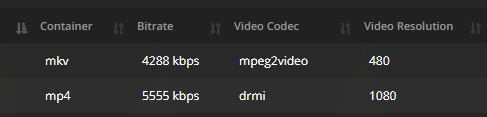
In Plex, you can’t list the movies, but if you are on the movie pre-play screen, the video shows as type DRMI instead of H.264/H.265/etc.

In Tautulli, you can list the movies in a library and one of the columns is Video Codec: