Server Version#:
Player Version#: 7.28.0.15501
Tuner Make/Model: hd homerun prime
Guide/Lineup name:
Using XMLTV?:
Channel number/Name: all video and live tv only in this app. Not in other apps “kodi, native Samsung tv app and so on. Just amazon app.
Just updated the Plex app from the Amazon store and I am getting a pulsing pixelation on all recorded video and movies as well as live TV. I opened up a few other Plex applications on the same TV and the same fire TV box and I am not getting This pixelation. It seems to be specific to the version of software downloaded through the most recent update on the Amazon store. I have recorded a video showing what’s happening. I also noticed that if I go into settings and drop the resolution and then go back in a second time and return the resolution back to original it fixes the issue. Unfortunately it only fixes the issue for the video or channel being viewed at the moment and revert right back when changing the channel.
Here’s a video showing the pixelation as well as the switching of resolution to temporarily fix the Issue.
I would just like to say that I am experiencing this same issue on two different Fire TV 4K sticks. Tried updating both sticks, updating my televisions software, and I am also experiencing install issues with MrMC on my Fire Stick. Some sort of update messed with something it seems. Works on laptop, PC, etc…
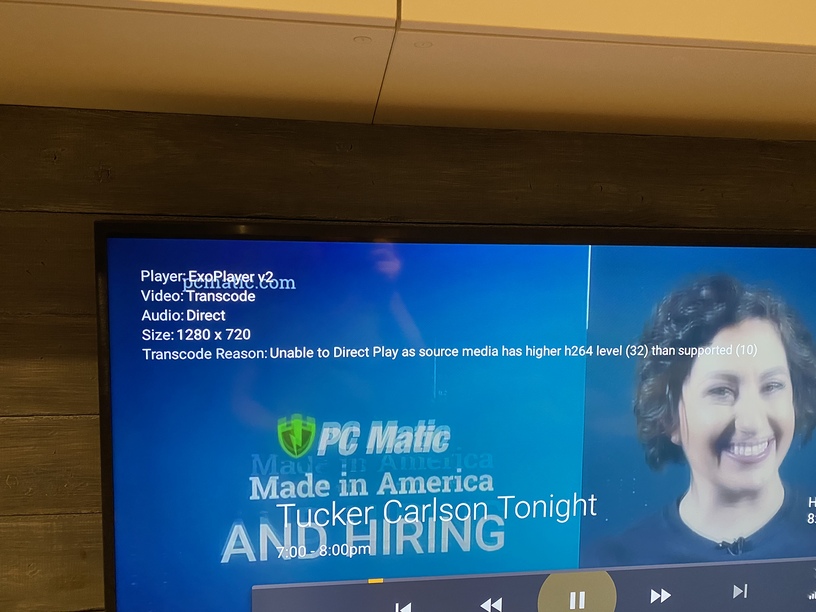
Enable: “Display Information” in the Plex App settings.
When you bring up the OSD it will show some info about the stream.
You’ll probably see the video is transcoding - when it used to Direct Play.
There’s not much you can do about it right now - but that’s what might be happening.
Once you see the reason for the transcode you could see if a setting might fix it, however unlikely that might be.
There’s a bug.
A big hairy one.
They’re working on it.
or so we’re told.
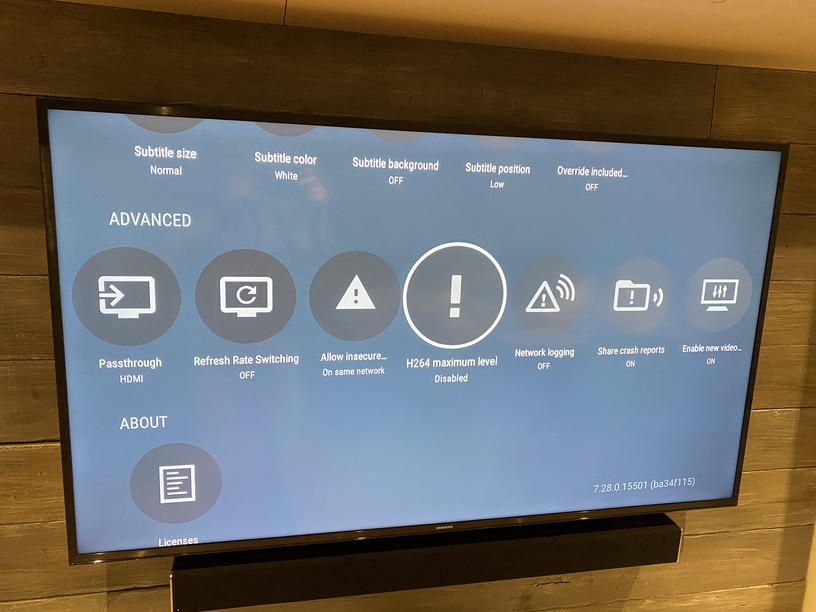
Disabled h264. Problem solved!
Thanks juice.
In the settings change the 264 level to 4.1 - at least.
Leave it on - set it to 4.1.
You can probably play up to 5.0 - don’t know what you have, but you can bump it up as required. You want to know why something isn’t working right, disabling that setting may just cause a blank screen with no info if the video can’t be played.
Yep that still works.
Should I try to go higher?
Was originally on 1.0 recommended
If you want to go on a hunt in your library for an item with a 5.2 level - to see if that works, otherwise put it on 5.0 and keep an eye on it. You can leave the info displaying, so you’ll know what’s up if something goes haywire.
Just tested it out and it looks like so far 1.0 and 1.1 are the only to settings that cause issues
Well yea… the video’s level is 3.2
The ‘bug’ set the level at 1.0
Normal level for older FireTV is 4.0
Newer models can be as high as 5.2
Most will work at 5.0 - but you have to keep an eye on it.
Yep just those two settings are causing the issue.
Awesome thank you for explaining that to be honest I was unaware of those details and for that matter what the setting values normally are.
Clarity:
The FireTV has a suggested max video level - it varies by what model you have.
The setting over-rides the info the FireTV is telling Plex about the max level, tells Plex a bald-faced lie (so Plex won’t transcode for that reason) and we all hope things work out…lol
Sometimes they don’t - keep an eye on it.